Notices
Media Share Z Related Photos and Video

*DSLR Pics* Night shots of my car

Thread Tools
 
Search this Thread
 
Old Aug 2, 2007 | 08:14 AM
  #21  
iStan's Avatar
iStan
ZR
Premier Member
iTrader: (29)
 
Joined: Apr 2006
Posts: 6,444
Likes: 3
From: Las Vegas
Default

I need to find time to go out and take pics.. Oh, and I need to get my car running too
Reply
Old Aug 2, 2007 | 08:27 AM
  #22  
superchargedg's Avatar
superchargedg
Damn Noobs
iTrader: (4)
 
Joined: Dec 2005
Posts: 7,274
Likes: 2
From: timonium,md.
Default

Nice pic,s bert you picture *****.
Reply
Old Aug 2, 2007 | 08:35 AM
  #23  
NA&CH's Avatar
NA&CH
General & Tech Senior Moderator
MY350Z.COM
Premier Member
iTrader: (74)
 
Joined: Jan 2004
Posts: 7,175
Likes: 132
From: Florida
Default

Nice pics Bert. Have fun in Vegas. Sleep during the day and party at night Or win some money for the zfoundation

Chris

Goodluck in Vegas
Reply
Old Aug 2, 2007 | 08:48 AM
  #24  
Alberto's Avatar
Alberto
Thread Starter
Cranky FI Owner
Premier Member
iTrader: (14)
 
Joined: Mar 2003
Posts: 34,715
Likes: 8
From: DMV
Default

Thanks guys...I cant wait to get out of MD!
Reply
Old Aug 2, 2007 | 09:06 AM
  #25  
ctwentytwo's Avatar
ctwentytwo
Registered User
iTrader: (9)
 
Joined: Dec 2003
Posts: 2,069
Likes: 1
From: Waipahu HI; Phoenix AZ
Default

Originally Posted by Alberto
Thanks guys...I cant wait to get out of MD!
If you are shooting in RAW, you can change the white balance settings in Canon's Digital Photo Professional RAW conversion software. Doesn't really matter really, what white balance setting you chose, if you shot in RAW, it's adjustable without loss (addition of noise or degrade in quality).
Reply
Old Aug 2, 2007 | 09:13 AM
  #26  
Alberto's Avatar
Alberto
Thread Starter
Cranky FI Owner
Premier Member
iTrader: (14)
 
Joined: Mar 2003
Posts: 34,715
Likes: 8
From: DMV
Default

Im not shooting in RAW, I honestly dont even know how to put the camera in that mode yet.
Reply
Old Aug 2, 2007 | 09:18 AM
  #27  
iStan's Avatar
iStan
ZR
Premier Member
iTrader: (29)
 
Joined: Apr 2006
Posts: 6,444
Likes: 3
From: Las Vegas
Default

Any of the non-basic modes (ie Full Manual Mode).. Where you choose the image quality under menu, instead of the high quality, choose RAW. It'll make a file that you can open with the Canon software to adjust the white balance. It'll also let you choose the high quality setting and the RAW, so you'll have both pics-> Lets you work on the WB yourself, but also creates raw files that you can alter the WB on.
This info works on a Canon XTi which Alberto and I have. May be the same for the XT as well.

Last edited by iStan; Aug 2, 2007 at 09:42 AM.

Reply
Old Aug 2, 2007 | 09:26 AM
  #28  
Alberto's Avatar
Alberto
Thread Starter
Cranky FI Owner
Premier Member
iTrader: (14)
 
Joined: Mar 2003
Posts: 34,715
Likes: 8
From: DMV
Default

Ah, very nice, thanks for the info.
Reply
Old Aug 2, 2007 | 09:34 AM
  #29  
Vick781's Avatar
Vick781
Registered User
 
Joined: Aug 2005
Posts: 4,585
Likes: 2
From: Anaheim Hills, CA
Default

Looking good berto
Reply
Old Aug 2, 2007 | 09:36 AM
  #30  
2TH PWR's Avatar
2TH PWR
New Member
iTrader: (21)
 
Joined: Sep 2006
Posts: 8,159
Likes: 107
From: London, Ontario, Canada
Default

I love the pics man, the tach one is especially cool. I want to give that a try later on
Reply
Old Aug 2, 2007 | 09:42 AM
  #31  
MI 35th's Avatar
MI 35th
OGPremierMafia
Premier Member
iTrader: (16)
 
Joined: Feb 2005
Posts: 5,106
Likes: 0
From: Cincinnati OH
Default

nice pics bud, check out the photography forums, itll help with the slr stuff, and exposure.
Reply
Old Aug 2, 2007 | 09:46 AM
  #32  
push's Avatar
push
Registered User
iTrader: (3)
 
Joined: Oct 2004
Posts: 864
Likes: 0
From: Cincinnati
Default

Most look pretty good, the first few had the negative space on the wrong side but all in all not bad for an slr noob. One thing I would suggest that has already been mentioned above is shooting in RAW, you can tweak WB, saturation, tone curve, etc a lot better and make the pics really pop with it. What camera you shooting with?

Another thing you may look into doing for night shots is something called HDR photography (high dynamic range). Basically it takes 2 or more of the same pictures with different exposures and merges them together. That way the cars color comes out perfect and you can map the highlights and shadows better and really create an awesome image.

Here are two examples of HDR photography I've done:
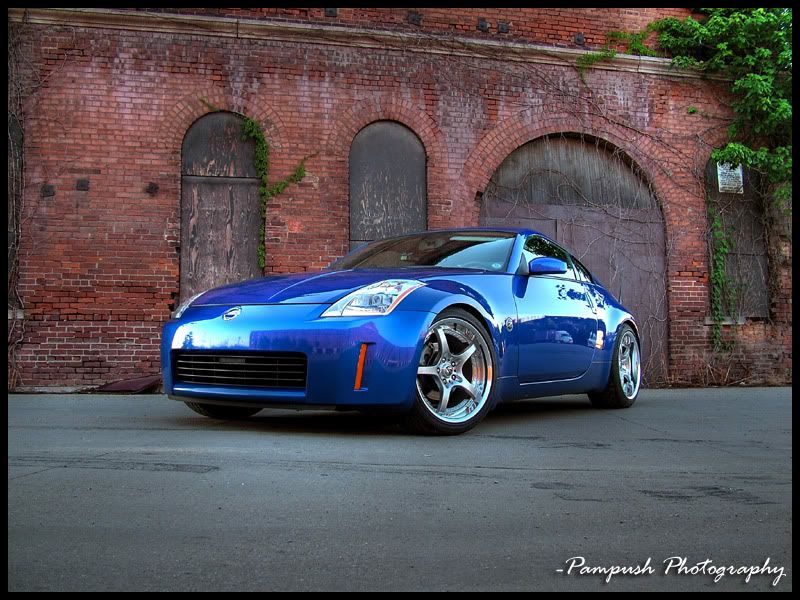


Before I created the HDR image the colors weren't nearly as vibrant. You can compensate for that with saturation, but when you have multiple exposures and merging them you can really make the colors pop and detail come out and create a cool effect.

Last edited by push; Aug 2, 2007 at 09:49 AM.
Reply
Old Aug 2, 2007 | 10:09 AM
  #33  
Alberto's Avatar
Alberto
Thread Starter
Cranky FI Owner
Premier Member
iTrader: (14)
 
Joined: Mar 2003
Posts: 34,715
Likes: 8
From: DMV
Default

push-Im using a Cannon Digital Rebel XTI. Thanks for the advice, I'll look into doing that those pics are great, the color is amazing. So you wouldnt change the f/stop, white balance, etc for the diff shots, just the shutter? What program do you use?
Reply
Old Aug 2, 2007 | 10:39 AM
  #34  
Voboy's Avatar
Voboy
New Member
iTrader: (58)
 
Joined: Feb 2004
Posts: 2,995
Likes: 3
From: Houston, TX
Default

You should try out using the custom white balance... bring a white sheet of paper with you and snap it and use that pic as the custom white... start shooting around and see if that looks better for you too.

If anything in photoshop you can always do auto levels and adjust brightness/contrast, and hue/saturation.
Reply
Old Aug 2, 2007 | 11:26 AM
  #35  
push's Avatar
push
Registered User
iTrader: (3)
 
Joined: Oct 2004
Posts: 864
Likes: 0
From: Cincinnati
Default

Originally Posted by Alberto
push-Im using a Cannon Digital Rebel XTI. Thanks for the advice, I'll look into doing that those pics are great, the color is amazing. So you wouldnt change the f/stop, white balance, etc for the diff shots, just the shutter? What program do you use?
I usually shoot in aperture priority (aV on your camera). If you want to shoot raw and still want it do automatically do your aperture and shutter speed then choose the P mode, since you can't shoot raw in auto mode. I usually don't mess with the white balance as I just correct it in third party software.

Right now I'm using lightroom and photoshop for post processing work. Although Canons software that comes with the camera is pretty damn good. I used zoombrowser ex and raw image task to do stuff.
Reply
Old Aug 2, 2007 | 11:42 AM
  #36  
synth19's Avatar
synth19
Registered User
iTrader: (11)
 
Joined: May 2003
Posts: 4,069
Likes: 0
From: Chicago
Default

Hey Push, I just started looking at HDR and am going to mess around with it eventually. When you say "take 2 or more pictures at different exposures," How do you do this? Do you photograph something twice, @ 2 different exposures? OR... do you take one shot, and adjust the exposure with software (which gives you now 2 shots @ two different exposures). thanks
Reply
Old Aug 2, 2007 | 11:47 AM
  #37  
skaterbasist's Avatar
skaterbasist
Registered User
iTrader: (3)
 
Joined: Apr 2006
Posts: 2,071
Likes: 0
From: .
Default

Alberto,

If you ever wan't to get rid of those wheels, im here to take them from you

My favorite wheels by far. Too bad they're discontinued

.
Reply
Old Aug 2, 2007 | 11:55 AM
  #38  
push's Avatar
push
Registered User
iTrader: (3)
 
Joined: Oct 2004
Posts: 864
Likes: 0
From: Cincinnati
Default

Originally Posted by synth19
Hey Push, I just started looking at HDR and am going to mess around with it eventually. When you say "take 2 or more pictures at different exposures," How do you do this? Do you photograph something twice, @ 2 different exposures? OR... do you take one shot, and adjust the exposure with software (which gives you now 2 shots @ two different exposures). thanks
What camera you using? In order for it to work you either need to have the hands of a surgeon or auto-bracketing capability on your camera. exposure bracketing on most cameras will take an underexposed image, normal exposure, and then an over exposed image (some nikon dslrs will take more than 3 exposure values) one right after the other. My camera will do -2 to +2 ev's I believe it is. Usually I have it take a -1, 0 and +1. Once you set the auto-bracketing put the camera on a sturdy tripod, set the auto timer, compose your shot, focus and take the picture and wait for the timer to take the pics. Once you get those you can merge them in Photomatix pro, or some other HDR software (photoshop can do this) and then map the tone curve so the picture looks proper. You can do some really creative stuff with it. Some go for surreal looks with really vivid colors, I prefer just to use the HDR to bring out the colors slightly more keeping the image somewhat believable. The possibilities are endless.\

BTW I have a Canon 30d

Last edited by push; Aug 2, 2007 at 12:03 PM.
Reply
Old Aug 2, 2007 | 12:10 PM
  #39  
Alberto's Avatar
Alberto
Thread Starter
Cranky FI Owner
Premier Member
iTrader: (14)
 
Joined: Mar 2003
Posts: 34,715
Likes: 8
From: DMV
Default

Originally Posted by skaterbasist
Alberto,

If you ever wan't to get rid of those wheels, im here to take them from you

My favorite wheels by far. Too bad they're discontinued

.
Ha-thanks, I dont think I could ever get rid of them. Unless your car is blue you wouldnt want them, I painted the edges Daytona Blue-its very subtle...
Reply
Old Aug 2, 2007 | 01:40 PM
  #40  
afro561's Avatar
afro561
Registered User
 
Joined: Aug 2004
Posts: 96
Likes: 0
From: Ellicott City, Maryland
Default

I knew that place looked familiar, isnt that right where the Bennigans is?
Reply


All times are GMT -8. The time now is 10:21 AM.