


Monster truck Z...


 Monster truck Z...
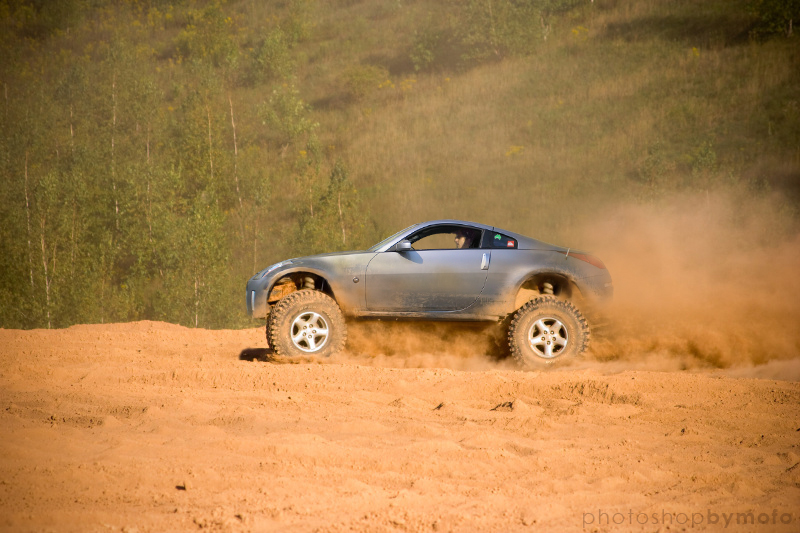
Ok, so this is my first attempt at photoshop really so go easy on me. I'm pretty happy with the results. I've worked on it for a while tonight and there are still a lot of little tweaks that I need to do. It's tougher than it would seem to take a whole jeep out of a background and smoothly replace it with a 350z,  . Any ways, here are the original two pictures:
Jeep pic-

Z pic-

Final (for tonight) product-

I need to learn how to properly light and blend the picture of the Z into the background without it standing out so much. It also wouldn't hurt to get some practice with blending the background. I think the result would have been a little cleaner if I'd taken more time. Any ways, more to come hopefully as I get the hang of photoshop.
. Any ways, here are the original two pictures:Jeep pic-
Z pic-
Final (for tonight) product-
I need to learn how to properly light and blend the picture of the Z into the background without it standing out so much. It also wouldn't hurt to get some practice with blending the background. I think the result would have been a little cleaner if I'd taken more time. Any ways, more to come hopefully as I get the hang of photoshop.

looks good for a first ever attempt. hell, it looks good for a intermediate pshop user. tint the window so it doesnt look like the car is driving itself...or find a pic of someone in a racecar with a helmet on.

The lighting and the window REALLY throw it off; since you know how to use the pen tool to cut out the car, why didn't you use it on the window?
The first thing I would say to do is cleanly remove the Jeep from the original image BEFORE bringing the Z in. That will give you good practice to removing an item and retaining a realistic look, regardless of what other images you import. With the Z, make sure to add the mud that would be kicked up on the car, and move the Jeep wheels to fit the body better. The lighting is going to be harder to match, but for starters I would fix the Jeep shadow since it doesn't match the Z. And as stated above, you need a driver! Challenge yourself and add that hillbilly driving the Jeep.
Hope that doesn't come off as nitpicking! Just trying to help. This is exactly the kind of stuff that will help you learn the program, so keep at it.
The first thing I would say to do is cleanly remove the Jeep from the original image BEFORE bringing the Z in. That will give you good practice to removing an item and retaining a realistic look, regardless of what other images you import. With the Z, make sure to add the mud that would be kicked up on the car, and move the Jeep wheels to fit the body better. The lighting is going to be harder to match, but for starters I would fix the Jeep shadow since it doesn't match the Z. And as stated above, you need a driver! Challenge yourself and add that hillbilly driving the Jeep.
Hope that doesn't come off as nitpicking! Just trying to help. This is exactly the kind of stuff that will help you learn the program, so keep at it.

Wow, thanks for the advice guys. Yeah, my main problem is that I don't know how to use the tools so I see what is wrong with it and want to fix it but don't know which tools to use,  . Thanks for the tips!
. Thanks for the tips!

Thread
Thread Starter
Forum
Replies
Last Post

