


both windows do not fully close


Thread Starter
Registered User
iTrader: (22)
Joined: Jul 2007
Posts: 2,185
Likes: 2
From: Los Angeles, Ca
 both windows do not fully close
Hey guys, I have an awkward situation... I was out and about this weekend x-mas shopping... when I was finished, I jumped in the ride and took off. I was a little hot from all the running around @ the mall, so I prop'd open both my windows half way. When I got home, I tried to roll them back up, but they wouldn't full close, there was a 1/2 inch gap left. I thought it was the battery, so I had the battery checked and it was ok. I just recently had the passenger side window motor changed about a year ago, which is fairly new in my book.
So now I honestly have no clue what is going on... I've searched through the forums for any possible answers, but had no luck finding anything. Is this some safety feature or are my window motors screwed, even though they both go up and down smoothly... I'm about to take the car in to the shop, but I would love to avoid this if there is a simple fix for this. Thanks guys!
UPDATE 2/7/10: okay since the last posting, it was fixed because of a "bad ground" as what the dealership stated, which they fixed for free, but didn't really explain what or where this ground was. Lately, it has been raining, and now this problem is back again... so I don't think it's the reset function as others have stated... I really think the water is getting in some how and affecting the circuit that controls both windows. Has anyone had the same prob? I'm getting fed up with the dealer not knowing exactly whats going on...
So now I honestly have no clue what is going on...
I've searched through the forums for any possible answers, but had no luck finding anything. Is this some safety feature or are my window motors screwed, even though they both go up and down smoothly... I'm about to take the car in to the shop, but I would love to avoid this if there is a simple fix for this. Thanks guys!UPDATE 2/7/10: okay since the last posting, it was fixed because of a "bad ground" as what the dealership stated, which they fixed for free, but didn't really explain what or where this ground was. Lately, it has been raining, and now this problem is back again... so I don't think it's the reset function as others have stated... I really think the water is getting in some how and affecting the circuit that controls both windows. Has anyone had the same prob? I'm getting fed up with the dealer not knowing exactly whats going on...
Last edited by jubes; Feb 7, 2010 at 02:55 PM.


Thread Starter
Registered User
iTrader: (22)
Joined: Jul 2007
Posts: 2,185
Likes: 2
From: Los Angeles, Ca
I appreciate the posting, but I don't think it's the motor.
They go up and down smoothly, but awkwardly stop 1/2" short of the full length. I would believe this would be more a programming or sensor type problem than a motor prob. Plus, I just had the passenger side changed earlier this year with a new one. Another is that it's both sides and not just one or the other.
They go up and down smoothly, but awkwardly stop 1/2" short of the full length. I would believe this would be more a programming or sensor type problem than a motor prob. Plus, I just had the passenger side changed earlier this year with a new one. Another is that it's both sides and not just one or the other.
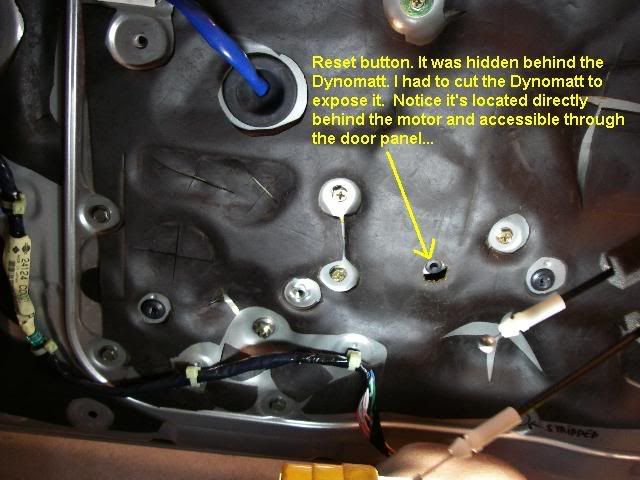
If you go to the very end of the install, there is a reset procedure. I am sure this is your problem. The reset button is behind the door panel
Putting everything back is fairly easy. Having your wife or someone help you hold the panel when reattaching it helps a bit, but you can certainly do it by yourself if need be.
Remember to attach the motor to the back of the panel first, then loosely fasten the two bottom 12mm track nuts next. You can loosely attach the two top track bolts after that, then scew in all the remaining 12 panel bolts. Be careful screwing in the 12 panel bolts. They strip easily.
After the inner door panel was back on, I plugged the switch panel in to test it. Just as I thought, when using the "auto up" feature the window rolled up then half way back down.
All I had to do to fix this was perform the "reset" procedure. I've attached a copy of the reset procedure as thumbnails.
You will need to have access to the reset switch. Here it is...
After I completed the reset procedure. Everything worked just fine. I'm hoping this is a long term fix. Only time will tell now.
I hope you guys enjoyed this tutorial.
That is all, OK I'm finished.....
Remember to attach the motor to the back of the panel first, then loosely fasten the two bottom 12mm track nuts next. You can loosely attach the two top track bolts after that, then scew in all the remaining 12 panel bolts. Be careful screwing in the 12 panel bolts. They strip easily.
After the inner door panel was back on, I plugged the switch panel in to test it. Just as I thought, when using the "auto up" feature the window rolled up then half way back down.
All I had to do to fix this was perform the "reset" procedure. I've attached a copy of the reset procedure as thumbnails.
You will need to have access to the reset switch. Here it is...
After I completed the reset procedure. Everything worked just fine. I'm hoping this is a long term fix. Only time will tell now.
I hope you guys enjoyed this tutorial.
That is all, OK I'm finished.....
Last edited by CRIDDA; Dec 14, 2009 at 01:05 PM.

Thread
Thread Starter
Forum
Replies
Last Post
350Z_Al
Exterior & Interior
133
Oct 29, 2020 07:44 PM
Gruppe-S
Body Interior
13
May 16, 2016 10:42 PM
