


Stealth V1 Installation (1 of 10)

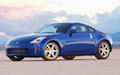

what does it look like with the hatch closed?
can you see if if you are driving behind or is it totally concealed?
also, do u have any rear pics?
thanks
my V1 is finally here, and i am def. goin with this setup!
can you see if if you are driving behind or is it totally concealed?
also, do u have any rear pics?
thanks
my V1 is finally here, and i am def. goin with this setup!
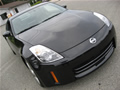
I'll post some pictures of how it looks like when the hatch is close. For the most part you can not see it if you're just looking at the car. If you bend down and look through the windshield (provided that the light shining through from the rear window is good enough) you can see it. Anyone admiring the car upclose from a regular upright standing position will not see it unless they know that it's there, it just looks like part of the center brake component assembly. Since the remote is in, it shuts all the lights off on the V1 so it won't tip anyone behind me that it's there.
The one drawback that I've found is that when I need to mute the V1 while driving instead of being able to turn it down or adjust the volume. It is possible to reach back and adjust the volume while holding the brake. DO NOT ATTEMPT TO DO THIS WHILE DRIVING! I've given it a try and it is not possible w/o putting yourself and your car at serious risk.
The one drawback that I've found is that when I need to mute the V1 while driving instead of being able to turn it down or adjust the volume. It is possible to reach back and adjust the volume while holding the brake. DO NOT ATTEMPT TO DO THIS WHILE DRIVING! I've given it a try and it is not possible w/o putting yourself and your car at serious risk.
Front View
Here's a shot from the front. In order to see the V1 you have to get close, squat down and look straight through the windshield. Provided that you have enough back lighting, you can see the silhouette of it.
Rear view
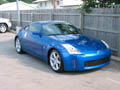
Here's the best shot I could get from behind the car this day. You can see it best by leaning over the rear passenger-side fender. even w/o the glare from the hatch, it's still not noticeable, unless you know what to look for.

With the "arrows" facing backwards, can't people behind you just tailgate and use your V1 as their V1?
I'm not sure what you're asking. Are you asking if the V1 is displays are visible through the rear window to someone traveling behind my Z? IT IS NOT VISIBLE because this design calls for the use of the V1 remote unit. When connected it shuts off the displays on the main unit.
Registered User
Joined: Oct 2002
Posts: 804
Likes: 0
From: Las Vegas, NV
Jelledge and Drivesolo,
I'm assuming you guys aren't using Valentine's remote audio adapter in addition to the remote display. Any reason not to, other than it's another $50 on top of the $440 we've already shelled out?
The upside would be you'd have control of all functions of the unit, except power on/off. No more risking your life trying to reach back and adjust the volume from the driver's seat, as drivesolo recommended against. Also the sound warnings would be coming from in front of you again, instead of behind.
What do you think?
I'm assuming you guys aren't using Valentine's remote audio adapter in addition to the remote display. Any reason not to, other than it's another $50 on top of the $440 we've already shelled out?
The upside would be you'd have control of all functions of the unit, except power on/off. No more risking your life trying to reach back and adjust the volume from the driver's seat, as drivesolo recommended against. Also the sound warnings would be coming from in front of you again, instead of behind.
What do you think?
Registered User
Joined: Jun 2002
Posts: 293
Likes: 0
From: Idaho
Audio Adaptor
I am not using it just because I did not see the need. I usually just set the volume of the V1 to something comfortable when the music is down and use the mute button when needed. I find that I rely only partially on the audio warnings. I mounted my remote unit right in the periphery vision area so if it goes off I notice it quickly.
I mounted my remote unit down low such that it has a very dark background. That way even on bright sunny days I have no trouble seeing.
Have fun,
Ja
I mounted my remote unit down low such that it has a very dark background. That way even on bright sunny days I have no trouble seeing.
Have fun,
Ja
Jelledge and Drivesolo,
I'm assuming you guys aren't using Valentine's remote audio adapter in addition to the remote display. Any reason not to, other than it's another $50 on top of the $440 we've already shelled out?
The upside would be you'd have control of all functions of the unit, except power on/off. No more risking your life trying to reach back and adjust the volume from the driver's seat, as drivesolo recommended against. Also the sound warnings would be coming from in front of you again, instead of behind.
What do you think?
I'm assuming you guys aren't using Valentine's remote audio adapter in addition to the remote display. Any reason not to, other than it's another $50 on top of the $440 we've already shelled out?
The upside would be you'd have control of all functions of the unit, except power on/off. No more risking your life trying to reach back and adjust the volume from the driver's seat, as drivesolo recommended against. Also the sound warnings would be coming from in front of you again, instead of behind.
What do you think?
In the even that I'm caught in an area where its going nuts due to non-threatening radar, I just mute it. When I leave the area, I cycle back to the setting that I was on and the volume is on again.
The sound from the V1 is just as audible from the position on the head liner than it is from the windsheild. And if there's any need to adjust it, when you come to a stop (don't do it while moving), just reach back and tune it.
The location of the remote in my setup is viewable in the driver's vision. The only time that I need to look at it directly is to see the number of bogies its tracking. I know what it's tracking (X vs K and Ka), the urgency of it and I can see the direction in my peripheral vision.
Who needs a bracket?
Thanks to all the guys that have sent me mail and complemented me on this setup. I'm glad I could have been some help.
A couple of you guys have asked me if I would be willing to make and sell them the bracket. I've given it some thought as to what it would take for me to make it a couple more times and I figure that I could do it. As far as price I'd rather negotiate a trade rather than a dollar value. I'm looking for 350Z related artwork, calendars and posters. Large ads are also something that I’d be interested in. I’m looking to decorate a wall of my garage in a 350Z theme. I’m open to suggestions if you have anything you might want to trade (preferably Nissan and/or Z related), I’d rather not take $ since I never intended to sell this item.
So if you’re interested let me know so I know how many to make. I’d like to make all of them in one day so I’ll let you know when they’re available.
A couple of you guys have asked me if I would be willing to make and sell them the bracket. I've given it some thought as to what it would take for me to make it a couple more times and I figure that I could do it. As far as price I'd rather negotiate a trade rather than a dollar value. I'm looking for 350Z related artwork, calendars and posters. Large ads are also something that I’d be interested in. I’m looking to decorate a wall of my garage in a 350Z theme. I’m open to suggestions if you have anything you might want to trade (preferably Nissan and/or Z related), I’d rather not take $ since I never intended to sell this item.
So if you’re interested let me know so I know how many to make. I’d like to make all of them in one day so I’ll let you know when they’re available.
Registered User
Joined: Oct 2002
Posts: 255
Likes: 0
From: Tampa, Fl
I would like one. I am not sure as to what I can send you. I have actually been looking for garage posters and decorations myself (unsuccessfully I might add). How about some print outs of my Z along side my friend Z (95TT)? What a hot wheels 350Z 1/64 scale I have some of those hanging on my wall? 

I keep meaning to put up a pic of my install. I did pretty much the same thing, but also put my remote display in the nav compartment. I had to take out the center console, and I used some velcro to stick it to the center top of the compartment. The wire is mostly hidden by the nav door, and the only wire you can see witht he door closed is the small piece running from the detector into the headliner.
I would be interested in getting a bracket like you have made, but i dont think I have anything Z related that I could trade for it.
I would be interested in getting a bracket like you have made, but i dont think I have anything Z related that I could trade for it.

New Member
Joined: Oct 2002
Posts: 215
Likes: 0
From: South Carolina
Originally posted by zPilott
... but also put my remote display in the nav compartment. I had to take out the center console, and I used some velcro to stick it to the center top of the compartment. The wire is mostly hidden by the nav door, and the only wire you can see witht he door closed is the small piece running from the detector into the headliner. ...
... but also put my remote display in the nav compartment. I had to take out the center console, and I used some velcro to stick it to the center top of the compartment. The wire is mostly hidden by the nav door, and the only wire you can see witht he door closed is the small piece running from the detector into the headliner. ...
Sorry for the delay.
Hey guys,
Sorry about disappearing for a while, I've had to take my attention away from this for a while. As it looks right now 5 of you out there seem interested in making a trade.
Just to let you know, I won't be able to start until next weekend (3/14 - 3/16) the earliest. If you're still interested send me a message to let me know and we can talk about a trade. I'm still looking for wall art. If anyone out there is an exceptional artist I'm willing to trade for a custom drawing of a 350z. Prefferably something large enough to admire from several feet away.
Once again, I appologize for taking so long.
Sorry about disappearing for a while, I've had to take my attention away from this for a while. As it looks right now 5 of you out there seem interested in making a trade.
Just to let you know, I won't be able to start until next weekend (3/14 - 3/16) the earliest. If you're still interested send me a message to let me know and we can talk about a trade. I'm still looking for wall art. If anyone out there is an exceptional artist I'm willing to trade for a custom drawing of a 350z. Prefferably something large enough to admire from several feet away.
Once again, I appologize for taking so long.


OH btw I say this post and decided to try and make this piece myself except I used the visor attachment piece of metal and bent it to fit. ill be installing tomorrow and will take pictures.
tested mount this weekend - to works
This past weekend, I attended the IRDC Performance Racing School at the regional racetrack in the Seattle area, Pacific Raceways (formerly S.I.R.). As a rule they instructed us to remove everything from the interior of our vehicles. Just out of curiosity I deliberately left the V1 in so I could see what would happen when subjected to a full day of heavy lateral loading. I noted it's exact initial position before we began the day, noting its proximity to details on the edge of the headliner. Luckily my instructor did not notice the V1 even after a detailed tech inspection. It wasn't that he wasn't thorough; it's just that it's in a location that no one even considers looking at.
9 hrs later after a full day of tossing the Z around like never before, which was an awesome experience to begin with (I'll have to post the info on my experience), I checked it as I was putting everything back in. Just to let you know, the lateral g's and the braking that the car went through that day were probably the maximum that a stock Performance model could attain, short of hitting something solid. To my surprise it was exactly in the same position, from what I could tell it did not move at all. The remote until didn't move either, although by being so light it probably has very little possibility of ever moving.
When I got home that night I attempted to remove it to see if there was any damage to the edge of the headliner and to see what exactly was keeping it glued there. It came out easily with no problems and as far as I could tell the headliner is still untouched. I seems that when the bracket is put in place and the headliner goes back to it's original position, there is friction all around the lip and the inside of the bracket, the headline holds the inside and the rubber seal and the outside. It sandwiches it there very nicely.
9 hrs later after a full day of tossing the Z around like never before, which was an awesome experience to begin with (I'll have to post the info on my experience), I checked it as I was putting everything back in. Just to let you know, the lateral g's and the braking that the car went through that day were probably the maximum that a stock Performance model could attain, short of hitting something solid. To my surprise it was exactly in the same position, from what I could tell it did not move at all. The remote until didn't move either, although by being so light it probably has very little possibility of ever moving.
When I got home that night I attempted to remove it to see if there was any damage to the edge of the headliner and to see what exactly was keeping it glued there. It came out easily with no problems and as far as I could tell the headliner is still untouched. I seems that when the bracket is put in place and the headliner goes back to it's original position, there is friction all around the lip and the inside of the bracket, the headline holds the inside and the rubber seal and the outside. It sandwiches it there very nicely.
Made a couple more brackets
Okay, I finally got the time to get back into the garage and make a few more brackets. I sent everyone who contacted me in my my350Z personal mail a reply. If anyone else is interested let me know through the my350Z mail.