


Add-on device to support mute feature?


Thread Starter
New Member


Joined: Dec 2006
Posts: 7,337
Likes: 204
From: Edina, Minnesota
 Solution: Add-on device that supports Aftermarket & OEM Nav. Voice Guidance
Equipment and Configuration
Clarion DXZ745MP H/U with Sirius satellite
Eclipse 4 Channel Amp
Focal 165 V Slim in the doors and Infinity’s in the rear speaker space
Power Acoustik PT-700MHR LCD
Garmin GVN52 Navigation Box
I connected the Garmin GVN52 right and left audio wires to the Clarion’s AUX connection. This way I can select AUX on the H/U and hear the Garmin’s voice guidance through the car’s speakers. This works great. The voice guidance from the Garmin sounds so real and natural you think there is someone sitting in the car telling you when to turn.
The Problem
While the system is navigating and listening to the voice prompts, I must set the Clarion to AUX. That means I cannot listen to the radio or CD player if I want to have voice guidance. The Garmin GVN52 has a mute wire, but the Clarion DXZ745MP does not support this. I would like the ability to play the radio or the CD player, and then have the Garmin mute this sound when it provides voice guidance.
The Question
Is there such a thing as an add-on device that I can place between the Clarion H/U and the amp that would support this and allow the Garmin to use its mute feature? The arrangement is connecting the Clarion and the Garmin to this device that supports the Garmin’s mute feature (instead of connecting the Garmin to the Clarion’s AUX). Another advantage of this arrangement is keeping the Clarions’ AUX available if I add another component.
Thanks for any help, --Spike
Clarion DXZ745MP H/U with Sirius satellite
Eclipse 4 Channel Amp
Focal 165 V Slim in the doors and Infinity’s in the rear speaker space
Power Acoustik PT-700MHR LCD
Garmin GVN52 Navigation Box
I connected the Garmin GVN52 right and left audio wires to the Clarion’s AUX connection. This way I can select AUX on the H/U and hear the Garmin’s voice guidance through the car’s speakers. This works great. The voice guidance from the Garmin sounds so real and natural you think there is someone sitting in the car telling you when to turn.
The Problem
While the system is navigating and listening to the voice prompts, I must set the Clarion to AUX. That means I cannot listen to the radio or CD player if I want to have voice guidance. The Garmin GVN52 has a mute wire, but the Clarion DXZ745MP does not support this. I would like the ability to play the radio or the CD player, and then have the Garmin mute this sound when it provides voice guidance.
The Question
Is there such a thing as an add-on device that I can place between the Clarion H/U and the amp that would support this and allow the Garmin to use its mute feature? The arrangement is connecting the Clarion and the Garmin to this device that supports the Garmin’s mute feature (instead of connecting the Garmin to the Clarion’s AUX). Another advantage of this arrangement is keeping the Clarions’ AUX available if I add another component.
Thanks for any help, --Spike
Last edited by Spike100; Jul 1, 2007 at 04:58 PM.



The circuit wouldn't be hard to design - $20 worth of parts give or take. It would act like a restaurant's paging mute system. Restaurants have a home stereo type audio system to play background music. They also have a separate paging system ... "Paul table for 1" which connects into a muting box between the receiver and the amplifier. The thing would likely run off of 12VDC if you could find one.
The page mute box would go between your head end and the amplifiers - your navigation voice output would then feed a second input. When the amplitude of the navigation signal reaches a certain volume the other input would be attenuated by -30 dB or the like and the navigation voice mixed in.
Here's an on-line magazine talking about paging mixers with a list of sources that you might want to dig through.
http://digitalcontentproducer.com/ma...paging_mixers/
Hey have a look at Radio Design Labs "sick ups"! Dude you so owe me a beer - the ST-VP2 is a fully automatic voice-over mixer.
They run on 24 VDC which is YOUR problem and a simple DC to DC doubler would work. 
http://www.rdlnet.com/product.php?page=24
The page mute box would go between your head end and the amplifiers - your navigation voice output would then feed a second input. When the amplitude of the navigation signal reaches a certain volume the other input would be attenuated by -30 dB or the like and the navigation voice mixed in.
Here's an on-line magazine talking about paging mixers with a list of sources that you might want to dig through.
http://digitalcontentproducer.com/ma...paging_mixers/
Hey have a look at Radio Design Labs "sick ups"! Dude you so owe me a beer - the ST-VP2 is a fully automatic voice-over mixer.
Fully AUTOMATIC Voice-Over Mixing
Noiseless Paging
Adjustable Fade Depth
Setting to Fade Music Fully Off
Adjustable Recovery Rate
Built-in AGC Compressor on Music Input
APPLICATION: The ST-VP2 can be wired into any line-level input of a paging amplifier. A line-level music source may be provided from a receiver, satellite decoder, tape or CD source. A line-level voice source may be provided from a telephone paging system at line level, or from a microphone which has been preamplified up to line level (See RDL STM-1, STM-2, STM-2X, STM-3, STM-LDA3 Microphone Preamplifiers). When a page is initiated, the module automatically senses the audio at the input, turns the music down to the desired level, and automatically fades the music back up after the page is completed. The VOICE input is completely turned off by the module until the next paging signal is received. Setup is made easy by two LED indicators at the front of the module. LEDs are provided to show correct operating level for each of the two inputs.
The music input provides an AGC/Compressor which transparently produces a consistent audio level for varying music sources and protects against excessive music levels which would otherwise mask the voice signal during voice-overs.
Noiseless Paging
Adjustable Fade Depth
Setting to Fade Music Fully Off
Adjustable Recovery Rate
Built-in AGC Compressor on Music Input
APPLICATION: The ST-VP2 can be wired into any line-level input of a paging amplifier. A line-level music source may be provided from a receiver, satellite decoder, tape or CD source. A line-level voice source may be provided from a telephone paging system at line level, or from a microphone which has been preamplified up to line level (See RDL STM-1, STM-2, STM-2X, STM-3, STM-LDA3 Microphone Preamplifiers). When a page is initiated, the module automatically senses the audio at the input, turns the music down to the desired level, and automatically fades the music back up after the page is completed. The VOICE input is completely turned off by the module until the next paging signal is received. Setup is made easy by two LED indicators at the front of the module. LEDs are provided to show correct operating level for each of the two inputs.
The music input provides an AGC/Compressor which transparently produces a consistent audio level for varying music sources and protects against excessive music levels which would otherwise mask the voice signal during voice-overs.
http://www.rdlnet.com/product.php?page=24
 I'll report back on the results.
Thread Starter
New Member
Joined: Dec 2006
Posts: 7,337
Likes: 204
From: Edina, Minnesota
I have the problem (described in the first post of this thread) solved.
The Problem: I want to send the Garmin GVN52 navigation voice guidance to my front speakers, but my H/U doesn't support a mute function. I believe people with the OEM Nissan navigation unit also face this problem when replacing the stock H/U.
Here's the device that provides the solution:
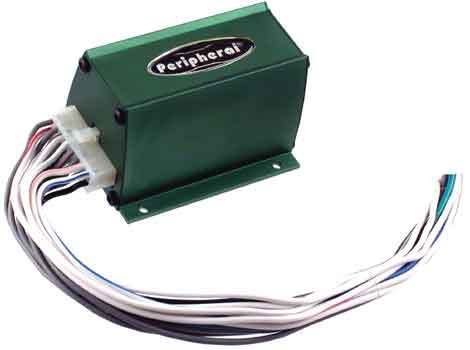
Peripheral SPK Two Channel Speaker Switcher
The device is designed to route the output from two separate sources, such as two head units to a set of speakers in a vehicle's sound system, and can also be used as a speaker level muting device. The device connects between the H/U and your external amp (or front speakers if there is no external amp). I was not able to figure out all the wiring for this, so I paid an installer put the device in my car. It works quite well, and I don't hear any sound degeneration or experience any compromises in my CES with this unit.
How it works: I can have the H/U playing the radio or CD player; and when the navigation unit sounds voice guidance, the radio or CD player mutes, and the navigation voice comes through the car's front speakers. After sounding the navigation voice commands, the system automatically reverts to the radio of CD player.
This would also be a solution for people with Nissan's OEM navigation system who want to replace the stock H/U with and after market CES and retain voice guidance through the car's front speakers.
--Spike
The Problem: I want to send the Garmin GVN52 navigation voice guidance to my front speakers, but my H/U doesn't support a mute function. I believe people with the OEM Nissan navigation unit also face this problem when replacing the stock H/U.
Here's the device that provides the solution:
Peripheral SPK Two Channel Speaker Switcher
The device is designed to route the output from two separate sources, such as two head units to a set of speakers in a vehicle's sound system, and can also be used as a speaker level muting device. The device connects between the H/U and your external amp (or front speakers if there is no external amp). I was not able to figure out all the wiring for this, so I paid an installer put the device in my car. It works quite well, and I don't hear any sound degeneration or experience any compromises in my CES with this unit.
How it works: I can have the H/U playing the radio or CD player; and when the navigation unit sounds voice guidance, the radio or CD player mutes, and the navigation voice comes through the car's front speakers. After sounding the navigation voice commands, the system automatically reverts to the radio of CD player.
This would also be a solution for people with Nissan's OEM navigation system who want to replace the stock H/U with and after market CES and retain voice guidance through the car's front speakers.
--Spike

Thread Starter
New Member
Joined: Dec 2006
Posts: 7,337
Likes: 204
From: Edina, Minnesota
Originally Posted by sirfatty
where can u buy that
Note: It is not easy to install this thing. If you are not an expert-level 12V installer, you may need help. I rate myself as "advanced amateur," and I couldn't get it working. After spending hours on this, I took the car and the device to a Professional Installer. He got it working, but it wasn't easy.
The tricky part (after figuring out the wiring) is establishing a proper ground. You cannot simply ground the device and expect it to work. You need to add a resistor to the ground. I added a 100K/ohm resistor to the ground, and tested this setup with the car's ignition at ACC. It worked perfectly. I put all the panels back into place, and drove the car. Unfortunately, what worked with the car's ignition at ACC didn't work at all when driving the car (with its ignition ON and engine running). I couldn't get sound out of the front speakers unless the navigation system and the LCD screen were ON.
Well... Crap! Ok... try something else... I'm thinking "bad ground." Disassembled the panels, and put a 200K/ohm resistor on the ground. Now... nothing worked (ignition at ACC or fully ON driving the car). No sound at all from the fronts whether the navigation system and LCD were ON of OFF.
At that point I gave up and took the car and the device to a Professional Installer. He did some rewiring on the entire CES, re-grounded my external amp, and added a 150K/ohm resistor. It works now!
-- Spike

Thread
Thread Starter
Forum
Replies
Last Post
Tochigi_236
Feedback & Suggestions for Our Forum
8
Sep 27, 2015 03:40 PM
