


How to hardwire 12V for Portable Navigation?


 How to hardwire 12V for Portable Navigation?
I just got a portable navi, does anyone know how I can hardwire the AC from the car to the unit? I want to do a clean install without using the car charger...It should be 12V but not completely sure...I'm a noob at wiring stuff, any help would be appreciated.
P.S. I looked at the sticky in this forum but don't know wtf it's talking about.
P.S. I looked at the sticky in this forum but don't know wtf it's talking about.

New Member


Joined: Dec 2006
Posts: 7,337
Likes: 204
From: Edina, Minnesota
Originally Posted by bugsbbunny
I just got a portable navi, does anyone know how I can hardwire the AC from the car to the unit? I want to do a clean install without using the car charger...It should be 12V but not completely sure...I'm a noob at wiring stuff, any help would be appreciated.
P.S. I looked at the sticky in this forum but don't know wtf it's talking about.
P.S. I looked at the sticky in this forum but don't know wtf it's talking about.
Here is a thread that discusses your question:
https://my350z.com/forum/audio-and-video/243690-hardwiring.html
--Spike
Originally Posted by Spike100
Ok… got it (I think). I’ll just describe how I did it (forgive me if I give too much detail or go beyond the info you are looking for).
I am assuming you plan placing the GPS inside the upper/forward cubby. To “hard-wire” the GPS unit, do this:
1) Determine the fitment of your GPS unit inside the forward/upper cubby and figure out how you are going to mount it. You may be able to secure the device as simply as using some Velcro strips. Or, maybe the unit comes with a mount that fits the cubby space.
2) Remove the center console (instructions are on this link http://liljerk.morpheus.net/350Z/) to gain access to the cubby and the car’s wiring. You are going to be drilling a hole in the cubby, so you need to do this so you are not drilling blindly into unknown territory.
3) Drill a hole in the right side of the cubby (your right as you face the cubby, and near the bottom rear of the cubby) large enough to accommodate the power line (and its in-line fuse if there is one), and place a grommet in the hole (to prevent chafing). You will run the GPS power line through the hole for a neat looking installation.
4) Cut off the plug at the end of the GPS’s power cord. The GPS’s power cord might have an in-line fuse. You can leave the in-line fuse in place as an extra measure of protection. If you have an in-line fuse and leave it in place, be sure the hole you drill and its grommet have adequate diameter to accommodate the in-line fuse. Of course, leave adequate slack to pull the line through the hole you make in the cubby so you can expose the in-line fuse in case you ever need to change that fuse.
5) Peel-back some of the sheathing to expose the wires inside. The black wire is the ground, and the colored wire (probably red) will be your hot wire. Ground the black wire and connect the other wire to a power wire coming off the car’s fuse box. The power line should be one that runs through the car’s ignition. It’s important to do this because it prevents your battery from draining if you don’t turn the GPS off when leaving the car.
In your question you state: “…Basically I want to run my gps through the passenger side lighter…” You can connect the GPS power line to any red wire that has its power cut by the ignition switch. For example, you could connect to the red wire that goes to your HU.
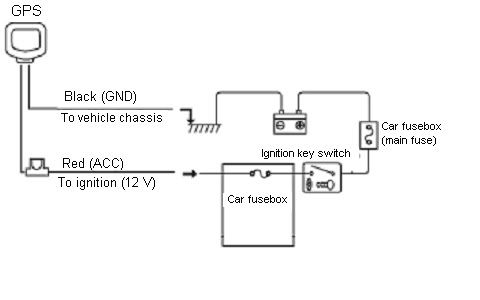
If you are uncertain about any of the connections, have a professional do the job. If you wire this incorrectly, you could damage the electrical system in the car or even cause a fire. --Spike
I am assuming you plan placing the GPS inside the upper/forward cubby. To “hard-wire” the GPS unit, do this:
1) Determine the fitment of your GPS unit inside the forward/upper cubby and figure out how you are going to mount it. You may be able to secure the device as simply as using some Velcro strips. Or, maybe the unit comes with a mount that fits the cubby space.
2) Remove the center console (instructions are on this link http://liljerk.morpheus.net/350Z/) to gain access to the cubby and the car’s wiring. You are going to be drilling a hole in the cubby, so you need to do this so you are not drilling blindly into unknown territory.
3) Drill a hole in the right side of the cubby (your right as you face the cubby, and near the bottom rear of the cubby) large enough to accommodate the power line (and its in-line fuse if there is one), and place a grommet in the hole (to prevent chafing). You will run the GPS power line through the hole for a neat looking installation.
4) Cut off the plug at the end of the GPS’s power cord. The GPS’s power cord might have an in-line fuse. You can leave the in-line fuse in place as an extra measure of protection. If you have an in-line fuse and leave it in place, be sure the hole you drill and its grommet have adequate diameter to accommodate the in-line fuse. Of course, leave adequate slack to pull the line through the hole you make in the cubby so you can expose the in-line fuse in case you ever need to change that fuse.
5) Peel-back some of the sheathing to expose the wires inside. The black wire is the ground, and the colored wire (probably red) will be your hot wire. Ground the black wire and connect the other wire to a power wire coming off the car’s fuse box. The power line should be one that runs through the car’s ignition. It’s important to do this because it prevents your battery from draining if you don’t turn the GPS off when leaving the car.
In your question you state: “…Basically I want to run my gps through the passenger side lighter…” You can connect the GPS power line to any red wire that has its power cut by the ignition switch. For example, you could connect to the red wire that goes to your HU.
If you are uncertain about any of the connections, have a professional do the job. If you wire this incorrectly, you could damage the electrical system in the car or even cause a fire. --Spike
This is what was posted on that thread, thanks for the lead. I'm still a little confused about the wiring. I have a car adapter that came with the Navi, could I use that? Just cut off the plug and strip back the wiring?
Also, what if the wires aren't long enough? Is there an extender I could get?
And lastly, where should I plug the "hot" wire to? Somewhere inside the fuse box? And for the ground wire, I can strip back the wire, attach a nut to it, and put it somewhere on the car?
Thanks~!!!
New Member
Joined: Dec 2006
Posts: 7,337
Likes: 204
From: Edina, Minnesota
re> I have a car adapter that came with the Navi, could I use that? Just cut off the plug and strip back the wiring?
Yes. You cut the wire, remove the plug, and expose the individual wires. You will see a black wire (which is the ground), and a red wire (which is the "hot" power line).
re> Also, what if the wires aren't long enough? Is there an extender I could get?
No need to worry about length. (Mercifully, girth is not a problem here either. ) You can use any wire (use the correct color sheath - red or black- for clarity) that you connect to the "original harness" (the wire you cut to remove the 12v plug). You connect the new "wire-extension" by using crimps or soldering/wrapping the "extension" wires to your GPS's "harness."
re> And lastly, where should I plug the "hot" wire to? Somewhere inside the fuse box? And for the ground wire, I can strip back the wire, attach a nut to it, and put it somewhere on the car?
Your "hot" wire will be any of the red wires you see after removing the center console and viewing the the Z's wiring. A good choice is a red wire going to your H/U. As my wiring diagram shows, you want to use a "fused" red wire connected to an ACC source. That provides a good power source that is protected by fusing, without risking draining your battery. The black wire is the ground. You connct this to your car's chassis (find any good bare metal ground point). I would avoid connecting to the H/U's chassis, and that is to prevent "noise" to your CES.
Important:
1) Do not connect to a yellow wire. A yellow wire supplies constant power, and connecting to a yellow wire may drain your battery.
2) Before making any connections, disconnect the ground wire on your battery so you don't damage the car's electical system or the component (GPS in your case) you are installing.
3) Use a voltage meter to check power lines.
--Spike
Yes. You cut the wire, remove the plug, and expose the individual wires. You will see a black wire (which is the ground), and a red wire (which is the "hot" power line).
re> Also, what if the wires aren't long enough? Is there an extender I could get?
No need to worry about length. (Mercifully, girth is not a problem here either.
) You can use any wire (use the correct color sheath - red or black- for clarity) that you connect to the "original harness" (the wire you cut to remove the 12v plug). You connect the new "wire-extension" by using crimps or soldering/wrapping the "extension" wires to your GPS's "harness." re> And lastly, where should I plug the "hot" wire to? Somewhere inside the fuse box? And for the ground wire, I can strip back the wire, attach a nut to it, and put it somewhere on the car?
Your "hot" wire will be any of the red wires you see after removing the center console and viewing the the Z's wiring. A good choice is a red wire going to your H/U. As my wiring diagram shows, you want to use a "fused" red wire connected to an ACC source. That provides a good power source that is protected by fusing, without risking draining your battery. The black wire is the ground. You connct this to your car's chassis (find any good bare metal ground point). I would avoid connecting to the H/U's chassis, and that is to prevent "noise" to your CES.
Important:
1) Do not connect to a yellow wire. A yellow wire supplies constant power, and connecting to a yellow wire may drain your battery.
2) Before making any connections, disconnect the ground wire on your battery so you don't damage the car's electical system or the component (GPS in your case) you are installing.
3) Use a voltage meter to check power lines.
--Spike

Till I get some money for a better head unit, I am trying to hook up a HarmonKardon iPod adapter. Right now I'm plugged into the lighter adapter in front of the passenger seat but I would later leave that source available. The power cable for HarmonKardon has 3 wires-Red,Black,Yellow. I am completely n00b at this electrical stuff so how can I hook it up to power on when I start the car? I don't want to cut any wires and screw up stuff.
New Member
Joined: Dec 2006
Posts: 7,337
Likes: 204
From: Edina, Minnesota
Originally Posted by SolarOrangeZ
Till I get some money for a better head unit, I am trying to hook up a HarmonKardon iPod adapter. Right now I'm plugged into the lighter adapter in front of the passenger seat but I would later leave that source available. The power cable for HarmonKardon has 3 wires-Red,Black,Yellow. I am completely n00b at this electrical stuff so how can I hook it up to power on when I start the car? I don't want to cut any wires and screw up stuff.
https://my350z.com/forum/showthread.php?t=243690
As to the question quoted here:
The red wire supplies power under ACC control (i.e., power is supplied only when ACC is ON).
The yellow wire supplies constant power (whether or not ACC is ON or OFF).
The black wire is a ground.
If you want to hard-wire your portable GPS, you cut-off the plug that comes with the power adapter line, expose the wires inside the sheath, connect the red wire to an ACC controlled and fused red wire in your car, ground the black wire, and ignore the yellow wire.
The yellow wire in your portable GPS's power line is probably meant only to light a LCD (indicating power) in the plug that you just cut off. The yellow wire might drain your battery if you include it in your hard-wiring solution.
--Spike
Trending Topics

Well, you can cut the lighter adapter off, but you have to be mindful of what voltage is actually getting to whatever device your trying to hard wire. In a few instances people that have tried this come into the shop with fried devices. The adapter they lopped off actually stepped down the 12v to a lower voltage (Several XM and Sirius units). If you cut off the adapter end and it contained a voltage stepdown, you will fry the device.
Make sure the device takes 12v-14v before you perform surery on the power cord. If the adapter cord does lower the voltage to what the device needs you will need to keep the cord intact and use an adapter like this

or you can solder two wires to the original adapter, the center contact is positive and the outer contact is negative
sorry spike, didnt read all of your post
Make sure the device takes 12v-14v before you perform surery on the power cord. If the adapter cord does lower the voltage to what the device needs you will need to keep the cord intact and use an adapter like this
or you can solder two wires to the original adapter, the center contact is positive and the outer contact is negative
sorry spike, didnt read all of your post
Last edited by Ichigo; Aug 2, 2007 at 07:10 PM.
New Member
Joined: Dec 2006
Posts: 7,337
Likes: 204
From: Edina, Minnesota
Originally Posted by Ichigo
Well, you can cut the lighter adapter off, but you have to be mindful of what voltage is actually getting to whatever device your trying to hard wire. In a few instances people that have tried this come into the shop with fried devices. The adapter they lopped off actually stepped down the 12v to a lower voltage (Several XM and Sirius units). If you cut off the adapter end and it contained a voltage stepdown, you will fry the device.
Make sure the device takes 12v-14v before you perform surery on the power cord. If the adapter cord does lower the voltage to what the device needs you will need to keep the cord intact and use an adapter like this
or you can solder two wires to the original adapter, the center contact is positive and the outer contact is negative
sorry spike, didnt read all of your post
Make sure the device takes 12v-14v before you perform surery on the power cord. If the adapter cord does lower the voltage to what the device needs you will need to keep the cord intact and use an adapter like this
or you can solder two wires to the original adapter, the center contact is positive and the outer contact is negative
sorry spike, didnt read all of your post
Your comment> "In a few instances people that have tried this come into the shop with fried devices. The adapter they lopped off actually stepped down the 12v to a lower voltage (Several XM and Sirius units). If you cut off the adapter end and it contained a voltage stepdown, you will fry the device."
What devices (XM and Sirius units) are prone to this problem?
I help friends doing these installs and certainly never want them to experience damage to their device (or even worse, to their car).
--Spike
The sirius S50 and the XM Roady 2. I know the Roady 2 takes 6 volts. Not sure what voltage the S50 runs off of. My XM MyFi uses 5.5 volts as well. Feed them 12-14v and its RMA time....
Of course the maufacturers know what voltage is being used in a car, but if they made the devices to work with 12-14volts you wouldnt need to buy special adapters would ya? Maybe it has more to do with reducing the size of the units by placing the voltage stepdowns inside the adapters as opposed to the units
Of course the maufacturers know what voltage is being used in a car, but if they made the devices to work with 12-14volts you wouldnt need to buy special adapters would ya? Maybe it has more to do with reducing the size of the units by placing the voltage stepdowns inside the adapters as opposed to the units
Last edited by Ichigo; Aug 5, 2007 at 07:28 PM.

Thread
Thread Starter
Forum
Replies
Last Post
Tochigi_236
Feedback & Suggestions for Our Forum
8
Sep 27, 2015 03:40 PM
