


oem navi


Registered User
Joined: Nov 2006
Posts: 468
Likes: 0
From: Plano, TX

your kidding right?
firstoff. okay lets assume you knew nothing about the 350z. go to the forum and go to the classified section. theres a good place to start.
next place would be that wonderful place called EBAY. they help you find whatever "it" is.
Second. Why do you want an OEM when honestly it SUCKS compared to other navi systems out there. just spend the money on a nice navi system like the Pioneer AVIC D1 or Z2 (if you have the money).
firstoff. okay lets assume you knew nothing about the 350z. go to the forum and go to the classified section. theres a good place to start.
next place would be that wonderful place called EBAY. they help you find whatever "it" is.
Second. Why do you want an OEM when honestly it SUCKS compared to other navi systems out there. just spend the money on a nice navi system like the Pioneer AVIC D1 or Z2 (if you have the money).
yeah, the factory navi is nice. The only thing i hate about it is putting in addresses. It take forever.
If your car doesn't have oem navi, it cost a lot of money to have it integrated in your car. If you do a search, i believe it cost around 8-10k to install or something like that.
If your car doesn't have oem navi, it cost a lot of money to have it integrated in your car. If you do a search, i believe it cost around 8-10k to install or something like that.

Registered User
Joined: Nov 2006
Posts: 468
Likes: 0
From: Plano, TX
he means its not touch screen. you must be at a complete stop to program it. and its the most counter intuitive navigation I have ever used.
For instance. Say I want to search for a mcdonalds near my location. Go to Points of Interest. click on the search in city field. type in the city of where you are. then type in mcdonalds. it will come up with a list of all the different mcdonalds in no apparant order. so if you want to find the one that you know is somewhere nearby, you must figure out which one from the 10,000 locations it is. Other option is to click on Quick Menu and click food. then it will show you a list of everything near where you are. but you must filter through all the restaraunts to find a mcdonalds.
If you want to go to an address, click menu the address/street. type in the street address using the 8 way scrolling joystick. it takes forever. then narrow down which city the street you are looking for is in. once complete, then input a house number. once selected, wait for the nav to calculate the route.
all the while you must be at a complete stop.
good news. you can program addresses into your address book so you can access them quicker and dont have to type them in manually. but think about it, if you go there often enough to have it in your address book, after about the third trip, you will have memorized how to get there.
After I got the iphone, the only reason why i keep the nav in the car is cuz it looks good. I don't use it much at all. and on top of that, I have to pay to have it updated once ever 500 years. and its really out of date most of the time.
For instance. Say I want to search for a mcdonalds near my location. Go to Points of Interest. click on the search in city field. type in the city of where you are. then type in mcdonalds. it will come up with a list of all the different mcdonalds in no apparant order. so if you want to find the one that you know is somewhere nearby, you must figure out which one from the 10,000 locations it is. Other option is to click on Quick Menu and click food. then it will show you a list of everything near where you are. but you must filter through all the restaraunts to find a mcdonalds.
If you want to go to an address, click menu the address/street. type in the street address using the 8 way scrolling joystick. it takes forever. then narrow down which city the street you are looking for is in. once complete, then input a house number. once selected, wait for the nav to calculate the route.
all the while you must be at a complete stop.
good news. you can program addresses into your address book so you can access them quicker and dont have to type them in manually. but think about it, if you go there often enough to have it in your address book, after about the third trip, you will have memorized how to get there.
After I got the iphone, the only reason why i keep the nav in the car is cuz it looks good. I don't use it much at all. and on top of that, I have to pay to have it updated once ever 500 years. and its really out of date most of the time.
Trending Topics


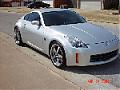
buy a z2 trust me it looks good  . Put your ipod inthe cubby so you have a place to run the wires. Now you spent less then it would cost to put a crappy oem nav. in place. And you have all the other goodies to boot.
. Put your ipod inthe cubby so you have a place to run the wires. Now you spent less then it would cost to put a crappy oem nav. in place. And you have all the other goodies to boot.
Originally Posted by 2006350zSA
buy a z2 trust me it looks good . Put your ipod inthe cubby so you have a place to run the wires. Now you spent less then it would cost to put a crappy oem nav. in place. And you have all the other goodies to boot.
. Put your ipod inthe cubby so you have a place to run the wires. Now you spent less then it would cost to put a crappy oem nav. in place. And you have all the other goodies to boot.OEM is not crappy. Just not worth it if your car doesn't already have it.
Guest
Posts: n/a
Please do a search on this. You basically cannot install an OEM Nav into a non nav equipped Z. The Z's electrical system is prewired from the factory for the nav system. It basically means you would have to tear your entire dash and other things apart to get to your cars electric system. It also means that the person selling theirs would have do the same. Not going to happen. There are reasons why Nissan charges around $5-6k to install these into non nav Z's. It is not a plug and play install. Go with aftermarket.

Registered User
Joined: Aug 2006
Posts: 613
Likes: 0
From: Atlanta, GA
+1 on dave079's post. If you have a non-nav Z,,,,you are looking at reworking the electrical system to add the factory Nav. There is no way I would have my car stripped down and completely re-wired for the OEM Nav. There are so many aftermarket units that provide superior Navigation than OEM.
I am not knocking OEM Nav,,,but if you didnt buy your car with it,,,,aftermarket is the way to go.....Just my opinion...
I am not knocking OEM Nav,,,but if you didnt buy your car with it,,,,aftermarket is the way to go.....Just my opinion...

Originally Posted by SuperBlack350
OEM is not crappy. Just not worth it if your car doesn't already have it.

New Member


Joined: Dec 2006
Posts: 7,337
Likes: 204
From: Edina, Minnesota
Originally Posted by kbn
where can i buy a oem navi ?
Navigation devices from Pioneer, Alpine, Eclipse, Kenwood, and Garmin are much better than the OEM Nissan navigation product. These manufacturers provide better navigation devices that cost must less, and fit either the upper/forward cubby or the double-din slot.
If your concern is a clean OEM look, here is a picture of a Garmin GVN 52 navigation box driving an LCD screen in my car.
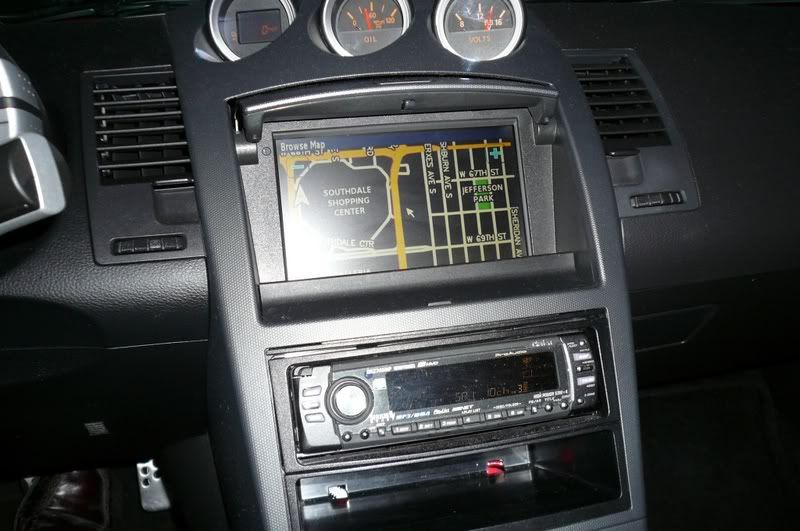
Please forgive the awful flash reflection…. I need to improve my photo technique. This picture was taken at night when the Garmin intelligently inverts the image (light foreground detail on black background… the opposite is true during daylight hours when the display is dark foreground details on a light background).
But you get the idea. The installation looks stock.
--Spike