


I think I want a Garmin Nuvi 350, any other good alternatives?


You can go to garmin.com. Go to products for the car and do a compare. The 650 doesn't have bluetooth or FM transmitter. Crutchfield has the 660 for about $579 but I've seen it as low as $459 if you google for Nuvi 660 prices. By contrast Crutchfield has the 650 for $549.
Update: I just caught the thread that had the 650 for $299 at costco. Does anyone know if costco sells the 660?
Update: I just caught the thread that had the 650 for $299 at costco. Does anyone know if costco sells the 660?
Last edited by whitetrack; Nov 18, 2007 at 04:34 PM.

Originally Posted by implayaz9
any good deals going on right now?
http://dealnews.com/
Also, there's a great site of black Friday deals here:
http://blackfriday.gottadeal.com/
I'm gonna get a $99 Navigon 2100 from Staples for my parents (I have a GPS). It's small, portable, it has pedestrian mode, text to speech (speaks street names) and it has a COOL preview mode of difficult intersections. Here's a review:
http://terrywhite.com/techblog/?p=377
Happy shopping!
_
perfect thread, just got on here to ask about some of these products. Does anyone know how I can get one without having a membership to costco
Last edited by mw9; Nov 22, 2007 at 10:09 AM.

Registered User
Joined: May 2007
Posts: 55
Likes: 0
From: OC
Originally Posted by LBkr
I'm gonna get a $99 Navigon 2100 from Staples for my parents (I have a GPS). It's small, portable, it has pedestrian mode, text to speech (speaks street names) and it has a COOL preview mode of difficult intersections. Here's a review:
http://terrywhite.com/techblog/?p=377
Happy shopping!
_

Registered User
Joined: Dec 2004
Posts: 1,658
Likes: 1
From: Colorado Springs, CO
Just saw Best Buy has the Nuvi 660 for $399!!! You can order it online and not deal with the crowds. Only good Friday and Saturday. I don't know how you can get a better deal than that!
Originally Posted by implayaz9
damm i wanna get one but is the deal online or its first come first serve in stores?


Thread Starter
New Member
Joined: Oct 2002
Posts: 2,129
Likes: 0
From: SF Bay Area, CA
Originally Posted by twinship
This is the same size as the 660, right? So basically the 650 is just like the 660 w/ somewhat fewer features? (Can't find a head-to-head comparo of the various nuvi models.)
Just checked the Costco site. For non-members, it' an extra 5%. Still pretty reasonable!
Just checked the Costco site. For non-members, it' an extra 5%. Still pretty reasonable!
I thought the 650 would include a carrying case and AC adapter since my 350 did. It does not and I double checked the bottom of the box to make sure nothing was missing. See https://buy.garmin.com/shop/shop.do?cID=134&pID=8671 vs. https://buy.garmin.com/shop/shop.do?cID=134&pID=400.
On a related note, Staples now has the Garmin Nuvi 260 for $250 at http://www.staples.com/webapp/wcs/st...yword=nuvi+260. That's the cheapest non-outdated Garmin I know of w/text to speech (reads out street names). If I didn't have my Nuvi 350 already, I'd probably have bought this instead. BTW, they also skimped on the accessories (no AC adapter, no case).
with this setup, how do I type in my addresses?
Originally Posted by Spike100
I understand. However, I think you should consider this. Installing a Garmin GVN-52 or a Kenwood KNA-G520 Navigation Box and an LCD screen is about the easiest project you can do on a Z. It’s fun to do, simple, and rewarding. It’s just a great way to get “your feet wet” on a CES project.
Installing the Garmin GVN-52 requires these components:
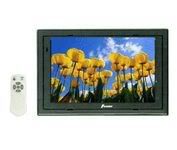
LCD screen (7inches) with a composite video connector (Examples: Farenheit T-7000MHR, Power Acoustik PT-700MHR, or NESA Vision NSM-7005)
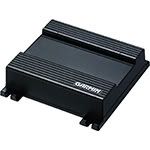
Garmin GVN52 Blackbox GPS
Connect the LCD to a switched ignition wire (typically red colored). Note: Do not connect an LCD to a constant-powered line (typically colored yellow) since many stand-alone LCDs have a “sleep mode” that draws power. The power draw is slight, but it will eventually drain your battery. Most stand-alone LCDs have a remote control allowing you to make settings (contrast, brightness, color, aspect ratio, ON/OFF, etc.). Typically these are “one-time-settings;” so once this is done, you hardly need the remote to do any additional settings. The setting you always need is ON/OFF, and you can set this to “always on with power” using the remote. Do this (always ON), and install a physical ON/OFF manual switch (the position where Nissan locates the seat heater button is a good place for your LCD ON/OFF). This way you won’t need to dig for the remote control each time you want to turn the monitor ON or OFF. You can just flip the conveniently located physical switch to power the LCD on or OFF. For that matter, you want to connect the power source of your GPS to the same ON/OFF switch you use for the LCD.
Your Garmin GVN52 has only six wires you need to connect.
1) There’s a switched (red) wire for power that you connect to your ignition. That’s the one you may also want to run through the physical switch you install to toggle the LCD on and off. This way you can turn both the LCD and the GPS device on or off together.
2) The yellow wire on the Garmin is connected to a constant power source. Don’t worry about the Garmin draining your battery off the yellow (constant) power supply. The Garmin GVN52 is intelligent and wont’ do this. In fact the device has its own internal battery, and only uses the constant power to recharge this battery. It won’t drain your car’s battery.
3 and 4) There are two (right and left) speaker wires you connect to your H/U or external amplifier (if you have one). The Garmin GVN52 issues voice commands, and connecting these two wires routes the voice commands through your car’s speakers.
5) The mute wire is connected to your H/U’s mute input. That defeats the H/U’s music when the Garmin issues voice guidance. If your H/U doesn’t support a mute wire, you can add this feature, but that goes beyond this discussion.
6) The last and 6th wire is the composite video wire you run to the LCD,\.
Done! Notice there is no need to connect silly and useless stuff like a Speed Sensor Wire (SSW) or a “parking brake-disconnect wire.” Nice.
The Garmin GVN52 does not support touch screen function. To get this with a similar installation, you need Kenwood’s KNA-G520 Navigation Box displaying on the Kenwood LZ-702W Monitor. The installation is nearly identical with this addition: You need to place the LZ-702W Monitor’s hideaway box in the large lower cubby behind the driver’s seat.
--Spike
Installing the Garmin GVN-52 requires these components:
LCD screen (7inches) with a composite video connector (Examples: Farenheit T-7000MHR, Power Acoustik PT-700MHR, or NESA Vision NSM-7005)
Garmin GVN52 Blackbox GPS
Connect the LCD to a switched ignition wire (typically red colored). Note: Do not connect an LCD to a constant-powered line (typically colored yellow) since many stand-alone LCDs have a “sleep mode” that draws power. The power draw is slight, but it will eventually drain your battery. Most stand-alone LCDs have a remote control allowing you to make settings (contrast, brightness, color, aspect ratio, ON/OFF, etc.). Typically these are “one-time-settings;” so once this is done, you hardly need the remote to do any additional settings. The setting you always need is ON/OFF, and you can set this to “always on with power” using the remote. Do this (always ON), and install a physical ON/OFF manual switch (the position where Nissan locates the seat heater button is a good place for your LCD ON/OFF). This way you won’t need to dig for the remote control each time you want to turn the monitor ON or OFF. You can just flip the conveniently located physical switch to power the LCD on or OFF. For that matter, you want to connect the power source of your GPS to the same ON/OFF switch you use for the LCD.
Your Garmin GVN52 has only six wires you need to connect.
1) There’s a switched (red) wire for power that you connect to your ignition. That’s the one you may also want to run through the physical switch you install to toggle the LCD on and off. This way you can turn both the LCD and the GPS device on or off together.
2) The yellow wire on the Garmin is connected to a constant power source. Don’t worry about the Garmin draining your battery off the yellow (constant) power supply. The Garmin GVN52 is intelligent and wont’ do this. In fact the device has its own internal battery, and only uses the constant power to recharge this battery. It won’t drain your car’s battery.
3 and 4) There are two (right and left) speaker wires you connect to your H/U or external amplifier (if you have one). The Garmin GVN52 issues voice commands, and connecting these two wires routes the voice commands through your car’s speakers.
5) The mute wire is connected to your H/U’s mute input. That defeats the H/U’s music when the Garmin issues voice guidance. If your H/U doesn’t support a mute wire, you can add this feature, but that goes beyond this discussion.
6) The last and 6th wire is the composite video wire you run to the LCD,\.
Done! Notice there is no need to connect silly and useless stuff like a Speed Sensor Wire (SSW) or a “parking brake-disconnect wire.” Nice.
The Garmin GVN52 does not support touch screen function. To get this with a similar installation, you need Kenwood’s KNA-G520 Navigation Box displaying on the Kenwood LZ-702W Monitor. The installation is nearly identical with this addition: You need to place the LZ-702W Monitor’s hideaway box in the large lower cubby behind the driver’s seat.
--Spike

New Member


Joined: Dec 2006
Posts: 7,337
Likes: 204
From: Edina, Minnesota
Originally Posted by mw9
with this setup, how do I type in my addresses?
A second way of entering data is pressing the physical buttons on the remote.
Here's a link to the Garmin GVN Manual:
http://www8.garmin.com/manuals/GVN53_OwnersManual.pdf
--Spike

Registered User
Joined: Sep 2006
Posts: 32
Likes: 0
From: New Jersey
Originally Posted by mthreat
As for size, the 660 fits in the 350Z's cubbyhole just fine, here's how I did it for an almost stock look: http://tinyurl.com/2k5wgt
This lets me close the cubbyhole cover to reduce visibility and theft, and I can remove it easily when I need to.
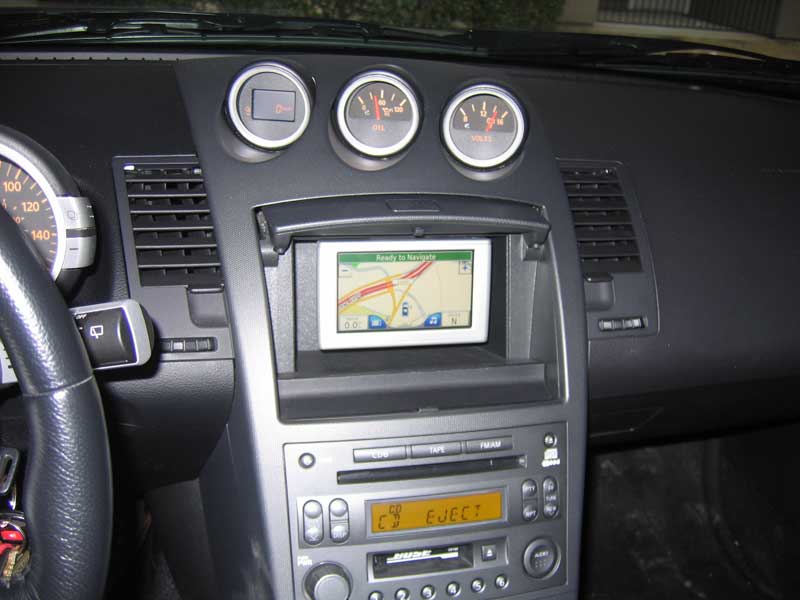
This lets me close the cubbyhole cover to reduce visibility and theft, and I can remove it easily when I need to.
Any suggestions?

Registered User
Joined: Oct 2004
Posts: 1,055
Likes: 0
From: NJ
Originally Posted by mw9
perfect thread, just got on here to ask about some of these products. Does anyone know how I can get one without having a membership to costco
Registered User
Joined: Sep 2006
Posts: 32
Likes: 0
From: New Jersey
Originally Posted by howardka
Has anybody tried this install in a 2006 with the Nuvi 680? I ordered the mount and I find that I can't seem to get it to fit with the power connector plugged into the cradle.
Any suggestions?
Any suggestions?
No answers I guess?
Registered User
Joined: Sep 2006
Posts: 32
Likes: 0
From: New Jersey
Originally Posted by Spike100
Not sure you exactly explained the problem?
--Spike
--Spike
Using the shorter mount as instructed, there does not seem to be enough space between the top & the bottom of the cubby for the Nuvi 680 to fit when the power cord is connected to the cradle. If I use the mount which came with the 680 all works fine, except that because of the length of the mount the cubby door can't be closed.
Also if I manage to mount it using the shorter mount, without the power connector, there isn't enough room to slide your finger under the front of the cradle to disengage the unit.
I hope this provides the required detail.
Thanks.

Registered User
Joined: Dec 2006
Posts: 250
Likes: 0
From: MODESTO, CA
Originally Posted by Spike100
The Garmin GVN-52 Black-Box “Brain” is what makes this installation so great. You simply install a LCD that supports composite video, and connect this to the GVN-52.
Garmin GVN-52 Black-Box
The Garmin GVN-52 is tiny and light and fits easily into the small/upper cubby behind either the driver or passenger seat. The device has an SD slot, so you can do updates (application software or maps) by downloading from Garmin’s website onto a SanDisk that you insert into the GVN-52’s SD slot. The update happens automatically. That update feature will keep your unit current for some time. I’ve already done two updates (to update the maps and install improved application software), and it was “drop-dead simple.”
In the event Garmin provides a new and improved “brain,” that is an easy swap as well. I have my unit in the small cubby behind the driver’s seat, attached with Velcro strips. Swapping in a new unit is as easy as pulling it off the Velcro mounting strips, and disconnecting/reconnecting one plug (the harness is a single plug for everything: power, sound, and composite video). Compare this to replacing the OEM Nissan navigation system and you see why you definitely want to go aftermarket.
With this said, I am not arguing with your good idea of mounting a removable and transportable GPS device such as the Garmin Nuvi. Your arrangement allows sharing a single GPS among multiple cars, and that saves money and eliminates learning the idiosyncrasies and esoterics of different devices. Another advantage of a removable device is the ability to take it with you when leaving the car, and using it to find locations when you’re “on foot.” I like this feature when in cities or locations where you didn’t know exactly where you were. Whether you’re out hiking or walking unfamiliar city streets, you can mark the location of your vehicle (so that you can always get back), and proceed with confidence.
--Spike
Garmin GVN-52 Black-Box
The Garmin GVN-52 is tiny and light and fits easily into the small/upper cubby behind either the driver or passenger seat. The device has an SD slot, so you can do updates (application software or maps) by downloading from Garmin’s website onto a SanDisk that you insert into the GVN-52’s SD slot. The update happens automatically. That update feature will keep your unit current for some time. I’ve already done two updates (to update the maps and install improved application software), and it was “drop-dead simple.”
In the event Garmin provides a new and improved “brain,” that is an easy swap as well. I have my unit in the small cubby behind the driver’s seat, attached with Velcro strips. Swapping in a new unit is as easy as pulling it off the Velcro mounting strips, and disconnecting/reconnecting one plug (the harness is a single plug for everything: power, sound, and composite video). Compare this to replacing the OEM Nissan navigation system and you see why you definitely want to go aftermarket.
With this said, I am not arguing with your good idea of mounting a removable and transportable GPS device such as the Garmin Nuvi. Your arrangement allows sharing a single GPS among multiple cars, and that saves money and eliminates learning the idiosyncrasies and esoterics of different devices. Another advantage of a removable device is the ability to take it with you when leaving the car, and using it to find locations when you’re “on foot.” I like this feature when in cities or locations where you didn’t know exactly where you were. Whether you’re out hiking or walking unfamiliar city streets, you can mark the location of your vehicle (so that you can always get back), and proceed with confidence.
--Spike