


Navigation pictures


Thread Starter
Registered User
Joined: Aug 2007
Posts: 3
Likes: 0
From: vancouver
 Navigation pictures
I would like to keep my stock stereo but add aftermarket navigation in the upper cuppy. Anyone who has done this can you please show me a photo of your system. I have searched and not found much.
Thanks, Sd
Thanks, Sd

New Member


Joined: Dec 2006
Posts: 7,337
Likes: 204
From: Edina, Minnesota
Here is a picture of my setup. I replaced the Z's stock stereo with a single-din clarion, but it would be the same with the stock radio.
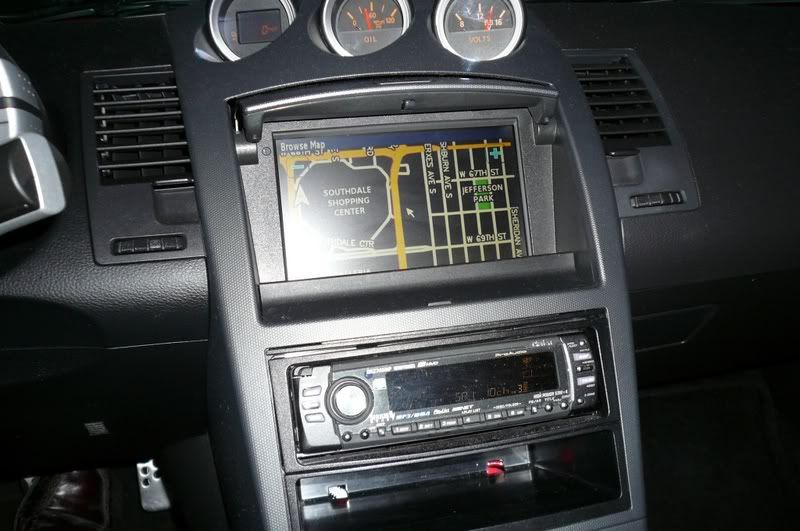
This shot was taken at night with the GPS displaying night-time mode. The reflection from my flash is awful, so don't judge the screen display on this picture.
To see more screen shots and reference manuals, go to Garmin's or Kenwood's homepage. If you search here on keywords Garmin, Kenwood, or Navigation you see a lot of screen shots.
--Spike
This shot was taken at night with the GPS displaying night-time mode. The reflection from my flash is awful, so don't judge the screen display on this picture.
To see more screen shots and reference manuals, go to Garmin's or Kenwood's homepage. If you search here on keywords Garmin, Kenwood, or Navigation you see a lot of screen shots.
--Spike
New Member
Joined: Dec 2006
Posts: 7,337
Likes: 204
From: Edina, Minnesota
More info for your question
The following is more information for fitting a navigation screen (or a CES operations screen) in the upper/forward cubby of your Z.
-------------------------------
Option 1: Garmin GVN 53 with a NTSC/PAL or RGB LCD Monitor
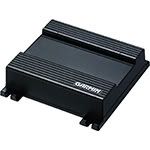
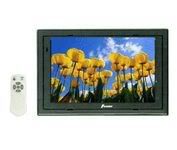
This setup uses the Garmin GVN 53 Navigation Black-Box and any 7” LCD monitor (NTSC/PAL or RGB). Its advantage is simple wiring and installation, and you can use just about any LCD monitor. Its downside is no support for touch-screen function. You operate the GPS using a handheld RF remote control.
--------------------------------------------------
Option 2: Kenwood KNA-G510 Navigation Box and Kenwood LZ-702W Touchscreen Monitor
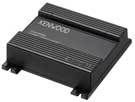
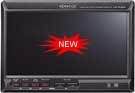
This setup uses the KNA-G510 Navigation Box (same as the Garmin GVN 53 Navigation Box except it supports touch-screen function) with the Kenwood LZ-702W Touchscreen Monitor. The Kenwood LZ-702W Touchscreen Monitor has a hideaway box that you install in one of the lower/large cubby spaces behind the driver or passenger seat. Its advantage is touch-screen function. The disadvantage is slightly more complicated wiring required to connect the hideaway box.
----------------------------------------
Option 3: Kenwood KOS System; which uses the Kenwood KNA-G510 Navigation Box, Kenwood KOS-L702 Remote Touch-Screen Monitor, and Kenwood KOS Controller (KOS-V500 or KOS-V1000). (Note: The picture above shows the KOS-V1000 Controller)
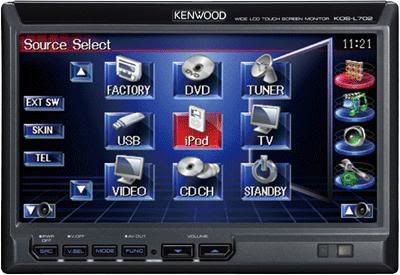
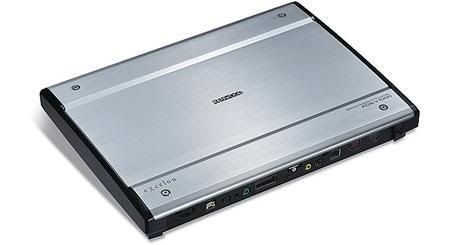
This setup is similar to Option 2 because it uses the same navigation box and provides touch-screen function. But this option incorporates the KOS Controller (instead of a hideaway box) allowing total flexibility for building a scalable CES system. In fact the KOS System allows you to integrate your OEM system using the KOS-L702 Remote Touch-Screen Monitor.
--Spike
- You must use a 7” LCD screen in the upper/forward cubby position. A double-din unit will not fit here.
- The upper/forward cubby of the Z is an ideal position for your GPS screen providing the best and safest viewing angle. In fact the lower double-din slot in the Z provides a poor viewing angle, and it not within the informal standard set by manufacturers’ of GPS devices (OEM and aftermarket suppliers).
- Your GPS device should be solid state and not HDD or DVD based. Solid state GPS devices (Garmin and Kenwood are examples) provide much better performance and reliability than HDD and DVD based devices (which suffer from much higher failure rates due to the mechanical nature of this type of device).
-------------------------------
Option 1: Garmin GVN 53 with a NTSC/PAL or RGB LCD Monitor
This setup uses the Garmin GVN 53 Navigation Black-Box and any 7” LCD monitor (NTSC/PAL or RGB). Its advantage is simple wiring and installation, and you can use just about any LCD monitor. Its downside is no support for touch-screen function. You operate the GPS using a handheld RF remote control.
--------------------------------------------------
Option 2: Kenwood KNA-G510 Navigation Box and Kenwood LZ-702W Touchscreen Monitor
This setup uses the KNA-G510 Navigation Box (same as the Garmin GVN 53 Navigation Box except it supports touch-screen function) with the Kenwood LZ-702W Touchscreen Monitor. The Kenwood LZ-702W Touchscreen Monitor has a hideaway box that you install in one of the lower/large cubby spaces behind the driver or passenger seat. Its advantage is touch-screen function. The disadvantage is slightly more complicated wiring required to connect the hideaway box.
----------------------------------------
Option 3: Kenwood KOS System; which uses the Kenwood KNA-G510 Navigation Box, Kenwood KOS-L702 Remote Touch-Screen Monitor, and Kenwood KOS Controller (KOS-V500 or KOS-V1000). (Note: The picture above shows the KOS-V1000 Controller)
This setup is similar to Option 2 because it uses the same navigation box and provides touch-screen function. But this option incorporates the KOS Controller (instead of a hideaway box) allowing total flexibility for building a scalable CES system. In fact the KOS System allows you to integrate your OEM system using the KOS-L702 Remote Touch-Screen Monitor.
--Spike
Last edited by Spike100; Nov 4, 2008 at 03:23 PM. Reason: Grammar- In the last sentence, "can" changed to "to".

Thread
Thread Starter
Forum
Replies
Last Post
Tochigi_236
Feedback & Suggestions for Our Forum
8
Sep 27, 2015 03:40 PM
