


my indash lcd monitor setup


Thread Starter
Registered User
Joined: Dec 2003
Posts: 28
Likes: 0
From: Kissimmee Fl
 my indash lcd monitor setup
i got a 4in lcd monitor in the spot that the nav system goes my 2 kicker comps 4 channel amp audiovox dvd player and monitor.
I need to post some pics but i dont have no one to post them.

I need to post some pics but i dont have no one to post them.





 5" screen
Here's mine with the 5" screen fit like a glove and the Nav Door works fine , also mine did not come with a Nav System until I changed my mind and installed a Kenwood

Registered User
Joined: Jun 2003
Posts: 154
Likes: 0
From: Seattle, WA
Re: my indash lcd monitor setup
Originally posted by sundevil67
Does the nav compartment door get in the way? I want to install a screen but my Z did not come with factory nav so the door sticks up and stays there -
Does the nav compartment door get in the way? I want to install a screen but my Z did not come with factory nav so the door sticks up and stays there -
Go to your nissan dealer's parts department and have them look up the part number(s) for the navigation center console pocket.
Buy it (it'll be >$100) and replace your current pocket with that.
Once you get the part, don't be afraid to whittle away at it a little bit to make your screen fit nicely.
Then you will be styling w/ a much better setup!
Can you post pics of your current setup?
Let's see some before and after pics!

Pv
Trending Topics

Registered User
Joined: Jun 2003
Posts: 154
Likes: 0
From: Seattle, WA
Originally posted by 350G
You're sh!ttin' me . . . there's a different center console if you bought the car with Nav? Anyone have any pics to illustrate the difference?
G
You're sh!ttin' me . . . there's a different center console if you bought the car with Nav? Anyone have any pics to illustrate the difference?
G
2004 Non-navi door:
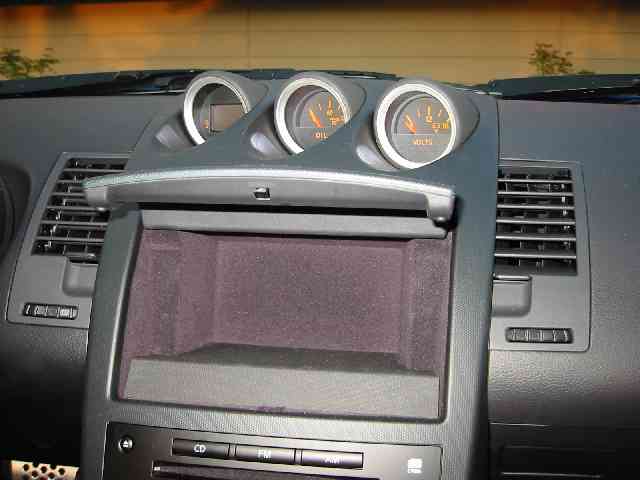

UUUUUGLY! It's covered in some cheap looking fabric texture and feels like cardboard.
Good luck easily fitting a display in there such that it looks nicer than the navi version.
I am pretty certain that the 2004 navi door looks like like the 2003, except that it is motorized:
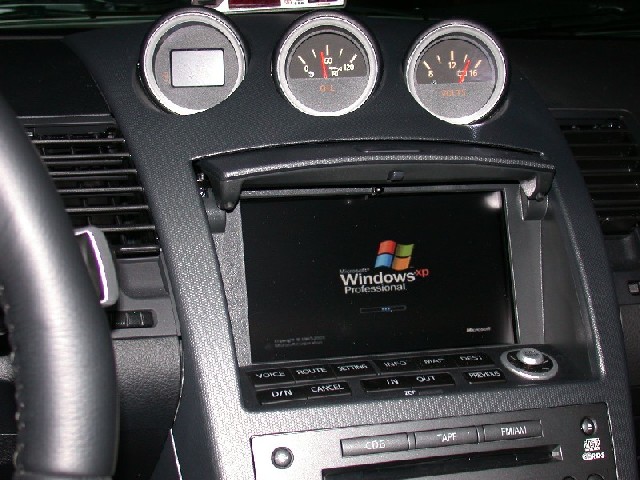
Ahh, MUCH better!
Anyone know, or can find out, the part number for the 2004 motorized version?
Pv
Last edited by swoobyz; Jan 6, 2004 at 10:53 PM.

New Member
Joined: Dec 2003
Posts: 535
Likes: 0
From: Phoenix, AZ
Re: 5" screen
WHere is your DVD player mounted?
Originally posted by Mapleleaf
Here's mine with the 5" screen fit like a glove and the Nav Door works fine , also mine did not come with a Nav System until I changed my mind and installed a Kenwood
Here's mine with the 5" screen fit like a glove and the Nav Door works fine , also mine did not come with a Nav System until I changed my mind and installed a Kenwood
Re: Re: 5" screen
Originally posted by sundevil67
WHere is your DVD player mounted?
WHere is your DVD player mounted?

Registered User
Joined: Aug 2003
Posts: 109
Likes: 0
From: Netherlands - Hengelo
Originally posted by brickyardbeast1
EVERYBODY NIIIIICE THINKING but i didnt want to cut anything mine looks factory
EVERYBODY NIIIIICE THINKING but i didnt want to cut anything mine looks factory


Thread
Thread Starter
Forum
Replies
Last Post
350Z_Al
Exterior & Interior
133
Oct 29, 2020 07:44 PM