


*** Picture Doctor Thread ***


Thread Starter
Registered User
iTrader: (9)
Joined: Dec 2003
Posts: 2,069
Likes: 1
From: Waipahu HI; Phoenix AZ

Thanks Stu...
You can see Stu used a different method of correcting... adjusting by curves through different layers.
You can see in the first pic of his adjustment shots, that the smooth flow of the histogram becomes like a comb on the right portion. This is what's called posterization, which is a term that describes the abrupt flow of a color from dark to light... which really pretty much describes pixelation (blockiness). You can see posterization and pixelation in the sky when you try to recover it.
The original picture suffered from too much .jpg compression, saving on file size, but sacrificing picture quality.
You can see Stu used a different method of correcting... adjusting by curves through different layers.
You can see in the first pic of his adjustment shots, that the smooth flow of the histogram becomes like a comb on the right portion. This is what's called posterization, which is a term that describes the abrupt flow of a color from dark to light... which really pretty much describes pixelation (blockiness). You can see posterization and pixelation in the sky when you try to recover it.
The original picture suffered from too much .jpg compression, saving on file size, but sacrificing picture quality.
Thread Starter
Registered User
iTrader: (9)
Joined: Dec 2003
Posts: 2,069
Likes: 1
From: Waipahu HI; Phoenix AZ
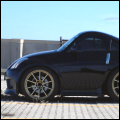
This is an idea to add interest and variety to shots of cars... try tilting the horizon to give it some tension. Some may not be fans of this, but I personally think it works with this 3/4 angle shot. Break the mundane!
BTW, try not to center the subject in the middle of the frame. In some instances, it works and would be the best option- like when you want to really emphasize the subject; but most of the time, try to offset it.
Tilted version of Stu's fix.

BTW, try not to center the subject in the middle of the frame. In some instances, it works and would be the best option- like when you want to really emphasize the subject; but most of the time, try to offset it.
Tilted version of Stu's fix.
Last edited by ctwentytwo; May 9, 2008 at 12:36 AM.
Registered User
Joined: Apr 2004
Posts: 4,801
Likes: 0
From: Hawaii
Thanks. Just starting to learn how to use PS. Until a few weeks ago, all I did was use a couple actions to sharpen cause I was lazy and some color correction via Curves. Watched a Total Training CS3 tutorial and been doing some practice to bring up my skills.
I decided to go with Levels on the first pic then Curves on the next. Both will do the job, just a different way of doing them. After playing with both, I prefer Levels. It's easier to visualize the changes because you can preview it and see the histogram.
I decided to go with Levels on the first pic then Curves on the next. Both will do the job, just a different way of doing them. After playing with both, I prefer Levels. It's easier to visualize the changes because you can preview it and see the histogram.
Registered User
Joined: Apr 2004
Posts: 4,801
Likes: 0
From: Hawaii
Originally Posted by ctwentytwo
This is an idea to add interest and variety to shots of cars... try tilting the horizon to give it some tension. Some may not be fans of this, but I personally think it works with this 3/4 angle shot.
Tilted version of Stu's fix.
Tilted version of Stu's fix.
guys, feel free to grab pics from my thread to find one you feel like fixing, i'd love to see what you guys come up with.
https://my350z.com/forum/media-share/276552-my-sb-car-make-t-and-e-vertex-350z-d.html
new pics are towards the end of the thread.
https://my350z.com/forum/media-share/276552-my-sb-car-make-t-and-e-vertex-350z-d.html
new pics are towards the end of the thread.
Registered User
Joined: Apr 2004
Posts: 4,801
Likes: 0
From: Hawaii
Originally Posted by noodleman
guys, feel free to grab pics from my thread to find one you feel like fixing, i'd love to see what you guys come up with.
https://my350z.com/forum/showthread.php?t=276552
new pics are towards the end of the thread.
https://my350z.com/forum/showthread.php?t=276552
new pics are towards the end of the thread.
^^^ haha, too lazy for that :P
i need to practice some more with the raw processing though...i can't seem to get good results from it. I took this pic in raw+fine mode, and processed both the raw and the jpg...and i liked the results from the jpg more?
from the raw:
work done:
-temp change
-colour curve
-brightness/contrast
-crop
-blank out licence plate
-resize
-border
-save (10)

from the jpg:
work done:
-auto levels
-auto colour
-crop
-blank out licence plate
-resize
-border
-save (8)
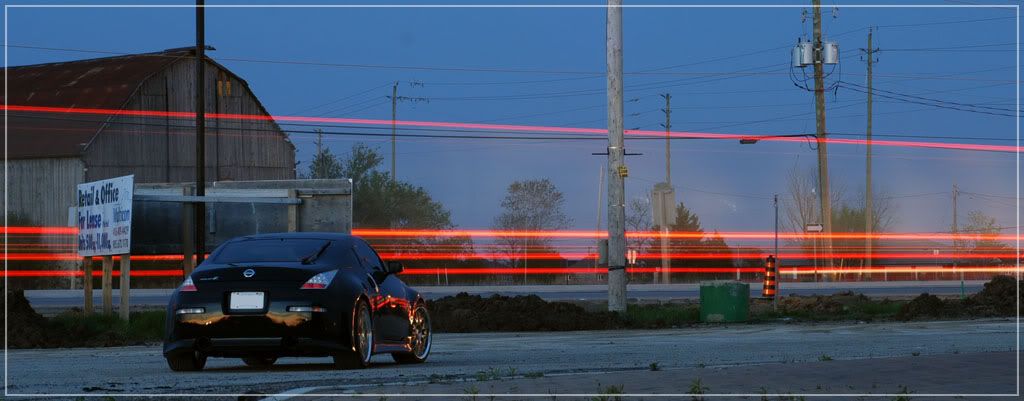
The quality of the image seem to be degraded from the raw wtf?! I saved the raw using max quality jpg (10), and the jpg was saved using (8).
Are it the steps i'm doing that's wrong?
hmm, looking at the pics side by side again, the raw processed pic does seem to retain more detail....what are your thoughts?
i need to practice some more with the raw processing though...i can't seem to get good results from it. I took this pic in raw+fine mode, and processed both the raw and the jpg...and i liked the results from the jpg more?
from the raw:
work done:
-temp change
-colour curve
-brightness/contrast
-crop
-blank out licence plate
-resize
-border
-save (10)
from the jpg:
work done:
-auto levels
-auto colour
-crop
-blank out licence plate
-resize
-border
-save (8)
The quality of the image seem to be degraded from the raw wtf?! I saved the raw using max quality jpg (10), and the jpg was saved using (8).
Are it the steps i'm doing that's wrong?
hmm, looking at the pics side by side again, the raw processed pic does seem to retain more detail....what are your thoughts?

Registered User
Joined: Jul 2003
Posts: 180
Likes: 0
From: san diego, ca
you have to put a lot more effort into raw.
raw is the image straight from the sensor with no in-camera processing.
jpegs are sharpened and colored according to your camera settings.
raw is for people who know what they're doing.
its easy to learn.
raw is the image straight from the sensor with no in-camera processing.
jpegs are sharpened and colored according to your camera settings.
raw is for people who know what they're doing.
its easy to learn.

Originally Posted by ctwentytwo
To open .jpg files with Camera RAW in CS3, you have to go to the Preferences menu and select the tickbox next to "open .jpg as RAW..." or something like that as my trial has expired.


Registered User
Joined: Jul 2003
Posts: 180
Likes: 0
From: san diego, ca
Originally Posted by GiftOfGab
just curious....how do you "de-fish" fisheye photos?

http://www.imagetrendsinc.com/produc...dpage_hemi.asp

Thread
Thread Starter
Forum
Replies
Last Post
Lt_Ballzacki
Brakes & Suspension
39
Aug 6, 2021 06:19 AM
