


Need Help With Transparent Hood







Trending Topics


search in google = more answers.
Need one photoshop program. Paint shop pro. Gimp (Free)
One bipod/tripod/quadpod/octopod and take two pics at the same place, one with hood open, hood closed.
load on computer.
open program.
and start fiddling.
ive heard people making clear hoods too, lol.
Need one photoshop program. Paint shop pro. Gimp (Free)
One bipod/tripod/quadpod/octopod and take two pics at the same place, one with hood open, hood closed.
load on computer.
open program.
and start fiddling.
ive heard people making clear hoods too, lol.
Last edited by Concave; Aug 18, 2008 at 08:52 AM.


Take one picture with the hood close and another with it open.
You open both images in PS.
Drag the one with the hood close to the image of the hood open.
Select the top layer.
Select eraser tool
Erase the area you want the bottom layer to show.
Wallah "see-throw" hood.
That's a rough how to. I haven't done it on a while so I might have left out some details. If you really want to learn how to use PS, go to Barnes and Noble and get a book on how to use PS. It is pretty awesome.
You open both images in PS.
Drag the one with the hood close to the image of the hood open.
Select the top layer.
Select eraser tool
Erase the area you want the bottom layer to show.
Wallah "see-throw" hood.
That's a rough how to. I haven't done it on a while so I might have left out some details. If you really want to learn how to use PS, go to Barnes and Noble and get a book on how to use PS. It is pretty awesome.

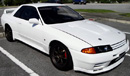
Like this?

I did that in Photoshop with relatively no difficulty.
Like others said,
Two images. One open and one closed.
Open in Photoshop.
Drag the closed hood image on top of the open hood image.
Align them properly.
*You could just marquee around the hood and start erasing, to make it easier to stay in the lines.
*Or, you mask. If you do not know how to use them, either learn or just use the eraser tool.
I did that in Photoshop with relatively no difficulty.
Like others said,
Two images. One open and one closed.
Open in Photoshop.
Drag the closed hood image on top of the open hood image.
Align them properly.
*You could just marquee around the hood and start erasing, to make it easier to stay in the lines.
*Or, you mask. If you do not know how to use them, either learn or just use the eraser tool.


Thread
Thread Starter
Forum
Replies
Last Post
