


How-to: Wheel Swap (56K no-no)


Thread Starter
Registered User
Joined: Mar 2005
Posts: 1,176
Likes: 0
From:
 How-to: Wheel Swap (56K no-no)
Find a picture that you want to chop. In this example we'll use the S2000.

You'll also need to find a picture of the wheel you want to put onto your car (from this point on, we'll call it the DONOR). If you can find an image of it at the same angle of the wheel you want to "replace," you're life will be a thousand times easier and the finished chop will look a that much better as well.

Open the picture of the S2k in photoshop.

This is what it should look like when opened.

Open the DONOR picture. Once again, open it in photoshop by clicking File>Open.

You'll also need to find a picture of the wheel you want to put onto your car (from this point on, we'll call it the DONOR). If you can find an image of it at the same angle of the wheel you want to "replace," you're life will be a thousand times easier and the finished chop will look a that much better as well.
Open the picture of the S2k in photoshop.
This is what it should look like when opened.
Open the DONOR picture. Once again, open it in photoshop by clicking File>Open.
Thread Starter
Registered User
Joined: Mar 2005
Posts: 1,176
Likes: 0
From:
It should look something like this.

Zoom in on the DONOR by pressing ctrl "+" This will make it easier to select your wheel. Then proceed to select the wheel using your tool of choice (I prefer the polygonal lasso).

Press Ctrl C to copy your selection. Then click back to your original picture.

Paste your wheel to a new layer by pressing Ctrl V. Notice that the wheel does not automatically put itself where it needs to go. It is also not the right size, as long as it's bigger than it needs to be, you're ok.

Change tools to the Move Tool. It's the one that looks like an arrow.

Zoom in on the DONOR by pressing ctrl "+" This will make it easier to select your wheel. Then proceed to select the wheel using your tool of choice (I prefer the polygonal lasso).
Press Ctrl C to copy your selection. Then click back to your original picture.
Paste your wheel to a new layer by pressing Ctrl V. Notice that the wheel does not automatically put itself where it needs to go. It is also not the right size, as long as it's bigger than it needs to be, you're ok.
Change tools to the Move Tool. It's the one that looks like an arrow.
Thread Starter
Registered User
Joined: Mar 2005
Posts: 1,176
Likes: 0
From:
Click on the wheel that you just pasted and drag it to the area where it should be. It does not need to be perfect at this point.

Zoom In on the wheel by pressing ctrl "+".

WHile having the layer you want to "manipulate" selected (see bottom right corner for an example), click Edit>Transform>Distort.

This opens up what looks to be a box around the wheel. At this point, click the boxes and drag them around to place the wheel where you want it to be. The closer you can keep the box to looking rectangular, the better.

Zoom Out, by pressing ctrl "-" to make sure that it still looks ok.

Zoom In on the wheel by pressing ctrl "+".
WHile having the layer you want to "manipulate" selected (see bottom right corner for an example), click Edit>Transform>Distort.
This opens up what looks to be a box around the wheel. At this point, click the boxes and drag them around to place the wheel where you want it to be. The closer you can keep the box to looking rectangular, the better.
Zoom Out, by pressing ctrl "-" to make sure that it still looks ok.
Thread Starter
Registered User
Joined: Mar 2005
Posts: 1,176
Likes: 0
From:
If it still looks ok at this point, click on the move tool again (the one with the arrow) and then click Apply. If you don't like the way it looks, click Don't Apply.

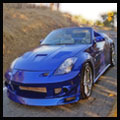
It should now look something like this....

Follow the same steps and do the same thing with the back wheel!
It should now look something like this....
Follow the same steps and do the same thing with the back wheel!


New Member
Joined: Feb 2005
Posts: 2,149
Likes: 0
From: East Texas (Tyler Area)
Awesome write up need Z!!! Not quite the way I do wheel swaps, but then again there are always about 10 ways to do something in photoshop. Again, good job, I am sure this one will get stickied as well as the color change tutorial.
Thread Starter
Registered User
Joined: Mar 2005
Posts: 1,176
Likes: 0
From:
How do you do yours?
Do you use the circular selector thingy (can't think of the name)? I usually use that but it just depends on the shape of the wheel. Well, that and I didn't want to get too high-tech in this one
Do you use the circular selector thingy (can't think of the name)? I usually use that but it just depends on the shape of the wheel. Well, that and I didn't want to get too high-tech in this one
Trending Topics

New Member
Joined: Feb 2005
Posts: 2,149
Likes: 0
From: East Texas (Tyler Area)
Originally Posted by need Z
How do you do yours?
Do you use the circular selector thingy (can't think of the name)? I usually use that but it just depends on the shape of the wheel. Well, that and I didn't want to get too high-tech in this one
Do you use the circular selector thingy (can't think of the name)? I usually use that but it just depends on the shape of the wheel. Well, that and I didn't want to get too high-tech in this one
However, your write up is exactly the way I would tell anyone to do this if they never had before. Like you I just figured the things that I do know out on my own. Slowly but surely I am learning things, takes patience though when you spend an hour doing someting and then realize it isn't going to work.
Thread Starter
Registered User
Joined: Mar 2005
Posts: 1,176
Likes: 0
From:
Originally Posted by RxZ
Yep, mostly anyway. Called the Elliptical Marquee(sp?) Tool. I have sometimes done it just the way you described, especially when I first got Photoshop (about 4 months ago). With the distortion features I have been able to find on CS2, it makes it easier (maybe) to line things up, it will kinda get the perspective for you so long as you get it really close. Comes in handy when you get a request for wheel swaps with completly different perspectives
However, your write up is exactly the way I would tell anyone to do this if they never had before. Like you I just figured the things that I do know out on my own. Slowly but surely I am learning things, takes patience though when you spend an hour doing someting and then realize it isn't going to work.
However, your write up is exactly the way I would tell anyone to do this if they never had before. Like you I just figured the things that I do know out on my own. Slowly but surely I am learning things, takes patience though when you spend an hour doing someting and then realize it isn't going to work.
)


Thread
Thread Starter
Forum
Replies
Last Post