


Any one has Garmin Navigation 7200


 Any one has Garmin Navigation 7200
Any one has this unit installed in there car? I was originally looking at the Nuvi 660 but the 4.3 inch screen is way to small.. I not sure either if this 7 inch screen can fit in the chubby just wanted opinions.. Thanks
http://reviews.cnet.com/car-gps-navi...tag=prod.txt.1
http://reviews.cnet.com/car-gps-navi...tag=prod.txt.1

my dad has a Garmin, its a 3.5'' touch screen..sounds small, but its a perfect size for a navi IMO. if you want something to go in the cubby deal, get a in-dash DVD/CD/Navi.
Jake
Jake
Originally Posted by VQZ33_Jake
my dad has a Garmin, its a 3.5'' touch screen..sounds small, but its a perfect size for a navi IMO. if you want something to go in the cubby deal, get a in-dash DVD/CD/Navi.
Jake
Jake
I have an eclipse Navi 5435 In Dash with sound system in my Lexus and let me tell you after opening up the console it was never the same again creaks and noises etc..
 Rattling sometimes in the colder months.. This would have been perfect being no modification needed whatsoever.
Last edited by kham25; Sep 12, 2007 at 01:02 PM.


New Member


Joined: Dec 2006
Posts: 7,337
Likes: 204
From: Edina, Minnesota
The Garmin 7200 is just a little large (especially depth-wise) to easily fit into the upper/forward cubby space. Another problem is accessing the SanDisk slot with this mount. It’s a nice unit, but I think you have better choices if your intention is using the upper/forward cubby to display navigation.
If you want to mount a navigation screen in the Z’s upper/forward cubby, I would consider these solutions:
Garmin (This system uses a handheld RF controller and does not support touch-screen functions.)
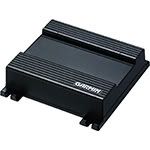
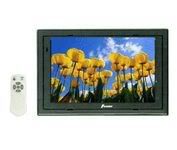
Garmin GVN 52 Navigation Box and LCD Screen (some choices: Farenheit T-7000MHR, Power Acoustik PT-700MHR, or NESA Vision NSM-7005… all are 7” LCD screens that use composite video to connect to the Garmin GVN 52 navigation box)
Kenwood (This uses touch-screen functions to operate the system.)
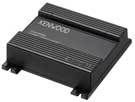
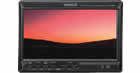
Kenwood KNA-G510 Navigation Box and Kenwood LZ-702W LCD Monitor
Both solutions place an LCD screen in the upper/forward cubby and the navigation box in the small cubby behind the driver’s seat. For this installation, a good position for the GPS antenna is on top of or inside the rear strut bar (Z coupe). You can wire the nav’s voice/sound through your car’s CES.
Another choice is installing the Kenwood DNX 7100 unit in the double-din slot below the upper/forward cubby.
--Spike
If you want to mount a navigation screen in the Z’s upper/forward cubby, I would consider these solutions:
Garmin (This system uses a handheld RF controller and does not support touch-screen functions.)
Garmin GVN 52 Navigation Box and LCD Screen (some choices: Farenheit T-7000MHR, Power Acoustik PT-700MHR, or NESA Vision NSM-7005… all are 7” LCD screens that use composite video to connect to the Garmin GVN 52 navigation box)
Kenwood (This uses touch-screen functions to operate the system.)
Kenwood KNA-G510 Navigation Box and Kenwood LZ-702W LCD Monitor
Both solutions place an LCD screen in the upper/forward cubby and the navigation box in the small cubby behind the driver’s seat. For this installation, a good position for the GPS antenna is on top of or inside the rear strut bar (Z coupe). You can wire the nav’s voice/sound through your car’s CES.
Another choice is installing the Kenwood DNX 7100 unit in the double-din slot below the upper/forward cubby.
--Spike
Originally Posted by Spike100
The Garmin 7200 is just a little large (especially depth-wise) to easily fit into the upper/forward cubby space. Another problem is accessing the SanDisk slot with this mount. It’s a nice unit, but I think you have better choices if your intention is using the upper/forward cubby to display navigation.
If you want to mount a navigation screen in the Z’s upper/forward cubby, I would consider these solutions:
Garmin (This system uses a handheld RF controller and does not support touch-screen functions.)
Garmin GVN 52 Navigation Box and LCD Screen (some choices: Farenheit T-7000MHR, Power Acoustik PT-700MHR, or NESA Vision NSM-7005… all are 7” LCD screens that use composite video to connect to the Garmin GVN 52 navigation box)
Kenwood (This uses touch-screen functions to operate the system.)
Kenwood KNA-G510 Navigation Box and Kenwood LZ-702W LCD Monitor
Both solutions place an LCD screen in the upper/forward cubby and the navigation box in the small cubby behind the driver’s seat. For this installation, a good position for the GPS antenna is on top of or inside the rear strut bar (Z coupe). You can wire the nav’s voice/sound through your car’s CES.
Another choice is installing the Kenwood DNX 7100 unit in the double-din slot below the upper/forward cubby.
--Spike
If you want to mount a navigation screen in the Z’s upper/forward cubby, I would consider these solutions:
Garmin (This system uses a handheld RF controller and does not support touch-screen functions.)
Garmin GVN 52 Navigation Box and LCD Screen (some choices: Farenheit T-7000MHR, Power Acoustik PT-700MHR, or NESA Vision NSM-7005… all are 7” LCD screens that use composite video to connect to the Garmin GVN 52 navigation box)
Kenwood (This uses touch-screen functions to operate the system.)
Kenwood KNA-G510 Navigation Box and Kenwood LZ-702W LCD Monitor
Both solutions place an LCD screen in the upper/forward cubby and the navigation box in the small cubby behind the driver’s seat. For this installation, a good position for the GPS antenna is on top of or inside the rear strut bar (Z coupe). You can wire the nav’s voice/sound through your car’s CES.
Another choice is installing the Kenwood DNX 7100 unit in the double-din slot below the upper/forward cubby.
--Spike
Well what i was originally thinking was to have some sort of sticky back tape on the back of the back of the nav screen.I would not have to close the chubby just insert it in opening. I would only use the navi if i am going somewhere unknown anyways.. What u say sounds better though..

Thread
Thread Starter
Forum
Replies
Last Post
Tochigi_236
Feedback & Suggestions for Our Forum
8
Sep 27, 2015 03:40 PM
lauderdale75
2003-2009 Nissan 350Z
7
Dec 31, 2002 09:53 AM
