


avic d3 install help


Thread Starter
Registered User
iTrader: (5)
Joined: Oct 2008
Posts: 263
Likes: 0
From: Sunnyvale/Davis, CA
 avic d3 install help
So im in need of a quick answer because I am installing the unit right now. So I have the bluetooth module and i notice there are 3 yellow wires. One from unit itself, one from the harness, and one from the bluetooth module. So I was just wondering if I was suppose to connect all 3 of them together?
Thank You
-James
Thank You
-James

weird, mine just had one thick black wire going to the d3 and connected power ground and accessory wire on the bluetooth unit itself
edit: just double checked the diagrams, yellow wires on the D3 and bluetooth module are power wires, should have a fuse on them. need to be connected to constant power. im not sure about the yellow wire from the cars end. i just used a connector that hooks to the stock harness and just spliced colors to each other.
edit: just double checked the diagrams, yellow wires on the D3 and bluetooth module are power wires, should have a fuse on them. need to be connected to constant power. im not sure about the yellow wire from the cars end. i just used a connector that hooks to the stock harness and just spliced colors to each other.
Last edited by j1234; Jul 16, 2009 at 11:07 AM.

New Member
Joined: Nov 2007
Posts: 64
Likes: 0
From: Zachary, LA
Also, I don't know where you plan on installing the bluetooth module, but for me it fit easily under the white control box that is behind the climate control. Just letting you know...
Thread Starter
Registered User
iTrader: (5)
Joined: Oct 2008
Posts: 263
Likes: 0
From: Sunnyvale/Davis, CA
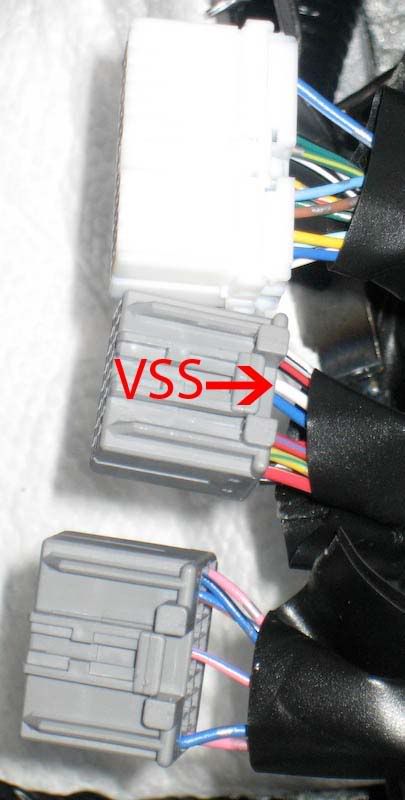
Thanks for all the help . Now I have one more question. For the vss wire I saw that the white wire is connected to a plug. So do I pull that out and connect it to the pink wire? Or how else do i connect it? (very simple terms or pictures would be very helpful. Sorry I am a noob at this)
. Now I have one more question. For the vss wire I saw that the white wire is connected to a plug. So do I pull that out and connect it to the pink wire? Or how else do i connect it? (very simple terms or pictures would be very helpful. Sorry I am a noob at this)
New Member
Joined: Nov 2007
Posts: 64
Likes: 0
From: Zachary, LA
You don't want to unplug that wire from the harness...you just need to connect the pink VSS wire from your harness to that wire (leaving it also connected to the harness).
Here's what I did: cut a little bit of that black wire covering away so that you can get to more of the white wire. Take a razor knife and carefully strip a section of the insulation from the white wire, exposing the bare wire beneath it (you just need 1/4 - 1/2 inch exposed). Take the pink wire and solder it to the exposed white wire and tape it up with electrical tape. If you don't want to solder, I suppose you could just wrap the wires together really good and tape it really tight, but solder would give you a better connection.
If you accidentally cut through the white wire when trying to strip the insulation, just take all 3 wires (2 ends of the white wire and 1 end of the pink) and solder them together (or twist them together, if not soldering) and tape them up.
Here's a bad illustration, but the visual might help:
Here's what I did: cut a little bit of that black wire covering away so that you can get to more of the white wire. Take a razor knife and carefully strip a section of the insulation from the white wire, exposing the bare wire beneath it (you just need 1/4 - 1/2 inch exposed). Take the pink wire and solder it to the exposed white wire and tape it up with electrical tape. If you don't want to solder, I suppose you could just wrap the wires together really good and tape it really tight, but solder would give you a better connection.
If you accidentally cut through the white wire when trying to strip the insulation, just take all 3 wires (2 ends of the white wire and 1 end of the pink) and solder them together (or twist them together, if not soldering) and tape them up.
Here's a bad illustration, but the visual might help:


Thread
Thread Starter
Forum
Replies
Last Post
maturola
Audio & Video
26
Jul 30, 2008 03:05 PM
