


7" Lilliput LCD / Computer in my 2004 Enthusiast


Thread Starter
Registered User
Joined: Mar 2004
Posts: 5
Likes: 0
From: Atlanta, GA
 7" Lilliput LCD / Computer in my 2004 Enthusiast
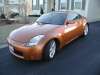
Well, I finally got around to install a computer and LCD in my 2004 Enthusiast. I've read about how the LCDs fit perfectly in the 2003 model, but Nissan changed the Nav box for the 2004 model.
My original plan was to mount the LCD and still have the nav door open/close. I also wanted to do this without cutting or changing any of the original parts of the car.
I started out by removing the backside of the nav door as well as the bottom portion of the Nav box. This created more space for the screen to fit.

From here, I took apart the Lilliput LCD, unsoldering the VGA cable and USB wires from the controller board. I mounted the controller board against the box to where the door will still close. I then ran the VGA/USB wires from behind the Nav box thru the small holes that were already there.

I unsoldered the IR "eye" from the button panel on the Lilliput case and soldered it directly to the controller board. That way I could still use the remote to control the brightness/contrast/etc. The last step was to put the screen on the front of the Nav box.


At this point I was sort of stuck. The door would not completely shut, but I was sure I could make it work. However, even if it did, I had to worry about how to keep it shut (since I took off the back part of the door). On top of that, I had to worry about keeping it in the same place, and then the most important thing was making it look nice.
SOO... I took a step back and decided to solder the IR eye back on the front of the lilliput front case, and mount the LCD screen itself back onto the front of the case. I then connected that to the LCD board that was in the back of the box. Doing this makes it look nice and neat, but the door won't shut.

This was the end result. The good part is the door is open to block the sun. The wires (VGA/USB, power) run perfectly thru the 2 small holes in the back of the box.
My original plan was to mount the LCD and still have the nav door open/close. I also wanted to do this without cutting or changing any of the original parts of the car.
I started out by removing the backside of the nav door as well as the bottom portion of the Nav box. This created more space for the screen to fit.
From here, I took apart the Lilliput LCD, unsoldering the VGA cable and USB wires from the controller board. I mounted the controller board against the box to where the door will still close. I then ran the VGA/USB wires from behind the Nav box thru the small holes that were already there.
I unsoldered the IR "eye" from the button panel on the Lilliput case and soldered it directly to the controller board. That way I could still use the remote to control the brightness/contrast/etc. The last step was to put the screen on the front of the Nav box.
At this point I was sort of stuck. The door would not completely shut, but I was sure I could make it work. However, even if it did, I had to worry about how to keep it shut (since I took off the back part of the door). On top of that, I had to worry about keeping it in the same place, and then the most important thing was making it look nice.
SOO... I took a step back and decided to solder the IR eye back on the front of the lilliput front case, and mount the LCD screen itself back onto the front of the case. I then connected that to the LCD board that was in the back of the box. Doing this makes it look nice and neat, but the door won't shut.
This was the end result. The good part is the door is open to block the sun. The wires (VGA/USB, power) run perfectly thru the 2 small holes in the back of the box.


Thread Starter
Registered User
Joined: Mar 2004
Posts: 5
Likes: 0
From: Atlanta, GA
The computer is nothing fancy.. its a small Compaq desktop I have that I mounted in a black laptop bag. Its a P3-900mhz machine with 512 MB ram running WinXP. I also have a GPS receiver mounted, as well as wireless internet.
It sits in the front of my trunk right behind the drivers seat. I run it off a power inverter. As the weeks go by, I might eventually get a smaller PC and run it off a DC-DC power supply. I'm still debating about it. For now, everything seems to be running perfectly.
It sits in the front of my trunk right behind the drivers seat. I run it off a power inverter. As the weeks go by, I might eventually get a smaller PC and run it off a DC-DC power supply. I'm still debating about it. For now, everything seems to be running perfectly.

Registered User
Joined: Mar 2003
Posts: 85
Likes: 0
From: Los Angeles, CA
This may be a stupid question so please excuse my ignorance. I assume you used some sort of a converting cable to go from VGA to RCA? Also as far as the trying to use a computer for NAV, is enterin information accomplished through a keyboard or touchscreen and some software that recognizes the touchscreen?
Trending Topics
Thread Starter
Registered User
Joined: Mar 2004
Posts: 5
Likes: 0
From: Atlanta, GA
The Lilliput monitor is a VGA touchscreen monitor. It accepts a direct VGA connection from the computer. (It also supports 2 additional RCA inputs). The touchscreen works via USB driver. It works just like a mouse (wherever you touch on the screen the mouse moves and clicks). The GPS software I use (Routis) has buttons and a keyboard on screen which works perfect for the touchscreen.

Thread
Thread Starter
Forum
Replies
Last Post
CFAUVEL
Exterior & Interior
3
Oct 1, 2015 03:20 PM


