


Members whose system was infected by the recent virus outbreak ONLY


Thread Starter
Retired Admin
iTrader: (95)
Joined: Dec 2000
Posts: 1,337,017,813
Likes: 78
From: Dallas / Chicago
 Members whose system was infected by the recent virus outbreak ONLY
In order for the IB techs to properly address and rectify the recent issue we've had with the XP/Vista Defender 2010 trojan virus, we are turning to you guys for help!
If you've recently experienced or currently are experiencing any sort of problems with malware (mostly the fake anti-virus stuff) on your system(s), please post your experiences here.
Be sure to include as much information as possible regarding your activities leading up to the virus appearing (i.e., link to threads, pictures, forums, albums, profiles, messages, etc). Screenshots of the pop ups, fake anti-virus program, etc would be of great help also, if possible.
We apologize for any and all inconvenience this recent outbreak may have caused you, the members. However, rest assured that neither IB, My350Z.com, nor its affiliates are responsible for such chaos. Thank you in advance for your cooperation and your patience.
- My350Z.com team
P.S. - All irrelevant content will be deleted without notice and infraction points may be issued.
If you've recently experienced or currently are experiencing any sort of problems with malware (mostly the fake anti-virus stuff) on your system(s), please post your experiences here.
Be sure to include as much information as possible regarding your activities leading up to the virus appearing (i.e., link to threads, pictures, forums, albums, profiles, messages, etc). Screenshots of the pop ups, fake anti-virus program, etc would be of great help also, if possible.
We apologize for any and all inconvenience this recent outbreak may have caused you, the members. However, rest assured that neither IB, My350Z.com, nor its affiliates are responsible for such chaos. Thank you in advance for your cooperation and your patience.
- My350Z.com team
P.S. - All irrelevant content will be deleted without notice and infraction points may be issued.



I honestly do not remember what thread I was in, but my computer "froze" and then a red/blue/green/yellow shield popped up saying that "xp antivirus has found high risk malware installed". It asked if I wanted to block it, I hit the x close to scan with spybot, and then it installed itself. I had been looking at the "girlfriend has my cell phone, am i busted" thread earlier, so not sure if that is where I picked it up (I know others had mentioned that one too). Took 4 days to get rid of it too! The I saw the fix for it on here.


just got my laptop reset completely back to nothing about a month ago, three weeks ago I log into my350 to check my PM's, go to my user CP, and BAM the knockoff virus defender pops up and doesn't stop. I did download and run MWB and it hasn't happened again.
Get some links up guys. Search your post histories if you need to. Mine popped up when I visited Bassholics thread about his girlfriend having his phone. The thread is no longer visible in OT, so it may have been soft deleted by him or moved to QP. I think it was on page 2.
Got it for the third time right when I posted post #5...in my own thread I created.
https://my350z.com/forum/other-vehic...e-and-use.html
https://my350z.com/forum/other-vehic...e-and-use.html

I just signed in, read the warning, ignored it lol, and I clicked new posts. Now I don't remember what thread I went into, but I can guarantee i didn't get infected from the home screen. I clicked on a thread and bAM.... Also I got rid of it by starting the computer up in "safe mode with networking" by holding F8 upon startup, then running "spybot search and destroy".
Trending Topics

(anders) I've been monitoring this very closely; still not finding anything coming from this site. It is possible that a member has a non-image avatar or signature; or was including an image into posts that might be trying to render as code - however, even that has not yet been detected. Site scan comes up clean each time, even in threads reported.
Did not find any exploits.
Scanned: Thursday, March 11, 2010
Did not find any exploits.
Scanned: Thursday, March 11, 2010

I got it this past weekend. It was anti virus vista 2010. I was on here, but wasn't sure I got it from here. Basically it wouldn't allow me to do anything, just kept popping up saying my computer was at risk. I called my dad, who works for Microsoft (which the program said it was made by) He searched it up and walked me through how to get id of it, it pretty much turned all my programs off, that way when I clicked on any program, only it would pop up. I tried to take a screen shot of it then, but I don't know how to get it back. If anyone knows how, I would be more than happy to try, and hopefully put it on here for you guys.
Heres a site that describes it, not very good on how to remove it though:
http://www.spywareremove.com/removeA...Vista2010.html
or this:
http://www.xp-vista.com/remove/antivirus-2010
Heres a site that describes it, not very good on how to remove it though:
http://www.spywareremove.com/removeA...Vista2010.html
or this:
http://www.xp-vista.com/remove/antivirus-2010
Last edited by 04fairlazdyz; Mar 11, 2010 at 07:15 PM.

I knew i got the irus from here because this website doesnt seem as safe as it used to be. Always my browser would crash or something would happen when i was on this site. I used Firefox and internet explorer.
I went to another checkpoint and clicked on that so it restored to previous time.
I went to another checkpoint and clicked on that so it restored to previous time.



Anders, take at look at this Google search for tauobex.exe. This is the file that my work PC flagged (AVG) when I started getting the XP 2010 Antivirus on a non-networked PC. The file was hidden on my thumbdrive and would not show up even if I enabled show hidden files in folder options. I got rid of it, but it was VERY nerveracking considering this was a PC testing flight hardware for the military:
http://www.google.com/search?hl=en&s...ex.exe&spell=1
http://www.google.com/search?hl=en&s...ex.exe&spell=1

I got that F'N virus from here too! I was on the forums main page when my computer froze up. This happened last Saturday afternoon.
It's called the antivirus soft. It said my computer was infected and asked if i wanted to purchase their antivirus to get rid of it... It wouldn't let my AVG antivirus run nor could i get on the internet or do anything else. I finally found out what to do by going to another computer and researching it.
I won't be coming back to this site again until you guys can find out how we all got affected.
It's called the antivirus soft. It said my computer was infected and asked if i wanted to purchase their antivirus to get rid of it... It wouldn't let my AVG antivirus run nor could i get on the internet or do anything else. I finally found out what to do by going to another computer and researching it.
I won't be coming back to this site again until you guys can find out how we all got affected.
Last edited by trackpilot; Mar 11, 2010 at 08:45 PM.

I picked it up on Tuesday, Windows Security Essentials DID NOT detect it. I used MalwareBytes to remove it. Damn near took out my development PC at work. Nice job guys!

I'm using Vista, picked it up a few days ago opening a thread but I can't remember which. Like everyone else, it was a anti-virus pop up that stated I have 7 infected files. It then asked me to fix it by registering. Of course I just click out of it.
It didn't freez my computer or slow it down, but it kept poping up since it also embeded itself to my toolbar. Using Firefox, I was unable to download maleware, but on Internet Explorer I was able to and eventually removed the virus. When maleware did the scan, it showed 19 files infected.
I hope this information help.
It didn't freez my computer or slow it down, but it kept poping up since it also embeded itself to my toolbar. Using Firefox, I was unable to download maleware, but on Internet Explorer I was able to and eventually removed the virus. When maleware did the scan, it showed 19 files infected.
I hope this information help.

It first came up for me when viewing the video of the kid who gets the camaro but AVG flagged it and I moved along.
I actually got infected when viewing the funny/gross pictures thread no warning from AVG or MS Security Essentials. Malware Bytes could not even run, cmd prompt wouldn't come up so I tried safe mode and the only thing I would get in safe mode was the fake anti-virus program.
1st encounter:
https://my350z.com/forum/the-lounge-...hreads-48.html
2nd encounter:
https://my350z.com/forum/the-lounge-...-only-164.html
I actually got infected when viewing the funny/gross pictures thread no warning from AVG or MS Security Essentials. Malware Bytes could not even run, cmd prompt wouldn't come up so I tried safe mode and the only thing I would get in safe mode was the fake anti-virus program.
1st encounter:
https://my350z.com/forum/the-lounge-...hreads-48.html
2nd encounter:
https://my350z.com/forum/the-lounge-...-only-164.html
Last edited by bck2stkz; Mar 12, 2010 at 08:02 AM.

This has really been a real PITA! My comp got infected and screwed up my whole system! I had to do a system restore to even get the comp to work. Was this a link on the forums or was this piggy backed onto to the forums link?

 Ad Poisoning
I still think it's the ads. Doubleclick in particular. See the screenshot from one of my laptops that got infected.
Exploit using poorly updated adobe reader software? This screen shot represents the detected item "Exploit:Win32/Pdfjsc.EI".
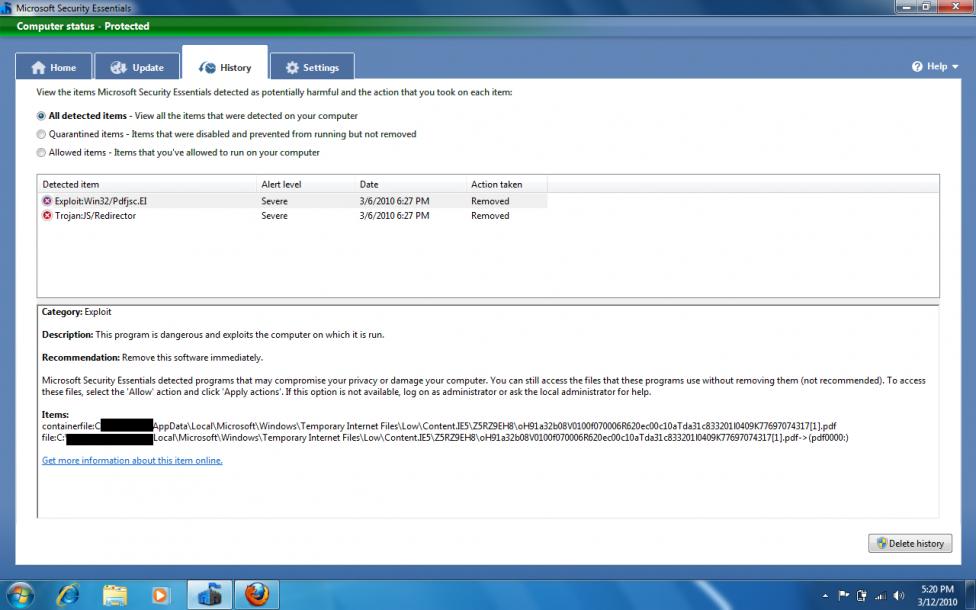
Trojan from doubleclick.net? This screen shot represents the detected item "Trojan:JS/Redirector".

After searching for "KAV2[1].htm" I found something interesting on the avast! blog -> http://blog.avast.com/2010/02/18/ads...93-jsprontexi/. Notice how doubleclick.net is in the top 8.
Exploit using poorly updated adobe reader software? This screen shot represents the detected item "Exploit:Win32/Pdfjsc.EI".
Trojan from doubleclick.net? This screen shot represents the detected item "Trojan:JS/Redirector".
After searching for "KAV2[1].htm" I found something interesting on the avast! blog -> http://blog.avast.com/2010/02/18/ads...93-jsprontexi/. Notice how doubleclick.net is in the top 8.
Last edited by MDHRZ; Mar 12, 2010 at 01:48 PM.