


Senior Citizen 70 Returns


Thread Starter
New Member


Joined: Mar 2007
Posts: 660
Likes: 143
From: Tucson, Arizona
 Senior Citizen 70 Returns
Thanks to all of you who responded to my newbie post. You sound like a great bunch. I look forward to reading and learning from all of you about my new beast. Just to set the record straight. I don't wear depends, weigh the same as I did when I was 19 (145 lbs), don't have a pot belly, and never visit Hometown Buffet. Been married 40 years, have 2 daughters and one granddaughter, never owned a sports car before, and have owned a string of Honda Civics and one CRV. I am a mostly retired school psychologist who still counsels kids in a local school district 2 days a week. I brought my Z to one of the elementary schools today and word got out that it belongs to me. All the 10 year olds got together and are building an alter but I am not sure if its to worship me or the car.
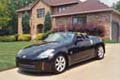
I'd like to put in a picture of the car but I can't figure out how to do it. Tried the insert function but don't know what to do about the url request. Was able to bring up a picture with the Manage Attqchments but can't get it into the message. Please help an old codger like me.
Bob
I'd like to put in a picture of the car but I can't figure out how to do it. Tried the insert function but don't know what to do about the url request. Was able to bring up a picture with the Manage Attqchments but can't get it into the message. Please help an old codger like me.
Bob

When you get to the manage attachments, use the Browse button to fnd the file. Make sure its the right size allowable, theres a table on the bottom of the manage attachments with the allowable sizes. Find the file, and click upload. Let it do its thing, and then click close window.

If you have many pics you may want to sign up for a photo hosting sight such as photobucket.com
1) got to www.photobucket.com
2) create an account by clicking on the red join now
3) Select a user name and password
4) Fill out all the stuff in yellow fields like name, email, etc.
5) accept the terms
6) Click Browse after it directs you to the your account
7) Find the dir/file/pic select then click open
8) After loads click Upload
9) You'll see the pic uploaded (You may have to scroll down)
10) Find the pic thumbnail, click on the field that say IMG Code and it'll highlight
11) hit Ctrl and C at the same time to copy or right click and copy
12) come back to this thread, start a post, and do a Ctrl and V or right click paste
1) got to www.photobucket.com
2) create an account by clicking on the red join now
3) Select a user name and password
4) Fill out all the stuff in yellow fields like name, email, etc.
5) accept the terms
6) Click Browse after it directs you to the your account
7) Find the dir/file/pic select then click open
8) After loads click Upload
9) You'll see the pic uploaded (You may have to scroll down)
10) Find the pic thumbnail, click on the field that say IMG Code and it'll highlight
11) hit Ctrl and C at the same time to copy or right click and copy
12) come back to this thread, start a post, and do a Ctrl and V or right click paste

 Just to let you know... do us all a favor by sticking with your original thread.
Thread
Thread Starter
Forum
Replies
Last Post
Colombo
Forced Induction
35
Nov 9, 2020 10:27 AM