Notices
Photography Techniques, Cameras, Lenses, & Equipment

HDR photography.

Thread Tools
 
Search this Thread
 
Old Jan 31, 2009 | 04:46 PM
  #321  
clinch9's Avatar
clinch9
Registered User
iTrader: (1)
 
Joined: Sep 2003
Posts: 11
Likes: 0
From: Kansas City, MO
Default

Will there be any quality loss once converted to JPEG? This is my first go at HDR so I'm still pretty new at this

Last edited by clinch9; Jan 31, 2009 at 04:46 PM. Reason: I'm wonderful at spelling
Reply
Old Jan 31, 2009 | 04:57 PM
  #322  
clinch9's Avatar
clinch9
Registered User
iTrader: (1)
 
Joined: Sep 2003
Posts: 11
Likes: 0
From: Kansas City, MO
Default

Well I can convert them to JPEG and open them inside of CS2 now, yet when I go to File -> Automate -> Merge to HDR - I get an error that says there's not enough dynamic range in these photos to construct a useful HDR image.

Wow I'm completely lost! I have three photos, one of -2 exposure, one at 0 exposure, and one at +2 exposure.. how's there's not enough dynamic range in that?
Reply
Old Jan 31, 2009 | 05:00 PM
  #323  
AUtigers350z's Avatar
AUtigers350z
Registered User
iTrader: (18)
 
Joined: Dec 2005
Posts: 809
Likes: 0
From: Birmingham, AL
Default

Photoshop makes it a lot harder to work with HDR image processing than other programs such as Photomatix, which I would definitely recommend.

http://www.hdrsoft.com/

You can download a trial version from that site and if you like it, either buy it (best option) or you would probably be able to torrent it.

Reply
Old Jan 31, 2009 | 05:34 PM
  #324  
J_Dizzle's Avatar
J_Dizzle
southcentral>me
Premier Member
iTrader: (13)
 
Joined: Oct 2007
Posts: 7,453
Likes: 0
From: on da streets in MS
Default

I use a program called dynamic HDR. I believe its free. and its pretty easy to use
Reply
Old Jan 31, 2009 | 05:38 PM
  #325  
J_Dizzle's Avatar
J_Dizzle
southcentral>me
Premier Member
iTrader: (13)
 
Joined: Oct 2007
Posts: 7,453
Likes: 0
From: on da streets in MS
Default

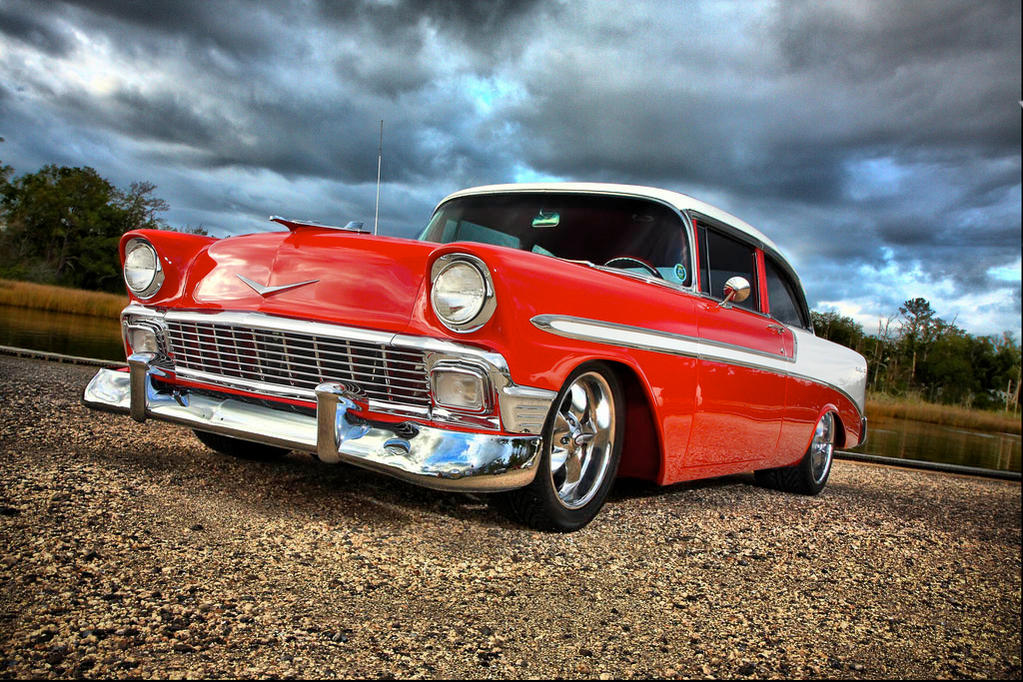
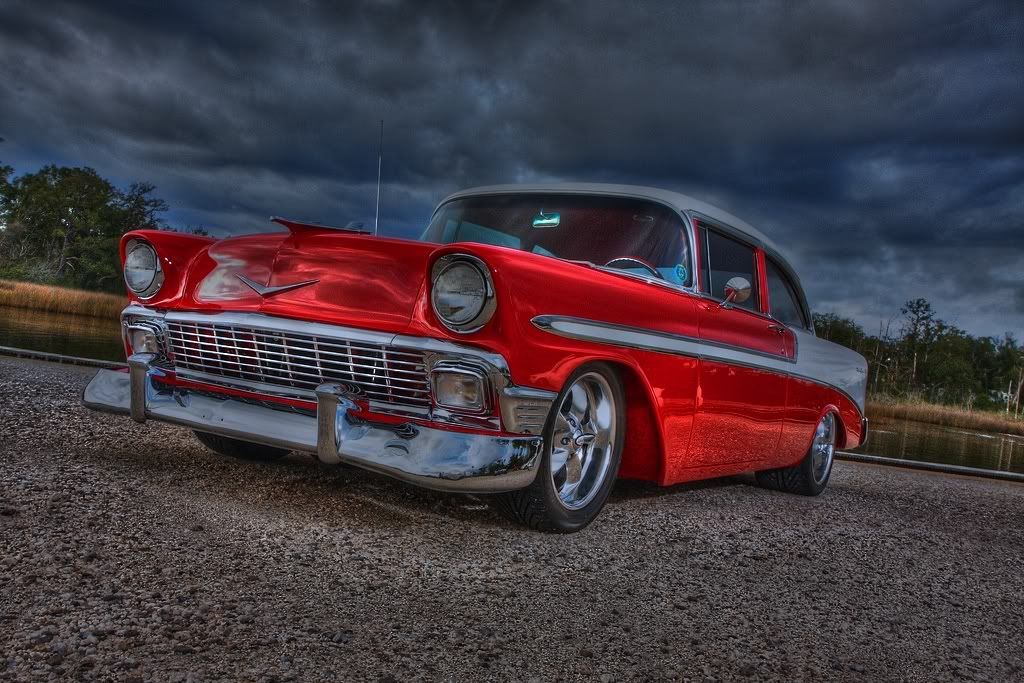
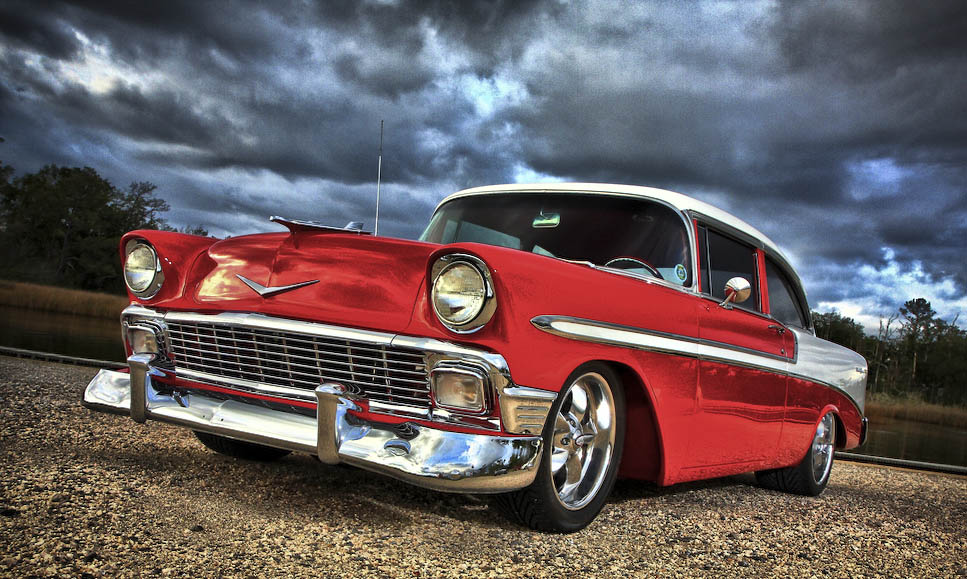
i went a little overboard with this one. but it still came out good i though

thoughts?

original


HDR
Reply
Old Feb 1, 2009 | 07:21 AM
  #326  
Anthony C's Avatar
Anthony C
Registered User
iTrader: (1)
 
Joined: Nov 2006
Posts: 668
Likes: 0
From: New York
Default

i like the original better to be honest
Reply
Old Feb 1, 2009 | 08:19 AM
  #327  
dkorr's Avatar
dkorr
Registered User
iTrader: (3)
 
Joined: Feb 2005
Posts: 1,351
Likes: 0
From: San Diego
Default

I agree with Anthony C. The HDR version is too saturated (no detail in the front fender) and its too grainy (the clouds).

The original picture is really good because its properly exposed (the white tail fin and the tire tread). You know its exposed properly when you just barely make out the tread pattern and the tire is not too dark or light. Also the headlamps and front hood appears yellowish, indicating that the sun is setting/rising. But the clouds in the background is inconsistent, indicating a colder, midday sky.

The original shot is almost a perfect shot. The only thing I would have done differently is opening up the aperture to blur out the trees/lake in the background; crop the car lower so its sits on the bottom 3rd of the image (1/3 Rule); add ND Grad filter to darken the clouds and/or use vignetting to darken the foreground gravel at the edges; and use a Circular Polarizer to take out the reflection of the windshield- but then, sometimes people prefer to leave in the glare because it adds realism.

Last edited by dkorr; Feb 1, 2009 at 02:48 PM.
Reply
Old Feb 1, 2009 | 08:58 AM
  #328  
J_Dizzle's Avatar
J_Dizzle
southcentral>me
Premier Member
iTrader: (13)
 
Joined: Oct 2007
Posts: 7,453
Likes: 0
From: on da streets in MS
Default

ha wow guys. thanks for the thorough explanation. i knew it was a bit over done. but i felt like sharing anyway

and if i would had more time to put into shooting the photos i would've but some more thought and effort into it. i was pretty rushed. maybe i'll make another HDR version to try and keep the realism but still get the clouds to stand out in it
Reply
Old Feb 1, 2009 | 12:35 PM
  #329  
AUtigers350z's Avatar
AUtigers350z
Registered User
iTrader: (18)
 
Joined: Dec 2005
Posts: 809
Likes: 0
From: Birmingham, AL
Default

J_Dizzle, I messed around with your photo a bit on Lightroom just to see what I could come up with. What you think?

HDR photography.-3238609404_a918d4c852_b-1.jpg
Reply
Old Feb 1, 2009 | 12:38 PM
  #330  
J_Dizzle's Avatar
J_Dizzle
southcentral>me
Premier Member
iTrader: (13)
 
Joined: Oct 2007
Posts: 7,453
Likes: 0
From: on da streets in MS
Default

i like it, but i think you lost the bright red that i wanted out of it. it looks to candy when in reality the car is a very vibrant red
Reply
Old Feb 1, 2009 | 01:01 PM
  #331  
Spork's Avatar
Spork
Registered User
iTrader: (6)
 
Joined: May 2007
Posts: 27,592
Likes: 6
From: MN
Default

Originally Posted by J_Dizzle
i like it, but i think you lost the bright red that i wanted out of it. it looks to candy when in reality the car is a very vibrant red
Looks anodized almost. Not "deep".

Last edited by Spork; Feb 1, 2009 at 01:04 PM.
Reply
Old Feb 1, 2009 | 01:27 PM
  #332  
stu46's Avatar
stu46
Registered User
 
Joined: Apr 2004
Posts: 4,801
Likes: 0
From: Hawaii
Default

Too lazy to remove reflections, but that would go a long way to improve the picture.
Reply
Old Feb 1, 2009 | 02:46 PM
  #333  
dkorr's Avatar
dkorr
Registered User
iTrader: (3)
 
Joined: Feb 2005
Posts: 1,351
Likes: 0
From: San Diego
Default

as u can see the car's exposure is near perfect so there's no need to mess with it... the OP did a good job in capturing it.

Reply
Old Feb 1, 2009 | 03:13 PM
  #334  
AUtigers350z's Avatar
AUtigers350z
Registered User
iTrader: (18)
 
Joined: Dec 2005
Posts: 809
Likes: 0
From: Birmingham, AL
Default

Here's another go at it..

HDR photography.-caredit.jpg
Reply
Old Feb 1, 2009 | 06:49 PM
  #335  
J_Dizzle's Avatar
J_Dizzle
southcentral>me
Premier Member
iTrader: (13)
 
Joined: Oct 2007
Posts: 7,453
Likes: 0
From: on da streets in MS
Default

Originally Posted by dkorr
as u can see the car's exposure is near perfect so there's no need to mess with it... the OP did a good job in capturing it.
well thank you

Originally Posted by AUtigers350z
Here's another go at it..

Attachment 226579

that one came out pretty good
Reply
Old Feb 1, 2009 | 07:28 PM
  #336  
AUtigers350z's Avatar
AUtigers350z
Registered User
iTrader: (18)
 
Joined: Dec 2005
Posts: 809
Likes: 0
From: Birmingham, AL
Default

Originally Posted by J_Dizzle
well thank you


that one came out pretty good
I mixed a few different photos and selected the "best" features from each one
Reply
Old Feb 1, 2009 | 07:30 PM
  #337  
J_Dizzle's Avatar
J_Dizzle
southcentral>me
Premier Member
iTrader: (13)
 
Joined: Oct 2007
Posts: 7,453
Likes: 0
From: on da streets in MS
Default

haha i see. anyone ever tried it with people? i mentioned it to my boss and showed him a couple shots and he seemed interested in doing it as part of sittings
Reply
Old Feb 1, 2009 | 07:36 PM
  #338  
AUtigers350z's Avatar
AUtigers350z
Registered User
iTrader: (18)
 
Joined: Dec 2005
Posts: 809
Likes: 0
From: Birmingham, AL
Default

Originally Posted by J_Dizzle
haha i see. anyone ever tried it with people? i mentioned it to my boss and showed him a couple shots and he seemed interested in doing it as part of sittings
For people it's usually easiest to use Photomatix and just Tone Map a RAW file. Unless you can get them to sit perfectly still through all the exposures
Reply
Old Feb 1, 2009 | 07:38 PM
  #339  
J_Dizzle's Avatar
J_Dizzle
southcentral>me
Premier Member
iTrader: (13)
 
Joined: Oct 2007
Posts: 7,453
Likes: 0
From: on da streets in MS
Default

well i shoot in raw. and i just well have a normally exposed photo, lightend shot, and darkend shot. so i can do it with one shot ha
Reply
Old Feb 1, 2009 | 08:26 PM
  #340  
Nateclipse's Avatar
Nateclipse
Registered User
iTrader: (19)
 
Joined: Feb 2007
Posts: 398
Likes: 0
From: Huntsville, AL
Default

heres my attempt at it, i tried bringing out as much red as possible, but being dark, its kinda hard, i like the original better but this is my try at it:
Reply


All times are GMT -8. The time now is 06:35 AM.