


what double din unit do i want???


Thread Starter
Registered User
iTrader: (20)
Joined: Aug 2006
Posts: 567
Likes: 0
From: Paradise Valley, AZ
 what double din unit do i want???
i have the panasonic CQ-VD6503U currently and overall ive never been that impressed so i'm givin it to my girlfriend but i need to replace it. ive looked and looked on here to help me decide but what i really need are some comparisons. i'm not too concerned about navigation, but i DO want one that will stream ipod video, show backgrounds, and have plenty of sound control. would the avic d3 possibly be right for me? any input would be great. and i'm actually looking to buy used so if anyone that reads this has one for sale let me know.
also...is there a unit that can display a different image on my upper screen? cuz right now i just have double display
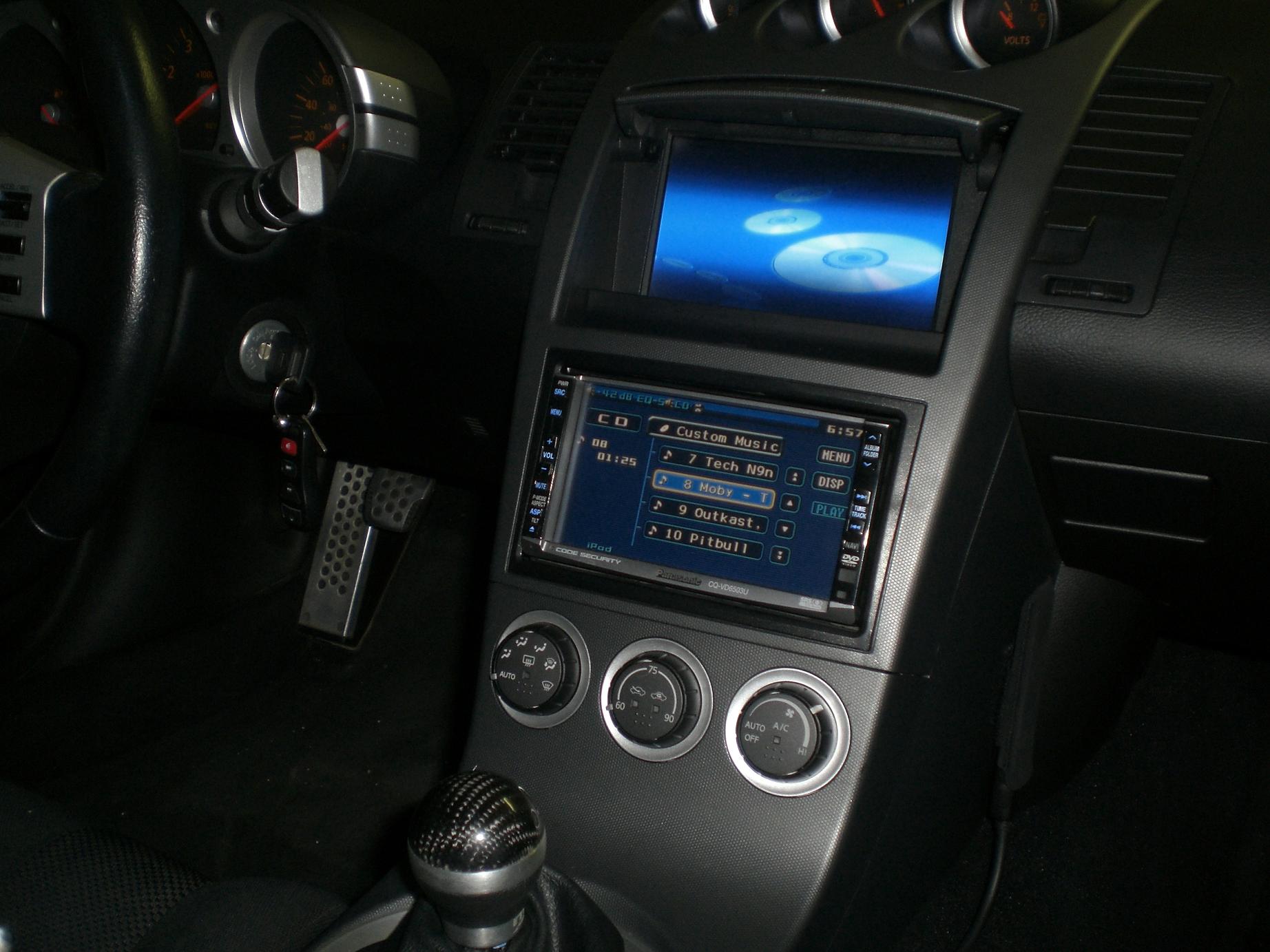
also...is there a unit that can display a different image on my upper screen? cuz right now i just have double display
Last edited by JonnyRod; Feb 7, 2008 at 05:01 PM.
Thread Starter
Registered User
iTrader: (20)
Joined: Aug 2006
Posts: 567
Likes: 0
From: Paradise Valley, AZ
well my panasonic has ipod "controls" but nothing at all what i am looking for. and i know all the units do not let you upload pictures for a background just like my panasonic does not.


New Kenwoods coming out soon:
https://my350z.com/forum/audio-and-video/328721-new-kenwood-dnx8120-excelon-double-din-5-1-rca-5v-preouts-wicked-cas.html
https://my350z.com/forum/audio-and-video/328722-sneak-peak-kenwood-dnx-5120-wicked-cas.html
Both of these have Nav, but I think they have other models that don't. I'm waitin' for my 8120.
https://my350z.com/forum/audio-and-video/328721-new-kenwood-dnx8120-excelon-double-din-5-1-rca-5v-preouts-wicked-cas.html
https://my350z.com/forum/audio-and-video/328722-sneak-peak-kenwood-dnx-5120-wicked-cas.html
Both of these have Nav, but I think they have other models that don't. I'm waitin' for my 8120.


Trending Topics

Thread Starter
Registered User
iTrader: (20)
Joined: Aug 2006
Posts: 567
Likes: 0
From: Paradise Valley, AZ
Originally Posted by justesen
hi... took a look at your jpg and noticed two screens. What's the screen that's mounted in the cubby above the main unit? Thanks.

New Member


Joined: Dec 2006
Posts: 7,337
Likes: 204
From: Edina, Minnesota
Originally Posted by rs90808
i have the panasonic CQ-VD6503U currently and overall ive never been that impressed so i'm givin it to my girlfriend but i need to replace it…
y
y
Good luck with that one.

--Spike
New Member
Joined: Dec 2006
Posts: 7,337
Likes: 204
From: Edina, Minnesota
Hi rs90808,
And all kidding aside about the gf comment… I read your thread and would like to offer a suggestion.
Have you considered the Kenwood KOS System?
This is: Kenwood KOS-L702 Remote Touch-Screen Monitor plus the Kenwood Controller KOS-V500 (or KOS-V1000)
To install this, you would replace your Farenheit T-7000MHR in the upper/forward cubby with the Kenwood KOS-L702 Remote Touch-Screen Monitor, and install the Kenwood Controller KOS-V500 or KOS-V1000 in the lower/large rear compartment behind the passenger seat (or anywhere where you can have occasional access to the device). After doing this, you connect all your existing CES devices (including your H/U) to the KOS Controller.
The advantages using the Kenwood KOS System:
You can use your existing devices (so you don’t lose this investment) by simply connecting them to the KOS Controller and outputting to the KOS-L702 Remote Touch-Screen Monitor where you have touch-screen control (or use the remote IR handheld control). You can even connect an OEM H/U.
Adding an additional device (i.e., navigation, DVD player, etc.) is simple. You route the new device through the KOS controller, and see it and operate it on the Kenwood KOS-L702 Remote Touch-Screen Monitor or the handheld IR remote control. Of course, you can use the device’s internal controls as well.
The KOS system supports component devices so you can upgrade your CES without sacrificing your entire investment (as is the case when replacing a Double-Din “All-in-One” device).
The Kenwood KOS Contoller Units also have an advanced receiver for terrestrial radio reception.
--Spike
And all kidding aside about the gf comment… I read your thread and would like to offer a suggestion.
Have you considered the Kenwood KOS System?
This is: Kenwood KOS-L702 Remote Touch-Screen Monitor plus the Kenwood Controller KOS-V500 (or KOS-V1000)
To install this, you would replace your Farenheit T-7000MHR in the upper/forward cubby with the Kenwood KOS-L702 Remote Touch-Screen Monitor, and install the Kenwood Controller KOS-V500 or KOS-V1000 in the lower/large rear compartment behind the passenger seat (or anywhere where you can have occasional access to the device). After doing this, you connect all your existing CES devices (including your H/U) to the KOS Controller.
The advantages using the Kenwood KOS System:
You can use your existing devices (so you don’t lose this investment) by simply connecting them to the KOS Controller and outputting to the KOS-L702 Remote Touch-Screen Monitor where you have touch-screen control (or use the remote IR handheld control). You can even connect an OEM H/U.
Adding an additional device (i.e., navigation, DVD player, etc.) is simple. You route the new device through the KOS controller, and see it and operate it on the Kenwood KOS-L702 Remote Touch-Screen Monitor or the handheld IR remote control. Of course, you can use the device’s internal controls as well.
The KOS system supports component devices so you can upgrade your CES without sacrificing your entire investment (as is the case when replacing a Double-Din “All-in-One” device).
The Kenwood KOS Contoller Units also have an advanced receiver for terrestrial radio reception.
--Spike
Thread Starter
Registered User
iTrader: (20)
Joined: Aug 2006
Posts: 567
Likes: 0
From: Paradise Valley, AZ
Originally Posted by Spike100
You have something you don’t like, and want to replace… so you give this to your gf?
Good luck with that one.
--Spike
Good luck with that one.
--Spike
but yea...about the kenwood setup...thats exactly like what im lookin for. but a little more than i wanted to spend...is there any similar setup in which i could use my existing upper screen?
Last edited by JonnyRod; Feb 7, 2008 at 07:00 PM.
New Member
Joined: Dec 2006
Posts: 7,337
Likes: 204
From: Edina, Minnesota
…Just kidding about pawning off “junk” to your gf.
As to sending A/V output to the Farenheit screen, most DD devices can do this, but not navigation. Although, it appears that at least one of the next generation of Kenwood DD devices will do this (send navigation display to a remote screen).
--Spike
As to sending A/V output to the Farenheit screen, most DD devices can do this, but not navigation. Although, it appears that at least one of the next generation of Kenwood DD devices will do this (send navigation display to a remote screen).
--Spike


Thread
Thread Starter
Forum
Replies
Last Post
Workshop12
Exterior & Interior
256
Mar 23, 2020 01:45 PM

