


New HU in "cubby"?


Thread Starter
New Member
Joined: Mar 2008
Posts: 22
Likes: 0
From: New Braunfels, TX
 New HU in "cubby"?
Im lookin @ gettin a kenwood DNX8120. I have the base modle so no navi to begin w/. Does anybody know if i can put the new HU in the "cubby". Im pretty sure id have to get some dash work done. I wanna mount it there so i dont have to look down to see the GPS.


This has been asked several times before.
It "could" be done but it totally would not be worth it at all. It's past the point of being labor intensive to get it to work/fit. Not to mention you would have a huge headunit protruding out of the front of the top of your dash that would absolutely run the sleekness of the dash.
So to sum it up, its not worth it. Either get a portable GPS unit to mount on your windshield or add a secondary screen in your cubby to use for your navigation.
It "could" be done but it totally would not be worth it at all. It's past the point of being labor intensive to get it to work/fit. Not to mention you would have a huge headunit protruding out of the front of the top of your dash that would absolutely run the sleekness of the dash.
So to sum it up, its not worth it. Either get a portable GPS unit to mount on your windshield or add a secondary screen in your cubby to use for your navigation.

I wanted to do what you want, but then came to this forum and found out I couldn't. I wanted the nav up top while still being able to use all the features of the 8120. My solution was to go with the dual screen system. Check it out here:
Dual Screen Setup in 06: Finally Done!
And you can find a lot of stuff in this link:
Double-Din H/U’s, Multiple Monitors, & Navigation (Pics here)
Dual Screen Setup in 06: Finally Done!
And you can find a lot of stuff in this link:
Double-Din H/U’s, Multiple Monitors, & Navigation (Pics here)
Thread Starter
New Member
Joined: Mar 2008
Posts: 22
Likes: 0
From: New Braunfels, TX
I wanted to do what you want, but then came to this forum and found out I couldn't. I wanted the nav up top while still being able to use all the features of the 8120. My solution was to go with the dual screen system. Check it out here:
Dual Screen Setup in 06: Finally Done!
And you can find a lot of stuff in this link:
Double-Din H/U’s, Multiple Monitors, & Navigation (Pics here)
Dual Screen Setup in 06: Finally Done!
And you can find a lot of stuff in this link:
Double-Din H/U’s, Multiple Monitors, & Navigation (Pics here)

I just installed a 7" screen in place of the cubby and a blackbox navigation system (Garmin GVN-53). I wired the sound into my speaker system and the mute wire from the head unit to the nav brain, so the head unit will mute when the nav needs to talk and it will play through the speakers in the car. I'll post pictures for you when I get home from work tonight. It's not all that hard to do.
Last edited by burner; Nov 13, 2008 at 10:37 AM.

New Member


Joined: Dec 2006
Posts: 7,337
Likes: 204
From: Edina, Minnesota
I just installed a 7" screen in place of the cubby and a blackbox navigation system (Garmin GVN-53). I wired the sound into my speaker system and the mute wire from the head unit to the nav brain, so the head unit will mute when the nav needs to talk and it will play through the speakers in the car. I'll post pictures for you when I get home from work tonight. It's not all that hard to do.
I did the same thing you describe. The only difference is I have the Garmin GVN 52 Black-box (your GVN 53 is the newer model that provides better GPS performance, and supports RGB monitors as well as the previous support for NTSC/PAL monitors).
I added a PAC device to accomplish this (muting the H/U’s current sound and broadcasting the GPS voice over the car’s speakers) because my Clarion DXZ745MP H/U doesn’t have a mute feature. It works. The problem I have with this setup is occasional “popping” sounds that really annoy me.
I am very interested in your solution. It might be worth replacing my current Clarion H/U with one that supports muting.
--Spike
Trending Topics
Here is my setup:
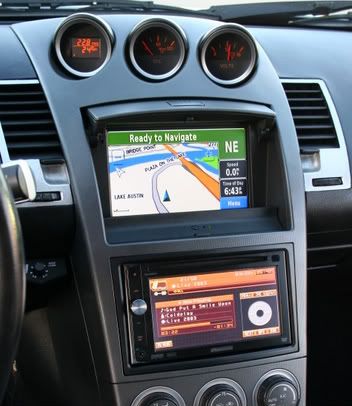
I don't get any popping on mute from my speakers, everything works great. Because the speakers in my car are all amped, the Garmin is hooked directly into the amp with a splitter which outputs to the speakers. It really works great and looks/feels OEM. As you may notice as well, I integrated a mute button and LED's right below the nav screen. These are hooked to a Passport 8500, which is mounted at the top of my windshield.
I don't get any popping on mute from my speakers, everything works great. Because the speakers in my car are all amped, the Garmin is hooked directly into the amp with a splitter which outputs to the speakers. It really works great and looks/feels OEM. As you may notice as well, I integrated a mute button and LED's right below the nav screen. These are hooked to a Passport 8500, which is mounted at the top of my windshield.

