


Pioneer Avic scratch removal?


Thread Starter
Registered User
iTrader: (35)
Joined: Dec 2005
Posts: 806
Likes: 0
From: Long Island, NY
 Pioneer Avic scratch removal?
I did something stupid today and got scratches on my Avic-D3. I did a few searches on the web and nothing was definitive. I searched on here and came up with a few threads, but nothing really gave an answer on there either. I asked people and called around, and they don't know anything as well. I read some places that said a touch-screen cell phone scratch remover will work, but then some people that I talked to said that it may do more damage than good. The scratches aren't terribly deep, but they are noticeable. Even if I can just make them lighter so I don't see them as much, I'll be happy. Does anybody know what would work, if anything? I understand that replacing the screen is expensive and difficult, so I am trying to avoid that. Any help is much appreciated!
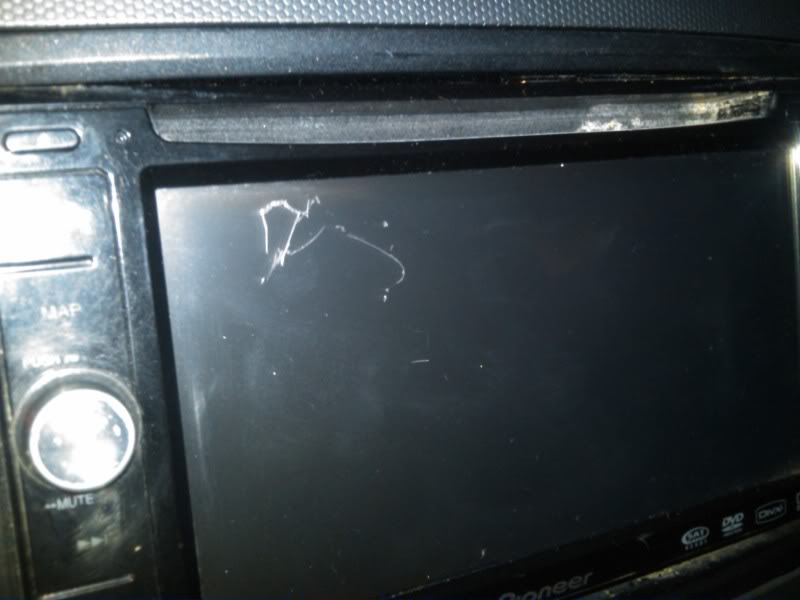
Last edited by chrisjersey06; Feb 18, 2011 at 02:57 PM.

Thread Starter
Registered User
iTrader: (35)
Joined: Dec 2005
Posts: 806
Likes: 0
From: Long Island, NY
Somebody recommended this stuff to me:
http://www.amazon.com/Displex-Screen.../dp/B001EJHMW0
I'm willing to give anything a shot, I just don't want to ruin the screen even more if it reacts poorly. The screen feels like a different kind of surface than an ipod or cell phone screen. If you read the reviews on there, about half are good and half are bad.
http://www.amazon.com/Displex-Screen.../dp/B001EJHMW0
I'm willing to give anything a shot, I just don't want to ruin the screen even more if it reacts poorly. The screen feels like a different kind of surface than an ipod or cell phone screen. If you read the reviews on there, about half are good and half are bad.
Last edited by chrisjersey06; Feb 18, 2011 at 04:57 PM.

New Member
Joined: Feb 2009
Posts: 2,821
Likes: 512
From: Seattle, WA
Use Quixx acrylic scratch remover. Be gentle and check your work as you go until you get the desired result. You can get it at most auto parts stores. I used it on a pioneer with a big scratch in it and it took it right out. That HU had a glossy finish though. Not too sure how it will work with a touch-screen that's matte, but really, anything's better than the way it looks now.
Seriously, Quixx works. Here's a link to their site:
http://www.quixx-usa.com/products/overview/27/In:en
Seriously, Quixx works. Here's a link to their site:
http://www.quixx-usa.com/products/overview/27/In:en
Thread Starter
Registered User
iTrader: (35)
Joined: Dec 2005
Posts: 806
Likes: 0
From: Long Island, NY
Use Quixx acrylic scratch remover. Be gentle and check your work as you go until you get the desired result. You can get it at most auto parts stores. I used it on a pioneer with a big scratch in it and it took it right out. That HU had a glossy finish though. Not too sure how it will work with a touch-screen that's matte, but really, anything's better than the way it looks now.
Seriously, Quixx works. Here's a link to their site:
http://www.quixx-usa.com/products/overview/27/In:en
Seriously, Quixx works. Here's a link to their site:
http://www.quixx-usa.com/products/overview/27/In:en


New Member


Joined: Dec 2006
Posts: 7,337
Likes: 204
From: Edina, Minnesota
Unfortunately, there is no good way to deal with a deep scratch on an LCD screen. Any polishing agent is simply an abrasive that spreads the problem to a wider area. A filler is only cosmetic, and does not even accomplish that adequately.
The advantage of the Z is its upper forward cubby where you place your LCD screen that is easily and inexpensively replaced. Expensive devices with LCD screens placed in the DD slot do not have this advantage.
--Spike
The advantage of the Z is its upper forward cubby where you place your LCD screen that is easily and inexpensively replaced. Expensive devices with LCD screens placed in the DD slot do not have this advantage.
--Spike
Trending Topics


i had a scratch like that, almost identical but in the other corner.
My unit came like that so im not sure how it happened, screen worked ok in that region so it wasnt a functional issue.
I used wet and dry paper on it and it came out. It left the screen very matte in that area. So i applied 3m photo finishing film to the entire scree and it looked like new when it was done.
That would be the only solution to fix it. I had to take apart the whole front of the unit.
if you need any tips just pm me.
Cheers
Ciprian
My unit came like that so im not sure how it happened, screen worked ok in that region so it wasnt a functional issue.
I used wet and dry paper on it and it came out. It left the screen very matte in that area. So i applied 3m photo finishing film to the entire scree and it looked like new when it was done.
That would be the only solution to fix it. I had to take apart the whole front of the unit.
if you need any tips just pm me.
Cheers
Ciprian

Thread
Thread Starter
Forum
Replies
Last Post
Gruppe-S
Body Interior
13
May 16, 2016 10:42 PM
