


Garmin GVN on factory NAV screen?


Thread Starter
Registered User
Joined: Mar 2012
Posts: 6
Likes: 0
From: Cincinnati, Ohio
 Garmin GVN on factory NAV screen?
Garmin GVN on factory NAV screen?
Ive been reading the forums for quite a while and am proud to be finally an owner!
I recently purchased a 2003 with navigation however I would need to purchase the software to have the navigation function. When considering this I thought initially of buying simply an all in one head unit, however I don’t want to waste that top cubby screen since it’s perfect for nav. I would like to still utilize the screen for navigation in that top cubby, however I rather spend the money on updating it to a garmin gvn 52 or 53.
So my initial idea is:
Garmin GVN for more reliable nav in top cubby
Pioneer AVH4400BH to replace head unit (for Bluetooth, possible back up camera, etc)
My two questions are
1.) will the garmin gvn work on the factory screen
2.) will there be any issues with installing the pioneer as a the double din below while having the garmin in the cubby screen?
Thanks for your help!
Ive been reading the forums for quite a while and am proud to be finally an owner!
I recently purchased a 2003 with navigation however I would need to purchase the software to have the navigation function. When considering this I thought initially of buying simply an all in one head unit, however I don’t want to waste that top cubby screen since it’s perfect for nav. I would like to still utilize the screen for navigation in that top cubby, however I rather spend the money on updating it to a garmin gvn 52 or 53.
So my initial idea is:
Garmin GVN for more reliable nav in top cubby
Pioneer AVH4400BH to replace head unit (for Bluetooth, possible back up camera, etc)
My two questions are
1.) will the garmin gvn work on the factory screen
2.) will there be any issues with installing the pioneer as a the double din below while having the garmin in the cubby screen?
Thanks for your help!

New Member


Joined: Dec 2006
Posts: 7,337
Likes: 204
From: Edina, Minnesota
You ask a good question. I’m not sure of the answer, but I can provide some information that will help your investigation.
1.) will the garmin gvn work on the factory screen
Nissan uses Xanavi (Clarion’s GPS division) equipment and guidance software. Your 2003 Nissan350z has an RGB monitor. I don’t believe (but am not certain) there is a standard VGA connector to the Clarion monitor in this vehicle. However, you don’t really need this because you can tap into the external wires to the monitor.
You will need the the Garmin GVN 53 “blackbox” since this device supports RGB and composite video (the Garmin GVN 52 only supports composite video). The wires coming from the GVN 53 for RGB are “raw” so you will need tobuild your own connector. That’s not a big deal.
2.) will there be any issues with installing the pioneer as a the double din below while having the garmin in the cubby screen?
You won’t have any problems doing this. In fact the OEM radio in your 350z is a Bose unit that fits a double-din slot.
Hope this is helpful,
--Spike
1.) will the garmin gvn work on the factory screen
Nissan uses Xanavi (Clarion’s GPS division) equipment and guidance software. Your 2003 Nissan350z has an RGB monitor. I don’t believe (but am not certain) there is a standard VGA connector to the Clarion monitor in this vehicle. However, you don’t really need this because you can tap into the external wires to the monitor.
You will need the the Garmin GVN 53 “blackbox” since this device supports RGB and composite video (the Garmin GVN 52 only supports composite video). The wires coming from the GVN 53 for RGB are “raw” so you will need tobuild your own connector. That’s not a big deal.
2.) will there be any issues with installing the pioneer as a the double din below while having the garmin in the cubby screen?
You won’t have any problems doing this. In fact the OEM radio in your 350z is a Bose unit that fits a double-din slot.
Hope this is helpful,
--Spike

I have the GVN53. Way back I had a lot of help from Spike on this combo (Power Acoustic screen in the cubby. Fits like stock even without any screws). What I know is it does not support any Touchscreen function. Not sure if the stock Navi is Touchscreen or not
New Member
Joined: Dec 2006
Posts: 7,337
Likes: 204
From: Edina, Minnesota
Hi beezee, You are correct: the factory navigation screen (Clarion) is not a touch-screen monitor.
The OEM Clarion monitor is actually very good and the display provides an excellent image.
frenchts can connect a Garmin GVN 53 to this monitor using the RBG leads from the GVN 53. He will need to make a custom VGA connector between the Garmin GVN and the OEM Clarion monitor, and that goes beyond my expertise (but someone in the business knows how to do this).
--Spike
The OEM Clarion monitor is actually very good and the display provides an excellent image.
frenchts can connect a Garmin GVN 53 to this monitor using the RBG leads from the GVN 53. He will need to make a custom VGA connector between the Garmin GVN and the OEM Clarion monitor, and that goes beyond my expertise (but someone in the business knows how to do this).
--Spike
Thread Starter
Registered User
Joined: Mar 2012
Posts: 6
Likes: 0
From: Cincinnati, Ohio
Huge help, thank you both. Spike in regards to this custom connector, would you suggest going this route or simply purchase a power acoustic screen similar to Beezee when i start the build?
Considering i already have it, I would like to keep the factory screen if the custom connector is a viable option that i could tackle on my own.
Considering i already have it, I would like to keep the factory screen if the custom connector is a viable option that i could tackle on my own.
Last edited by frenchts; May 16, 2012 at 10:18 AM.
If it turns out to be a headache, go the route i and some others took. The Power Acoustic/Fahrenheit 7inch screen. I will try and post a pic for you sometime this week. The screen can be bought well under 100.00. The only downside is you have to use a remote control. But I think it would be the same issue even if you use the factory screen. My car is 05 so I had to buy an 03 retractable cubby.
Last edited by beezee; May 16, 2012 at 12:05 PM.

Just buy a Magellan 1700 (7" screen) for $100 and replace the factory screen. Its a SUPER easy mod, you'll have much better navigation and its a touchscreen. Just leave the button panel for aesthetics.
Trending Topics

Thread Starter
Registered User
Joined: Mar 2012
Posts: 6
Likes: 0
From: Cincinnati, Ohio
I did some searching and stumbled upon some install pics, which look amazing. It seemed as though there might be an install guide floating around but couldn't find it in DIY
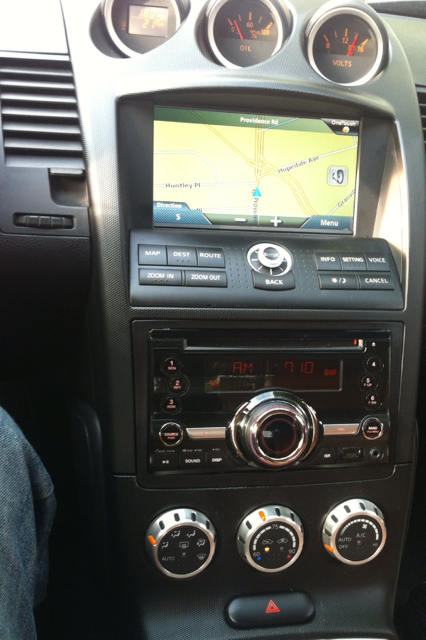
I followed some portions of this guide to replace my 05 cubby with an 03 cubby (retractable) and install my 7inch screen which I connected to my Garmin GVN53
https://my350z.com/forum/audio-video...y-monitor.html
https://my350z.com/forum/audio-video...y-monitor.html
Last edited by beezee; May 24, 2012 at 03:17 PM.
Here is mine:

I'm looking into doing this, and I'm trying to figure out what the differences are between the Magellan 1700, 1700MU, and 1700LM - and if they all fit the same.
Anyone in the know on this? TIA
Anyone in the know on this? TIA

I've gone with the 1700LM: it comes with unlimited map upgrades from Magellan included in the price. I found a refurbished one from the Magellan website for $117.
Last edited by Heritage; Jun 4, 2012 at 07:16 AM.

Thread
Thread Starter
Forum
Replies
Last Post
Colombo
Forced Induction
35
Nov 9, 2020 10:27 AM
Tochigi_236
Feedback & Suggestions for Our Forum
8
Sep 27, 2015 03:40 PM


