


Sirius PNP2 + iPod install on Z Roadster

Thread Starter
Registered User
Joined: Jun 2004
Posts: 743
Likes: 0
From: Tampa, Florida
 Sirius PNP2 + iPod install on Z Roadster
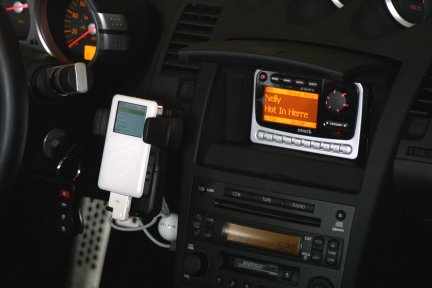
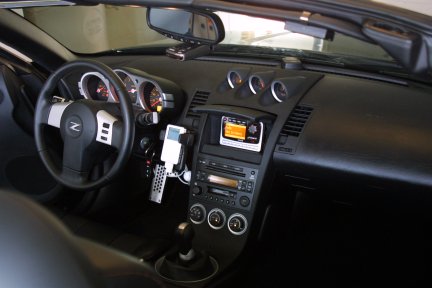
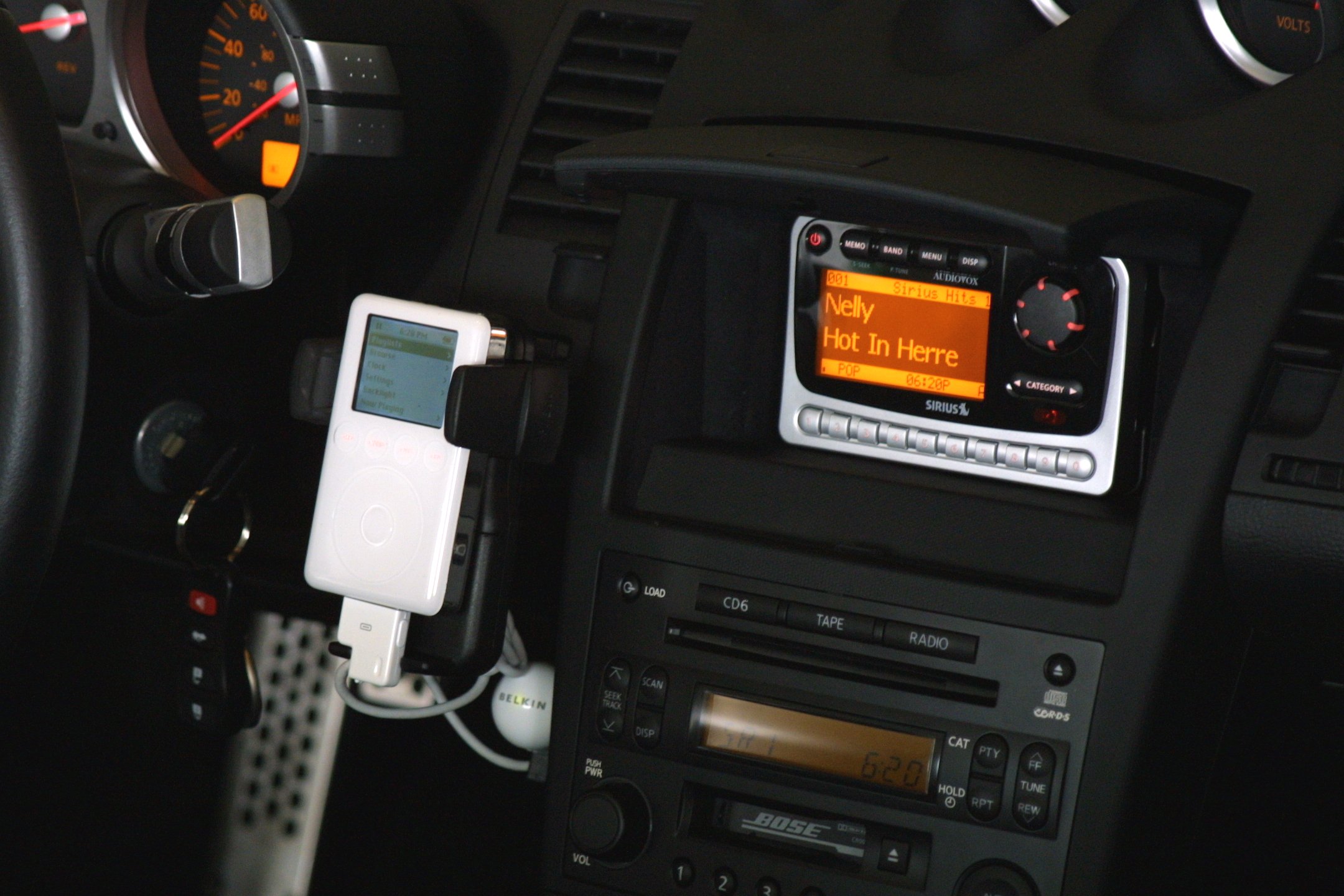
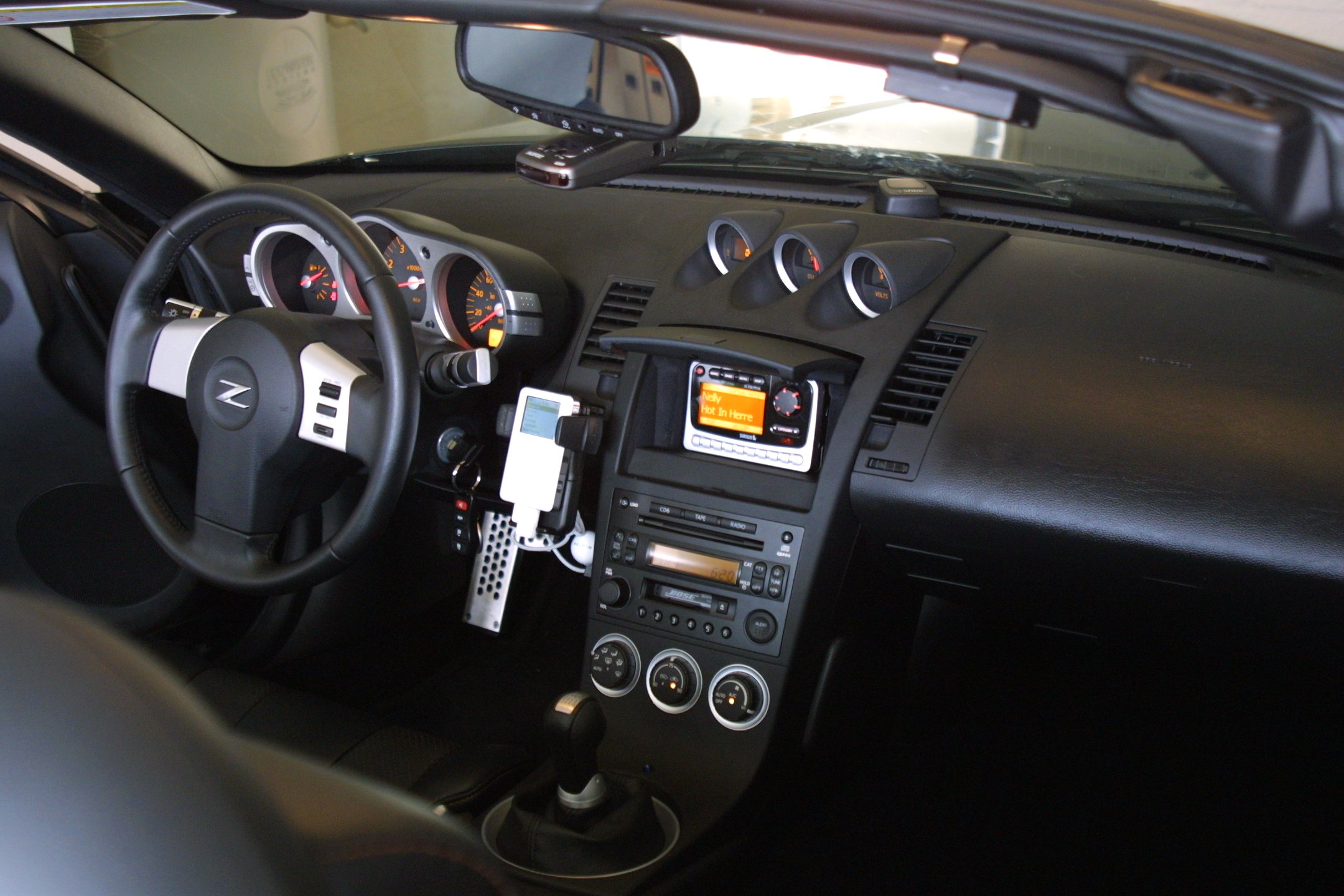
I finally got it - my Audiovox PNP2 Sirius tuner and my iPod both connected to my stock Bose radio using the Aux inputs from the PAC Audio adapter. Works like a champ!
Click on any of the pics for a really big pic (400-500KB each)
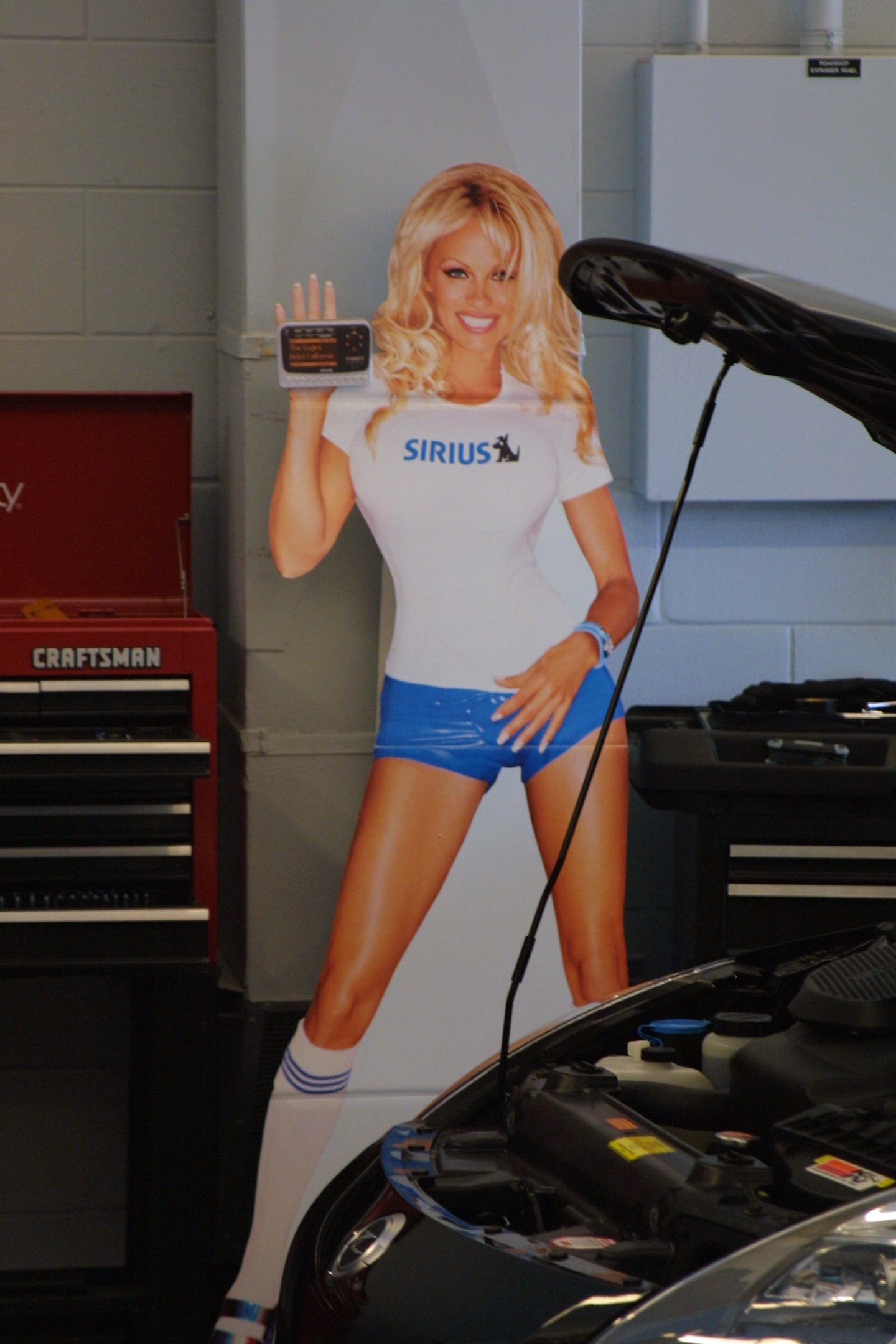
I even had Pam Anderson personally deliver my new tuner (well, kinda, not really )
)
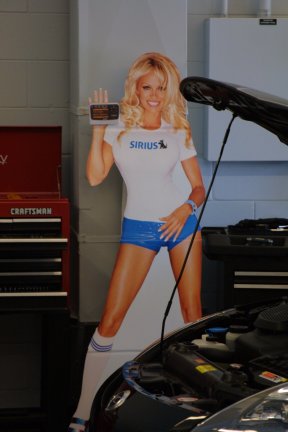
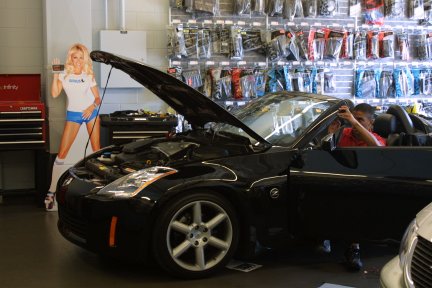
The guys at Circuit City did an outstanding job.
I used the Panavise InDash mount and Portagrip 2000. I connected both the iPod and the Sirius tuner to the Bose radio using the PAC Audio auxiliary input part number AAI-NIS. For the iPod I also used the Belkin auto kit which will charge the iPod and give me an amplified line into the Aux in for louder sound.
When putting the Audiovox PNP2 into the cubby hole, I had to "modify" the cradle (thanks Mike for the info) by removing the bottom two clips and disabling the top clip. The fit is very tight so you can't have the cradle clipping the tuner, otherwise there is no room for you to stick your fingers in there to unclip the tuner and remove it. I also had to cut a small piece of the plastic lip inside the cubby hole lid so it wouldnt press buttons on the tuner when I closed the lid.
Now my problem is deciding what music to hear!!!
Click on any of the pics for a really big pic (400-500KB each)
I even had Pam Anderson personally deliver my new tuner (well, kinda, not really
)
The guys at Circuit City did an outstanding job.

I used the Panavise InDash mount and Portagrip 2000. I connected both the iPod and the Sirius tuner to the Bose radio using the PAC Audio auxiliary input part number AAI-NIS. For the iPod I also used the Belkin auto kit which will charge the iPod and give me an amplified line into the Aux in for louder sound.
When putting the Audiovox PNP2 into the cubby hole, I had to "modify" the cradle (thanks Mike for the info) by removing the bottom two clips and disabling the top clip. The fit is very tight so you can't have the cradle clipping the tuner, otherwise there is no room for you to stick your fingers in there to unclip the tuner and remove it. I also had to cut a small piece of the plastic lip inside the cubby hole lid so it wouldnt press buttons on the tuner when I closed the lid.
Now my problem is deciding what music to hear!!!
Last edited by ZBoater; Jun 26, 2004 at 07:53 PM.

Thread Starter
Registered User
Joined: Jun 2004
Posts: 743
Likes: 0
From: Tampa, Florida
Originally posted by ncoastmd
zboater, can you give me a pic of your factory radio? i have a 2004 roadster and want to make sure we have the same radios. what button on the radio do you hit to switch to satellite band?
zboater, can you give me a pic of your factory radio? i have a 2004 roadster and want to make sure we have the same radios. what button on the radio do you hit to switch to satellite band?

Registered User
Joined: Dec 2003
Posts: 78
Likes: 0
From: La Verne CA
Re: Sirius PNP2 + iPod install on Z Roadster
Originally posted by ZBoater
I finally got it - my Audiovox PNP2 Sirius tuner and my iPod both connected to my stock Bose radio using the Aux inputs from the PAC Audio adapter. Works like a champ!
Click on any of the pics for a really big pic (400-500KB each)
I even had Pam Anderson personally deliver my new tuner (well, kinda, not really )
The guys at Circuit City did an outstanding job.
I used the Panavise InDash mount and Portagrip 2000. I connected both the iPod and the Sirius tuner to the Bose radio using the PAC Audio auxiliary input part number AAI-NIS. For the iPod I also used the Belkin auto kit which will charge the iPod and give me an amplified line into the Aux in for louder sound.
When putting the Audiovox PNP2 into the cubby hole, I had to "modify" the cradle (thanks Mike for the info) by removing the bottom two clips and disabling the top clip. The fit is very tight so you can't have the cradle clipping the tuner, otherwise there is no room for you to stick your fingers in there to unclip the tuner and remove it. I also had to cut a small piece of the plastic lip inside the cubby hole lid so it wouldnt press buttons on the tuner when I closed the lid.
Now my problem is deciding what music to hear!!!
I finally got it - my Audiovox PNP2 Sirius tuner and my iPod both connected to my stock Bose radio using the Aux inputs from the PAC Audio adapter. Works like a champ!
Click on any of the pics for a really big pic (400-500KB each)
I even had Pam Anderson personally deliver my new tuner (well, kinda, not really
)The guys at Circuit City did an outstanding job.
I used the Panavise InDash mount and Portagrip 2000. I connected both the iPod and the Sirius tuner to the Bose radio using the PAC Audio auxiliary input part number AAI-NIS. For the iPod I also used the Belkin auto kit which will charge the iPod and give me an amplified line into the Aux in for louder sound.
When putting the Audiovox PNP2 into the cubby hole, I had to "modify" the cradle (thanks Mike for the info) by removing the bottom two clips and disabling the top clip. The fit is very tight so you can't have the cradle clipping the tuner, otherwise there is no room for you to stick your fingers in there to unclip the tuner and remove it. I also had to cut a small piece of the plastic lip inside the cubby hole lid so it wouldnt press buttons on the tuner when I closed the lid.
Now my problem is deciding what music to hear!!!
PS,How is your reception with the dash mount antenna?
Last edited by lawnmore; Jun 29, 2004 at 03:27 PM.
Thread Starter
Registered User
Joined: Jun 2004
Posts: 743
Likes: 0
From: Tampa, Florida
Re: Re: Sirius PNP2 + iPod install on Z Roadster
Originally posted by lawnmore
Do you happen to have any pictures to go with your description of the modification to install the cradle? Was this your installers idea or did you get the idea elsewhere.Thanks RON
PS,How is your reception with the dash mount antenna?
Do you happen to have any pictures to go with your description of the modification to install the cradle? Was this your installers idea or did you get the idea elsewhere.Thanks RON
PS,How is your reception with the dash mount antenna?
No, sorry, I dont have any pictures. When I put the cradle in the cubby hole, it was pretty evident that it wouldn't fit, but I got confirmation from wmchew since he did it before me. I simply removed the bottom two clips with a screwdriver (I just snapped them off with the brute force method), and I stuck a little piece of plastic with superglue on the top button to keep it in the open position. Once installed you can't even tell.
The reception on the dash mount antenna is OK. I get 1 or 2 bars 80% of the time, 3 bars the rest of the time, with very few dropouts. It sounds just as good as my install on my PT Cruiser, which is on the roof.
I have since moved the antenna to be more on the dashboard on the drivers side and it seems to get even better reception. I will post a pic when I get a chance. The problem with the original location is that the installer did not remove the plastic pigtail on the antenna, and because of its position it was pressuring the antenna and it looked crooked, which drove me nuts. I have since relocated the antenna about 6-8 inches away from the windshield, placing it right on the middle of the dash on the driver's side (the passenger side has the big ol airbag). It is not as hidden, but it doesn't look bad either - it matches the black decor of the rest of the dash.

Registered User
Joined: Jun 2004
Posts: 12
Likes: 0
From: ca
Re: Re: Re: Sirius PNP2 + iPod install on Z Roadster
I've been debating where to put my sattelite antenna once I get my sattelite installed on my roadster. I never thought about putting it on the dash though. Have you thought about mounting the antenna inside the trunk by securing it on the inside of the trunklid? When I had my Nissan Murano, I hid the antenna inside the hatch. Since the hatch door was plastic, I was able to get a signal. I'll have to experiment with it on my roadster since the trunk lid is plastic as well. I am also going to hook up my Ipod as well as get XM once Alpine comes out with the components for my radio. Since I have an enthusiast model, I got the crappy radio. So this weekend I'm going to install an Alpine head unit. Hopefully by the end of the summer, Alpine will release the Ipod kit so I can control it with the HU. Please post a pic of your relocated antenna when you have a chance.
The reception on the dash mount antenna is OK. I get 1 or 2 bars 80% of the time, 3 bars the rest of the time, with very few dropouts. It sounds just as good as my install on my PT Cruiser, which is on the roof.
I have since moved the antenna to be more on the dashboard on the drivers side and it seems to get even better reception. I will post a pic when I get a chance. The problem with the original location is that the installer did not remove the plastic pigtail on the antenna, and because of its position it was pressuring the antenna and it looked crooked, which drove me nuts. I have since relocated the antenna about 6-8 inches away from the windshield, placing it right on the middle of the dash on the driver's side (the passenger side has the big ol airbag). It is not as hidden, but it doesn't look bad either - it matches the black decor of the rest of the dash. [/B][/QUOTE]
The reception on the dash mount antenna is OK. I get 1 or 2 bars 80% of the time, 3 bars the rest of the time, with very few dropouts. It sounds just as good as my install on my PT Cruiser, which is on the roof.
I have since moved the antenna to be more on the dashboard on the drivers side and it seems to get even better reception. I will post a pic when I get a chance. The problem with the original location is that the installer did not remove the plastic pigtail on the antenna, and because of its position it was pressuring the antenna and it looked crooked, which drove me nuts. I have since relocated the antenna about 6-8 inches away from the windshield, placing it right on the middle of the dash on the driver's side (the passenger side has the big ol airbag). It is not as hidden, but it doesn't look bad either - it matches the black decor of the rest of the dash. [/B][/QUOTE]

Was the PAC piece just plug and play? or was it a more involved install? I am getting mine put into my '03 tomorrow and want to know what to be expecting.
How do you like how it works? Better than an FM modulator I would have to assume?
How do you like how it works? Better than an FM modulator I would have to assume?
Trending Topics
Thread Starter
Registered User
Joined: Jun 2004
Posts: 743
Likes: 0
From: Tampa, Florida
Originally posted by BriA5
Was the PAC piece just plug and play? or was it a more involved install? I am getting mine put into my '03 tomorrow and want to know what to be expecting.
How do you like how it works? Better than an FM modulator I would have to assume?
Was the PAC piece just plug and play? or was it a more involved install? I am getting mine put into my '03 tomorrow and want to know what to be expecting.
How do you like how it works? Better than an FM modulator I would have to assume?
It works like a champ! The sound quality is much better than FM modulation, although I would put it a notch down from a CD.
Awesome. I can't wait till tomorrow. After 6 months of FM modulation, it is time for a step up.
Is the volume level about equal to the volume on your CDs? My FM modulator plays at a much lower level (for example, 15 on a CD is about equivalent to 22 on Sat. Radio FM modulated).
Is the volume level about equal to the volume on your CDs? My FM modulator plays at a much lower level (for example, 15 on a CD is about equivalent to 22 on Sat. Radio FM modulated).
Thread Starter
Registered User
Joined: Jun 2004
Posts: 743
Likes: 0
From: Tampa, Florida
Originally posted by BriA5
Is the volume level about equal to the volume on your CDs? My FM modulator plays at a much lower level (for example, 15 on a CD is about equivalent to 22 on Sat. Radio FM modulated).
Is the volume level about equal to the volume on your CDs? My FM modulator plays at a much lower level (for example, 15 on a CD is about equivalent to 22 on Sat. Radio FM modulated).

Registered User
Joined: Jan 2004
Posts: 37
Likes: 0
From: Chicago
What I did which worked really well is where I had everything installed, they took a pair of RCA's with a headphone jack on the other end and hooked it right into the iPod. The other end of course went into the HU. It works really great after trying it through the radio, in other cars cassete decks, etc. I put the iPod and the XM tuner right in the area where the nav would have gone, and they installed the AVN2454 for my HU. I have some pics posted. Need to scroll down the bottom of this other thread for what I did. The quality of the pics are not that great due to the camera I was using at that time.
http://www.350zmotoring.com/forums/s...&threadid=9969
http://www.350zmotoring.com/forums/s...&threadid=9969
Thread Starter
Registered User
Joined: Jun 2004
Posts: 743
Likes: 0
From: Tampa, Florida
The advantage of the Belkin auto kit is that it will recharge the iPod while using it, and it also has a built in amplifier. When using a cassette adapter this amplifier comes in very handy making it sound a lot better. And its also cheap.

Thread Starter
Registered User
Joined: Jun 2004
Posts: 743
Likes: 0
From: Tampa, Florida
Originally posted by junglist350Z
how loud is the ipod?
how loud is the ipod?
 Re: Sirius PNP2 + iPod install on Z Roadster
Originally posted by ZBoater
I finally got it - my Audiovox PNP2 Sirius tuner and my iPod both connected to my stock Bose radio using the Aux inputs from the PAC Audio adapter. Works like a champ!
Click on any of the pics for a really big pic (400-500KB each)
I even had Pam Anderson personally deliver my new tuner (well, kinda, not really )
The guys at Circuit City did an outstanding job.
I used the Panavise InDash mount and Portagrip 2000. I connected both the iPod and the Sirius tuner to the Bose radio using the PAC Audio auxiliary input part number AAI-NIS. For the iPod I also used the Belkin auto kit which will charge the iPod and give me an amplified line into the Aux in for louder sound.
When putting the Audiovox PNP2 into the cubby hole, I had to "modify" the cradle (thanks Mike for the info) by removing the bottom two clips and disabling the top clip. The fit is very tight so you can't have the cradle clipping the tuner, otherwise there is no room for you to stick your fingers in there to unclip the tuner and remove it. I also had to cut a small piece of the plastic lip inside the cubby hole lid so it wouldnt press buttons on the tuner when I closed the lid.
Now my problem is deciding what music to hear!!!
I finally got it - my Audiovox PNP2 Sirius tuner and my iPod both connected to my stock Bose radio using the Aux inputs from the PAC Audio adapter. Works like a champ!
Click on any of the pics for a really big pic (400-500KB each)
I even had Pam Anderson personally deliver my new tuner (well, kinda, not really
)The guys at Circuit City did an outstanding job.
I used the Panavise InDash mount and Portagrip 2000. I connected both the iPod and the Sirius tuner to the Bose radio using the PAC Audio auxiliary input part number AAI-NIS. For the iPod I also used the Belkin auto kit which will charge the iPod and give me an amplified line into the Aux in for louder sound.
When putting the Audiovox PNP2 into the cubby hole, I had to "modify" the cradle (thanks Mike for the info) by removing the bottom two clips and disabling the top clip. The fit is very tight so you can't have the cradle clipping the tuner, otherwise there is no room for you to stick your fingers in there to unclip the tuner and remove it. I also had to cut a small piece of the plastic lip inside the cubby hole lid so it wouldnt press buttons on the tuner when I closed the lid.
Now my problem is deciding what music to hear!!!
Zboater,
I was able to purchase a Satellite ready Bose 6 CD HU from a 350Z Roadster in Ebay. I am trying to copy your install of the PNP2 in the Nav cubby. However, I do not have an Ipod. Do I still need the PAC Audio auxilliary AAI-NIS? Besides the Audiovox PNP2 & car kit. What else would I need? Do I need a RF Modulator or could I now hook up directly into the aux. input of the Bose HU? How is your Sirius reception? I also got a Terk SIRMINI antenna which I am planning to install on the roof without the tail. Sorry for all the questions. BTW, how much did Circuit City charge you for this install?
Any who has feedback is very much appreciated. Thanks,
Jeff

Registered User
Joined: Mar 2006
Posts: 2
Likes: 0
From: tn
I found this thread just in the nick of time. I tried to install a new satelite receiver in my 2006 but was frustrated by the blue glow. I have a PNP2 which has orange like the rest of the gauges. I followed these steps and it worked out great.

Registered User
Joined: Sep 2012
Posts: 8
Likes: 0
From: Barksdale AFB
I finally got it - my Audiovox PNP2 Sirius tuner and my iPod both connected to my stock Bose radio using the Aux inputs from the PAC Audio adapter. Works like a champ!
Click on any of the pics for a really big pic (400-500KB each)
I even had Pam Anderson personally deliver my new tuner (well, kinda, not really )
The guys at Circuit City did an outstanding job.
I used the Panavise InDash mount and Portagrip 2000. I connected both the iPod and the Sirius tuner to the Bose radio using the PAC Audio auxiliary input part number AAI-NIS. For the iPod I also used the Belkin auto kit which will charge the iPod and give me an amplified line into the Aux in for louder sound.
When putting the Audiovox PNP2 into the cubby hole, I had to "modify" the cradle (thanks Mike for the info) by removing the bottom two clips and disabling the top clip. The fit is very tight so you can't have the cradle clipping the tuner, otherwise there is no room for you to stick your fingers in there to unclip the tuner and remove it. I also had to cut a small piece of the plastic lip inside the cubby hole lid so it wouldnt press buttons on the tuner when I closed the lid.
Now my problem is deciding what music to hear!!!
Click on any of the pics for a really big pic (400-500KB each)
I even had Pam Anderson personally deliver my new tuner (well, kinda, not really
)The guys at Circuit City did an outstanding job.
I used the Panavise InDash mount and Portagrip 2000. I connected both the iPod and the Sirius tuner to the Bose radio using the PAC Audio auxiliary input part number AAI-NIS. For the iPod I also used the Belkin auto kit which will charge the iPod and give me an amplified line into the Aux in for louder sound.
When putting the Audiovox PNP2 into the cubby hole, I had to "modify" the cradle (thanks Mike for the info) by removing the bottom two clips and disabling the top clip. The fit is very tight so you can't have the cradle clipping the tuner, otherwise there is no room for you to stick your fingers in there to unclip the tuner and remove it. I also had to cut a small piece of the plastic lip inside the cubby hole lid so it wouldnt press buttons on the tuner when I closed the lid.
Now my problem is deciding what music to hear!!!


Thread
Thread Starter
Forum
Replies
Last Post
Extreme Dimensions
Southern California
0
Sep 24, 2015 03:35 PM
