


Removable Nav Install

Thread Starter
Registered User
Joined: Oct 2002
Posts: 237
Likes: 0
From: New Jersey
 Removable Nav Install
Well I suck at having a sense of direction, something that's bitten me all my life, but I was determined to get nav on my next vehicle. However, the more I thought about it, the more I wanted the base Z, so I could save 5000-6000 bucks for go-fast mods, instead of paying for stuff I didn't want, like homelink or xenon headlights. So I bought the base and looked around for aftermarket alternatives. Thinking more, which tends to get one in trouble, led me to feel like I wanted to save weight and money, which I would earmark for further modification, so I decided on the Garmin Streetpilot III. It cost around $700 on Amazon, and I can move it to the wife's car if we're taking that, or I can take it out of mine just to save weight when I'm tearing it up.
The Garmin has been nothing but excellent at doing what I expected of it. The voice and display are excellent. The database covers the whole US. And the interface is intuitive.
Since the Z doesn't really have a good dash space, and the bean bag mount looked much better in my wife's car, I jury-rigged this contraption to hold it in the Z. It's probably not to everyone's taste, but it works really well for me, so I thought I'd share in case anyone else was thinking of going this direction.
I stole this idea from another message on this site, who stole it from an Audi board, I believe. So it's not my original idea.
Anyway, get a length of 2" PVC pipe from the hardware store, and cut off 6" or whatever looks like a good fit for your car. Wrap duct tape around the base so it'll have a nice snug fit in the passenger-side drink holder. Check fit in the car before going on. It should be just snug enough that you can put one layer of electrical tape around and you'll still be able to get it in the holder. Buy one black hard vinyl floor tile (or suitable alternative) and use a jigsaw to cut a circle the size of the pipe. Glue the circle to the top of the pipe using liquid nails or the like. Then to give it a less-crappy subdued look, wrap the whole gizmo in black, low gloss electrical tape. Finally, take the permanent adhesive disk for the Garmin, and trim it to match the tile you glued on top. Adhere the mount and let the whole thing dry overnight.
The finished product:
The Garmin has been nothing but excellent at doing what I expected of it. The voice and display are excellent. The database covers the whole US. And the interface is intuitive.
Since the Z doesn't really have a good dash space, and the bean bag mount looked much better in my wife's car, I jury-rigged this contraption to hold it in the Z. It's probably not to everyone's taste, but it works really well for me, so I thought I'd share in case anyone else was thinking of going this direction.
I stole this idea from another message on this site, who stole it from an Audi board, I believe. So it's not my original idea.
Anyway, get a length of 2" PVC pipe from the hardware store, and cut off 6" or whatever looks like a good fit for your car. Wrap duct tape around the base so it'll have a nice snug fit in the passenger-side drink holder. Check fit in the car before going on. It should be just snug enough that you can put one layer of electrical tape around and you'll still be able to get it in the holder. Buy one black hard vinyl floor tile (or suitable alternative) and use a jigsaw to cut a circle the size of the pipe. Glue the circle to the top of the pipe using liquid nails or the like. Then to give it a less-crappy subdued look, wrap the whole gizmo in black, low gloss electrical tape. Finally, take the permanent adhesive disk for the Garmin, and trim it to match the tile you glued on top. Adhere the mount and let the whole thing dry overnight.
The finished product:


Thread Starter
Registered User
Joined: Oct 2002
Posts: 237
Likes: 0
From: New Jersey
Read the post. I said it's not for everyone, but it might work for some, and hopefully will help those that want a removeable setup, or one they can share between cars. Personally, I'm going to spend the extra money on FI and suspension mods, and pull this out at the track, which is it's chief advantage. If you want a stereo or computer on wheels with LEDs and big fiberglass kits, then you have different priorities than I do, but I don't waste time harshing on those posts just to be an ***.
Registered User
Joined: Feb 2003
Posts: 407
Likes: 0
From: Largo, Fl
I think it's a good idea. Doesn't look as bad as my passport 8500 stuck to my window with a clothesline going to the power outlet 
The thing doesn't get in your way, is in perfect sight, doesn't slide around and is interchangeable with your other vehicles. Oh, and I can definitely relate with the sense of direction thing.
The thing doesn't get in your way, is in perfect sight, doesn't slide around and is interchangeable with your other vehicles. Oh, and I can definitely relate with the sense of direction thing.
Trending Topics
Thread Starter
Registered User
Joined: Oct 2002
Posts: 237
Likes: 0
From: New Jersey
Thanks for the positive reply Thack! I wasn't going to post, since I knew we have a lot of perfectionists and it's not suitable for that kind of priority, but I thought I owed it to the board, since I've gotten so much useful info here on things I never would have even known to ask about. But then jerky boy is the first to reply, and I was thinking "why did I bother?"



Registered User
Joined: Sep 2002
Posts: 226
Likes: 1
From: California
It came from the Audiworld forum, of which I'm a member of. The pvc thing is really a neat install in Audis. I have the SPIII and I'm going to make one for my allroad. Now I can use it for my Z too! Good job!!!
Thread Starter
Registered User
Joined: Oct 2002
Posts: 237
Likes: 0
From: New Jersey
Alphared,
I didn't want to cut in the Nav slot, which I would have to with the Garmin. I also wanted a setup that came out quickly and easily, so I could put it in the wife's car on a moment's notice or take out if I'm paring all the excess weight out (besides myself). Additionally I saw that area being used as a FI gauge display area in one of the supercharger applications, and I kind of liked it for that purpose. The big advantage of using the Nav slot would be anti-theft protection, since I feel obliged to disconnect and hide the unit when the car is parked off-base.
Thanks Lex!
I didn't want to cut in the Nav slot, which I would have to with the Garmin. I also wanted a setup that came out quickly and easily, so I could put it in the wife's car on a moment's notice or take out if I'm paring all the excess weight out (besides myself). Additionally I saw that area being used as a FI gauge display area in one of the supercharger applications, and I kind of liked it for that purpose. The big advantage of using the Nav slot would be anti-theft protection, since I feel obliged to disconnect and hide the unit when the car is parked off-base.
Thanks Lex!
Thread Starter
Registered User
Joined: Oct 2002
Posts: 237
Likes: 0
From: New Jersey
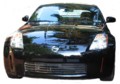
BTW, the flash camera makes the mount look a lot more obvious than it really is. When you're driving with it it kind of sits in the shadow of the GPS, so it really isn't noticeable. Since we have a lot of reservists on base without cars, I'll give one a ride if I see them walking in the same direction I'm going, and they always assume its some kind of fancy mount until I point out it's just some wrapped PVC in the drink holder. Like I said, it's not perfect and won't stand up to car show scrutiny, but it looks pretty decent for day to day driving, especially if you need the advantages it provides in this setup.
Registered User
Joined: May 2003
Posts: 77
Likes: 0
From: PA
I like it!
ttheisen93, I have to admit that I am horrible at directions myself
 I definitely like the idea of being able to move it from one car to another. I was thinking about getting one like yours, but I have a couple of questions.
How does it compare with the typical DVD Navigation systems? Where does it get uploads from? Is is fast? Is the information "limited" since it is all stored in the unit?
If I could find a way to not spend $2,500 on Navigation I would be overjoyed!
I definitely like the idea of being able to move it from one car to another. I was thinking about getting one like yours, but I have a couple of questions. How does it compare with the typical DVD Navigation systems? Where does it get uploads from? Is is fast? Is the information "limited" since it is all stored in the unit?
If I could find a way to not spend $2,500 on Navigation I would be overjoyed!
Thread Starter
Registered User
Joined: Oct 2002
Posts: 237
Likes: 0
From: New Jersey
Haanz,
I did a lot of research on this unit before buying, and had many of the same questions you do. From the research I did, I found that it compared very favorably with other navigation systems, in terms of database and unit features. The unit is the deluxe model, and it comes with a couple of disks covering the entire US. Since it isn't a DVD system, you can't put the whole shebang on the included 128 MB data card, but I am able to store all of New Jersey, half of NY, down to DC, and halfway across PA. For any drive but a cross-country that is way more than adequate, and if I was going to do a cross-country, I could narrow the area to a ~100 mile wide corridor covering the route I planned to take, or take my laptop with me (which I'd do anyway) and load a new map set every few days and have a couple of new states stored every day.
It is very fast and it has a very nice voice feature and rerouting if you miss your turn. The satellite antenna is very strong and hasn't broken lock under thick overhanging tree cover or power lines. The only time the screen redraw slows down is if you have it set to "track up" and the detail turned up to maximum, since the map has to rotate around your car cursor. I prefer to have "North up" and have the car cursor rotate on the map, since it gives me a more intuitive feel to what direction I'm going and where I'm at in relation to everything else.
The screen itself is obviously a little smaller than some of the installed screens, but it offers a really easy to read level of detail and graphics.
I particularly like how it tells you what road you're on, which direction you're going, and what cross street is coming up next, invaluable if you're looking for a tough to see turn.
The routing feature is really nice, with voice alerts that tell you you're going to turn left in 2.5 miles or whatever, then again at about a mile, then at 300-400 feet, which is pretty much when you should be hitting the turn signal and slowing down.
The price can't be beat, and now that they're bundling the deluxe package for $700 ($900 with $200 in rebates), you get a beanbag-type mount that has a non-slip (not even in hard braking) neoprene base for your other car, an adhesive mount base for your Z, a fully unlocked database for the entire US, a 128 MB data card, which is the biggest they make, and a power cord/speaker.
When I stopped and considered that I could have my navigation problem solved in both cars, and even rentals if I take it with me on trips, as well as saving a bunch of money I'd rather use on other mods, as well as the capability to remove it when I want to go light and fast, I decided that this was the choice that made the most sense for me.
I did a lot of research on this unit before buying, and had many of the same questions you do. From the research I did, I found that it compared very favorably with other navigation systems, in terms of database and unit features. The unit is the deluxe model, and it comes with a couple of disks covering the entire US. Since it isn't a DVD system, you can't put the whole shebang on the included 128 MB data card, but I am able to store all of New Jersey, half of NY, down to DC, and halfway across PA. For any drive but a cross-country that is way more than adequate, and if I was going to do a cross-country, I could narrow the area to a ~100 mile wide corridor covering the route I planned to take, or take my laptop with me (which I'd do anyway) and load a new map set every few days and have a couple of new states stored every day.
It is very fast and it has a very nice voice feature and rerouting if you miss your turn. The satellite antenna is very strong and hasn't broken lock under thick overhanging tree cover or power lines. The only time the screen redraw slows down is if you have it set to "track up" and the detail turned up to maximum, since the map has to rotate around your car cursor. I prefer to have "North up" and have the car cursor rotate on the map, since it gives me a more intuitive feel to what direction I'm going and where I'm at in relation to everything else.
The screen itself is obviously a little smaller than some of the installed screens, but it offers a really easy to read level of detail and graphics.
I particularly like how it tells you what road you're on, which direction you're going, and what cross street is coming up next, invaluable if you're looking for a tough to see turn.
The routing feature is really nice, with voice alerts that tell you you're going to turn left in 2.5 miles or whatever, then again at about a mile, then at 300-400 feet, which is pretty much when you should be hitting the turn signal and slowing down.
The price can't be beat, and now that they're bundling the deluxe package for $700 ($900 with $200 in rebates), you get a beanbag-type mount that has a non-slip (not even in hard braking) neoprene base for your other car, an adhesive mount base for your Z, a fully unlocked database for the entire US, a 128 MB data card, which is the biggest they make, and a power cord/speaker.
When I stopped and considered that I could have my navigation problem solved in both cars, and even rentals if I take it with me on trips, as well as saving a bunch of money I'd rather use on other mods, as well as the capability to remove it when I want to go light and fast, I decided that this was the choice that made the most sense for me.
Registered User
Joined: May 2003
Posts: 77
Likes: 0
From: PA
Thanks ttheisen93! I am sooooo excited I was just on the website and I saw that they are launching a new version that is integrated with a Palm, the iQue3600. It seems a little cheaper, and I think that I can buy a memory card to boost the range. Do you think that I can see these pieces at a Cicuit City or something like that? Now I know what I will be doing all weekend
I was just on the website and I saw that they are launching a new version that is integrated with a Palm, the iQue3600. It seems a little cheaper, and I think that I can buy a memory card to boost the range. Do you think that I can see these pieces at a Cicuit City or something like that? Now I know what I will be doing all weekend
Registered User
Joined: Sep 2002
Posts: 226
Likes: 1
From: California
I concur with everything ttheisen93 posted. It's a great little unit. Most of all, it's PORTABLE so you can bring it with you to whatever car you're driving that day. Yes, an installed system is nicer, but if you use several cars then it can get darn expensive.
Thread Starter
Registered User
Joined: Oct 2002
Posts: 237
Likes: 0
From: New Jersey
Haanz,
That Palm unit looks pretty neat and is also from Garmin, but it doesn't come out until August, and ends up costing about the same as the Streetpilot III with the auto and travel kits added in to provide the same mounting and cabling that the Streetpilot III comes with. Actually, if you buy a memory card it will end up being more expensive than the SP III, so be careful! It could have some advantages in that you can easily bring it with you, which alleviates the whole getting it stolen problem. And if you don't have a PDA already, all the better.
Which reminds me, if you read reviews from other people about these units, don't leave a portable GPS in plain sight in your car! Something that costs $700 and can be grabbed without having to tear your dash apart is just too tempting to the lowlifes. It's really easy to hide in the space behind the passenger's seat, so don't forget or you might come back to find a hole in your window, a rock on your seat, and no GPS!
I had to drop the Z off at the dealer today and I used the GPS to get me there, which worked out really well since its hard to get to and there's always traffic. The two times I saw a traffic jam ahead I just got off the freeway and it automatically re-routed me, saving a ton of time. The roads in NJ are really confusing and I never would have had the guts to get off the freeway without it guiding me.
That Palm unit looks pretty neat and is also from Garmin, but it doesn't come out until August, and ends up costing about the same as the Streetpilot III with the auto and travel kits added in to provide the same mounting and cabling that the Streetpilot III comes with. Actually, if you buy a memory card it will end up being more expensive than the SP III, so be careful! It could have some advantages in that you can easily bring it with you, which alleviates the whole getting it stolen problem. And if you don't have a PDA already, all the better.
Which reminds me, if you read reviews from other people about these units, don't leave a portable GPS in plain sight in your car! Something that costs $700 and can be grabbed without having to tear your dash apart is just too tempting to the lowlifes. It's really easy to hide in the space behind the passenger's seat, so don't forget or you might come back to find a hole in your window, a rock on your seat, and no GPS!
I had to drop the Z off at the dealer today and I used the GPS to get me there, which worked out really well since its hard to get to and there's always traffic. The two times I saw a traffic jam ahead I just got off the freeway and it automatically re-routed me, saving a ton of time. The roads in NJ are really confusing and I never would have had the guts to get off the freeway without it guiding me.

