


how to shoot pix properly?

 how to shoot pix properly?
so you guys keep posting these awesome pics of your cars and they all look great. I especially like the ones of the cars in a lit garage or undersome lights at night...looks awesome.
Anyone have any tips on how to get the pics to come out looking amazing? i found this really cool garage near me where i want to shoot my car. has really good lighting etc and I have a nikon coolpix 3100 and a tripod but im not sure what settings i should be using and what lighting etc? nightmode? flash or no flash? what length exposures?
thanks
Anyone have any tips on how to get the pics to come out looking amazing? i found this really cool garage near me where i want to shoot my car. has really good lighting etc and I have a nikon coolpix 3100 and a tripod but im not sure what settings i should be using and what lighting etc? nightmode? flash or no flash? what length exposures?
thanks

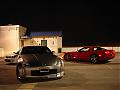
i just used a long exposure for this one. like 2.5 sec or so iso of 200 i believe, no flash, used a nikon d70. no photoshop was done except for the nissan logo. just got lucky with that one.


Does your camera have manual controls for shutterspeed? Play around with the times if it does also no flash is needed. You will need a tripod so there is no blur. Try to have your car lit up by a light of some sort. I am just a beginner myself at taking pics. good luck and post em up!



Originally Posted by backagain
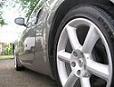
thanks, here is another one i took today, not of my car but you can see how the ISO / frame rate can set up a great pic, too much ISO will give you a grainy pic.

 This has been post processed [colors] as well, huh? What lens did you shoot with?
Trending Topics
Registered User
Joined: Jun 2005
Posts: 595
Likes: 0
From: Kansas City Kansas
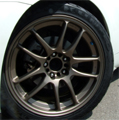
Here is one I have of my old car

It wasnt DARK in there, but it was bright either
Lower the ISO, up the exposure time until you get it right. Its digital, all it cost is time. I sometimes take 15 of the same photo b4 i get the right lighting
AND def. use a tripod
It wasnt DARK in there, but it was bright either
Lower the ISO, up the exposure time until you get it right. Its digital, all it cost is time. I sometimes take 15 of the same photo b4 i get the right lighting
AND def. use a tripod
Originally Posted by yobri
Nice shot! This has been post processed [colors] as well, huh? What lens did you shoot with?
This has been post processed [colors] as well, huh? What lens did you shoot with?
hmm i have a nikon 3100 and i dont think i can mess around with the ISO on it at all i think it just sets it up automatically but i could be wrong. Those pics are pretty sweet. I need to shoot like that!!

Registered User
Joined: May 2004
Posts: 21
Likes: 0
From: Phoenix
hey - you can use your coolpix and still get amazing results - the best way to go about it (if your camera is at all like my 2100 coolpix) is to set the flash mode to OFF and if you have an outdoor mode on the camera try that - it usually tries to meter from ambient (available) light, so you will need to use a tripod. Just try to shoot a couple from the same angle to play with the different settings (maybe party mode might create some funky lights, depending on the place you shoot).... If you get some crisp photos and just need some color tweaking, I would be happy to help you out, just send them my way
shelly.ivy@gmail.com
Best of luck on your photo shoot! Let us know how it turns out!!
- Shelly (pro-photog wife of metalaxe
shelly.ivy@gmail.com
Best of luck on your photo shoot! Let us know how it turns out!!
- Shelly (pro-photog wife of metalaxe

Registered User
Joined: Jan 2003
Posts: 155
Likes: 0
From: U.S.A.
Do no hesitate to use Photoshop and a good RAW converter, post processing is VERY important to any professional photographer and amatuers alike. Just like back in the film days, post processing in the dark room was a must.
Don't get me wrong though, you should always make the picture look as good as possible straight out of the camera, never have the I can always fix it later during post processing attitude.
Don't get me wrong though, you should always make the picture look as good as possible straight out of the camera, never have the I can always fix it later during post processing attitude.
Last edited by DJDaizzy; Sep 15, 2005 at 11:11 AM.

Registered User
Joined: Sep 2005
Posts: 20
Likes: 0
From: Pasadangerous, Ca.
some cool ways to make ur pictures of your car more defined and what not is.. if you have photoshop you go to image adjustments.. levels and adjust the lil arrows around.. and also if you go to image adjustments color balance you can fool around with the colors.. but i thnk the best is .. curves.. go to image adjustment curves and experiment and learn how to change the highlights around.. it makes your car look wet.. when its waxed.. at least it did to mine.. and if you wanna just change one of the colors around.. say your cars blue. just go to image adjustments selective color and click on the blue. on the top and you can change the different types of arrow saround making your car stand out more. its a selective adjustment on specific colors :] hope that helped 
Originally Posted by DJDaizzy
Do no hesitate to use Photoshop and a good RAW converter, post processing is VERY important to any professional photographer and amatuers alike. Just like back in the film days, post processing in the dark room was a must.
Don't get me wrong though, you should always make the picture look as good as possible straight out of the camera, never have the I can always fix it later during post processing attitude.
Don't get me wrong though, you should always make the picture look as good as possible straight out of the camera, never have the I can always fix it later during post processing attitude.
Registered User
Joined: Jan 2003
Posts: 155
Likes: 0
From: U.S.A.
Originally Posted by yobri
What CRT are you using for PP? I tried it with my flat panel, and the colors just don't quite come out right... that is, with on images viewed on different screens and on print. I don't really want to spend the 150 or so dollars on a Spyder... So I've heard that CRT is the way to go...
Originally Posted by DJDaizzy
I don't have a CRT, I use a 23" Sony SDM-P234 for the PC and a 23" Apple LCD for the Mac, I usually do all my editing on the Mac, I highly recommand the Spyder though, it helps a lot, all of my monitors are calibrated with it once a month, I highly recommand it if you're doing photography and editing.


Thread
Thread Starter
Forum
Replies
Last Post
m_0g
Audio, Video & Electronics (DIY)
12
Jun 3, 2021 10:05 AM

