


playing around with the D70s


 playing around with the D70s
Well got to go out today and play with the camera a bit. I was planning on playing with my new ND4 filter but by the time I got around to figure out the right settings my battery died  I took this pics of my back yard though. a little bit of editing and I think it came out pretty cool. I will try to go out tomorrow and play with the ND filter and see what I can come up with.

By salicrupr, shot with NIKON D70s at 2007-11-01

By salicrupr, shot with NIKON D70s at 2007-11-01
I took this pics of my back yard though. a little bit of editing and I think it came out pretty cool. I will try to go out tomorrow and play with the ND filter and see what I can come up with.By salicrupr, shot with NIKON D70s at 2007-11-01
By salicrupr, shot with NIKON D70s at 2007-11-01

Originally Posted by MR_X
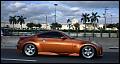
here is another shot from today.

Originally Posted by ctwentytwo
Nice shot. You could get a more dramatic shot with more compression with a longer focal length than the 70mm you used and going back.
 So you mean that if I used my 70-300mm lens, I would have a more dramatic shot?
Last edited by MR_X; Nov 15, 2007 at 04:22 AM.
Trending Topics
Originally Posted by MR_X
Explain, please! So you mean that if I used my 70-300mm lens, I would have a more dramatic shot?
So you mean that if I used my 70-300mm lens, I would have a more dramatic shot?Or a shorter focal length can make the last beam look much further (making the vanishing point closer).
I got better by retaking shots. Sometimes, I'm excited to see what's on the card and get disappointed by the results. I try to see what I did wrong and I just go back, and try what I was trying to capture what I had mind, over and over again. That's why many of my pics look similar.


OK, just try the getting all those beams in at 300mm... or if you have to go too far back, try 150mm. Use the same composition at those longer focal lengths.
That last beam, the rocks, and everything in the background will be magnified. This is called compression, or flattening. You see the effect between the two shots... just try it at 150mm +
...sorry, I had to try to PS this...

You can try PS CS3, open up the preferences, go to "file handling" and clik on the Prefer Adobe Camera RAW for JPEG Files... if you're shooting JPEG. It'll convert your JPEG files to a more universal RAW file... DNG. Then try the "Clarity" slider. It'll give more punch to your photos. Also used the lens correction slider to add the vignette. Adjusted vibrance and saturation, gave the sky a bluer tinge with color temp... which actually should be set with a meter... oh well, I think it works here.
You can download the trial CS3 at Adobe.
I do most of my post processing with Camera RAW, which is the Adobe RAW plug-in. Play around with it.
That last beam, the rocks, and everything in the background will be magnified. This is called compression, or flattening. You see the effect between the two shots... just try it at 150mm +
...sorry, I had to try to PS this...
You can try PS CS3, open up the preferences, go to "file handling" and clik on the Prefer Adobe Camera RAW for JPEG Files... if you're shooting JPEG. It'll convert your JPEG files to a more universal RAW file... DNG. Then try the "Clarity" slider. It'll give more punch to your photos. Also used the lens correction slider to add the vignette. Adjusted vibrance and saturation, gave the sky a bluer tinge with color temp... which actually should be set with a meter... oh well, I think it works here.
You can download the trial CS3 at Adobe.
I do most of my post processing with Camera RAW, which is the Adobe RAW plug-in. Play around with it.
Last edited by ctwentytwo; Nov 15, 2007 at 05:44 PM.
ah, I see now. sorry not to big on photography terms. I just see it and shoot it and try to get the look with out the terms. If the weather clears up tomorrow I try it. I also want to do a HDR of the same place.

Registered User
Joined: Oct 2005
Posts: 220
Likes: 0
From: Northern Va
ctwentytwo - That is an awesome PP you did with the original pic. My brother has CS3 on his pc and i may have to start playing around with it. that picsture just came alive.
MR X - I love the scenic backgrounds you take with your camera. Looking forward to those HDR pics.
MR X - I love the scenic backgrounds you take with your camera. Looking forward to those HDR pics.

Registered User
iTrader: (7)
Joined: Apr 2007
Posts: 1,334
Likes: 0
From: Northridge/Canoga Park, SOCAL
Question. On a 150 and 300 mm lense does that mean that it's zoomed back making the picture look deeper and wider angled with more color depth? I'm trying to understand how and why a lense can change how the picture looks.
I'm just assuming 300mm meand its wider angle (and wider range of color????)
I'm just assuming 300mm meand its wider angle (and wider range of color????)
Uhateit, here's an explanation.
Here's compression/flattening at work when you go with a longer focal length.
Look at the vertical beams shot with the short and long end of my 28-135mm lens. Look how much the background in the 135mm shot has been magnified, but the car size is rougly the same compared to 28mm. The beams now look to be stacked/compressed/flattened in the 135mm shot. You'll need lots of room though for some of these compression shots.
Shot at 28mm

Shot at 135mm

Here's compression/flattening at work when you go with a longer focal length.
Look at the vertical beams shot with the short and long end of my 28-135mm lens. Look how much the background in the 135mm shot has been magnified, but the car size is rougly the same compared to 28mm. The beams now look to be stacked/compressed/flattened in the 135mm shot. You'll need lots of room though for some of these compression shots.
Shot at 28mm
Shot at 135mm
Last edited by ctwentytwo; Nov 16, 2007 at 08:31 AM.



Thread
Thread Starter
Forum
Replies
Last Post
bcoffee20
Zs & Gs For Sale
5
Nov 19, 2015 06:39 PM