


Cubby space


 Cubby space
I'm looking into getting Kenwood DNX7100 and I hear that an additional screen can't display navigation info. So, I want to know if this double din unit, 7100 will fit in the cubby. Do you know if 7100 will fit in the cubby?

New Member


Joined: Dec 2006
Posts: 7,337
Likes: 204
From: Edina, Minnesota
^^ Darn, for sure… Mounting the navigation screen in the upper/forward cubby is the optimum viewing position for this type of device. The double-din position is a little low, and you must divert your eyes from the “road” to look at the screen.
That is one reason I went with separate components (a “black box” navigation device with a detached monitor) for my navigation setup. That gives me a much better and safer watch on the screen.
--Spike
That is one reason I went with separate components (a “black box” navigation device with a detached monitor) for my navigation setup. That gives me a much better and safer watch on the screen.
--Spike


Originally Posted by Spike100
That is one reason I went with separate components (a “black box” navigation device with a detached monitor) for my navigation setup. That gives me a much better and safer watch on the screen.
--Spike
--Spike
New Member
Joined: Dec 2006
Posts: 7,337
Likes: 204
From: Edina, Minnesota
I installed these:
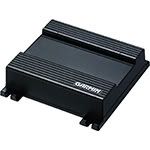
Garvin GVN 52
Installed in the rear cubby behind the driver's seat.
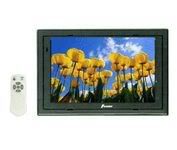
Power Acoustik PT-700MHR 7” LCD monitor (same as Farenheit T-7000MHR and NESA Vision NSM-7005)
Installed in the upper/forward cubby.
It's a nice navigation setup. It stores the application software and maps in fast ROM and doesn't use DVD disks. The map and text display is razor sharp on the Power Acoustik LCD. Garmin uses Navteq's database. I've already done an instant map and software update by simply downloading from Garmin's site.
--Spike
Garvin GVN 52
Installed in the rear cubby behind the driver's seat.
Power Acoustik PT-700MHR 7” LCD monitor (same as Farenheit T-7000MHR and NESA Vision NSM-7005)
Installed in the upper/forward cubby.
It's a nice navigation setup. It stores the application software and maps in fast ROM and doesn't use DVD disks. The map and text display is razor sharp on the Power Acoustik LCD. Garmin uses Navteq's database. I've already done an instant map and software update by simply downloading from Garmin's site.
--Spike
Trending Topics
New Member
Joined: Dec 2006
Posts: 7,337
Likes: 204
From: Edina, Minnesota
Originally Posted by davidz33
i'm gonna look into the "blackbox" option now kk
but I really like dnx7100 though lol
but I really like dnx7100 though lol
The Kenwood DNX7100 is just a terrific unit. Garmin is the OEM supplier for the navigation part so you get the same great features (Navteq maps, intuitive application software, very fast ROM performance, instant updates on Garmin's website, and much more) I have with the Garmin GVN 52. And, the Kenwood has touch screen function which the Garmin GVN 52 does not.
A feature (lacking in the Kenwood) that would be very cool is the ability to simultaneously output the navigation video to two displays. That way you could install a $100 monitor in the upper/forward cubby where you could watch the map more safely, but operate the unit with the lower touch screen. The double-din space is the best position for operating a touch screen since it is right in front of the shifter where you position your hand. The upper/forward cubby is the best position for the navigation screen since it requres miniml diversion of your line of vision from the road ahead.
--Spike
thanks for your input spike
Basically, i'm trying to display nav in the cubby, but i heard from dnx7100 users that nav screen cannot be routed to auxillary screen.
More I get to know about all these, harder time to make a decision
Basically, i'm trying to display nav in the cubby, but i heard from dnx7100 users that nav screen cannot be routed to auxillary screen.
More I get to know about all these, harder time to make a decision

Thread
Thread Starter
Forum
Replies
Last Post
