


dvd screen help


Thread Starter
Registered User
iTrader: (5)
Joined: Feb 2008
Posts: 345
Likes: 0
From: Baumholder Germany
 dvd screen help
so im planning on ordering a screen to fit in the nav cubby and im not sure what type of head unit i will need to have the screen work. is there anything else that i would need for to complete this?
i hate the look of the flip out monitors. thats why i want to do it this way.
i hate the look of the flip out monitors. thats why i want to do it this way.



there are quite a bit of post on what screens fit in the oem cubby area...some with little to no modification....
others require you buy the 03 center cubby dash...
do a search on it..
-j
others require you buy the 03 center cubby dash...
do a search on it..
-j

yea, takes alot of searching to fiqure it all out.
took me a while to realize what I wanted just wasnt possible.
Any headunit with a video out would play on a regular screen.
Since you have an 03, you should be set to just buy a slim screen.
Your nav cubby goes up, then slides inward?
One kind of like this, but im not 100% sure if its the exact same model number as this..
http://salestores.com/poacpt7wihel.html
should fit in the area, but again, im not 100%.
took me a while to realize what I wanted just wasnt possible.
Any headunit with a video out would play on a regular screen.
Since you have an 03, you should be set to just buy a slim screen.
Your nav cubby goes up, then slides inward?
One kind of like this, but im not 100% sure if its the exact same model number as this..
http://salestores.com/poacpt7wihel.html
should fit in the area, but again, im not 100%.
Thread Starter
Registered User
iTrader: (5)
Joined: Feb 2008
Posts: 345
Likes: 0
From: Baumholder Germany
yes the lip slides up and in. thank you guys.
ive been looking up some screens and other set ups people have. i love the way the power acoustik screen seems to fit in the cubby.
ive seen modules for navigation. are these just for certain units or is this something you can add to almost any unit?
ive been looking up some screens and other set ups people have. i love the way the power acoustik screen seems to fit in the cubby.
ive seen modules for navigation. are these just for certain units or is this something you can add to almost any unit?

New Member


Joined: Dec 2006
Posts: 7,337
Likes: 204
From: Edina, Minnesota
Spdtckts,
If I understand your question(s):
I also believe you have a 2003 Z. That makes installing a LCD monitor in the upper/forward cubby very easy. Paul350Z provides very clear instructions for installing a 7” LCD monitor in the Z’s upper/forward cubby in this thread:https://my350z.com/forum/audio-build...tallation.html
Here are three different ways to accomplish an installation of a 7” LCD monitor providing DVD function and navigation:
Option 1) Install a LCD monitor and use a Garmin GVN 53 Blackbox for navigation, and any source for DVD (H/U with DVD player (Single-Din or Double-Din H/U), or a separate DVD player device.
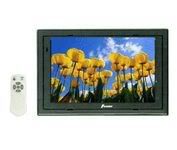
Examples of 7” LCD monitor are Farenheit T-7000MHR, Power Acoustik PT-700MHR, or NESA Vision NSM-7005 7" monitor. They are actually all the same monitor, but sold under different brand names.
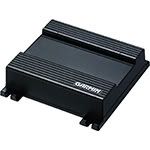
Garmin GVN 53 Blackbox Navigation Unit
Pros: This is the most inexpensive setup for navigation and DVD display. Navigation is extremely fast. Installation is literally “Drop-in.”
Cons: This setup does not support touch-screen function, but instead uses an RF controller for navigation.
====================================
Option 2) Install a Kenwood LZ-702W Touchscreen Monitor and the Kenwood KNA-G510 Navigation Box, and any source for DVD (H/U with DVD player (Single-Din or Double-Din H/U), or a separate DVD player device.
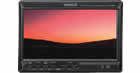
Kenwood LZ-702W Touchscreen 7” Monitor
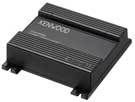
Kenwood KNA-G510 Navigation Box
Pros: This also an inexpensive setup for navigation and DVD display, and the monitor supports touch-screen function. Navigation is extremely fast. Installation is almost “drop-in” (the exception being you need to provide access to the lower buttons on the monitor, which is accomplished by making the lower finisher piece on the Z’s cubby removable).
Cons: Hardly any, but the Kenwood LZ-702W Touchscreen 7” Monitor has a hideaway box that you must mount somewhere away from the monitor. In the Z, the best position for the hideaway box is one of the large cubbies behind either the driver’s or passenger’s seat.
====================================
Option 3) Install a Kenwood KOS System: Kenwood KOS-L702 Remote Touch-Screen Monitor and a Kenwood Controller (KOS-V500 or KOS-V1000), combined with just about anything you want.
Kenwood KOS-L702 Remote Touch-Screen Monitor
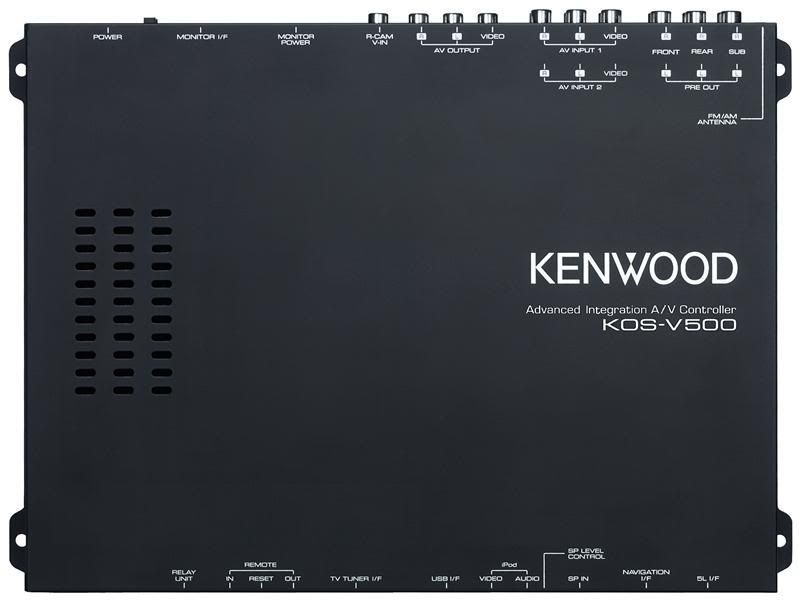
Kenwood KOS –V500 Controller
Pros: It supports just about anything you want to do with a car CES. You can add anything you want (including a CarPC), and drive the entire system using the KOS-L702 Remote Touch-Screen Monitor
or the handheld IR controller. It’s a scalable structure that you cannot “outrun.”
Cons: It is somewhat expensive, especially when you add a lot of components.
I hope this wasn’t too long a post that is boring.
--Spike
If I understand your question(s):
- You want to install a LCD screen in the Z’s upper/forward cubby.
- You want to use the LCD to display DVD’s, and possibly use this for navigation as well.
I also believe you have a 2003 Z. That makes installing a LCD monitor in the upper/forward cubby very easy. Paul350Z provides very clear instructions for installing a 7” LCD monitor in the Z’s upper/forward cubby in this thread:https://my350z.com/forum/audio-build...tallation.html
Here are three different ways to accomplish an installation of a 7” LCD monitor providing DVD function and navigation:
Option 1) Install a LCD monitor and use a Garmin GVN 53 Blackbox for navigation, and any source for DVD (H/U with DVD player (Single-Din or Double-Din H/U), or a separate DVD player device.
Examples of 7” LCD monitor are Farenheit T-7000MHR, Power Acoustik PT-700MHR, or NESA Vision NSM-7005 7" monitor. They are actually all the same monitor, but sold under different brand names.
Garmin GVN 53 Blackbox Navigation Unit
Pros: This is the most inexpensive setup for navigation and DVD display. Navigation is extremely fast. Installation is literally “Drop-in.”
Cons: This setup does not support touch-screen function, but instead uses an RF controller for navigation.
====================================
Option 2) Install a Kenwood LZ-702W Touchscreen Monitor and the Kenwood KNA-G510 Navigation Box, and any source for DVD (H/U with DVD player (Single-Din or Double-Din H/U), or a separate DVD player device.
Kenwood LZ-702W Touchscreen 7” Monitor
Kenwood KNA-G510 Navigation Box
Pros: This also an inexpensive setup for navigation and DVD display, and the monitor supports touch-screen function. Navigation is extremely fast. Installation is almost “drop-in” (the exception being you need to provide access to the lower buttons on the monitor, which is accomplished by making the lower finisher piece on the Z’s cubby removable).
Cons: Hardly any, but the Kenwood LZ-702W Touchscreen 7” Monitor has a hideaway box that you must mount somewhere away from the monitor. In the Z, the best position for the hideaway box is one of the large cubbies behind either the driver’s or passenger’s seat.
====================================
Option 3) Install a Kenwood KOS System: Kenwood KOS-L702 Remote Touch-Screen Monitor and a Kenwood Controller (KOS-V500 or KOS-V1000), combined with just about anything you want.
Kenwood KOS-L702 Remote Touch-Screen Monitor
Kenwood KOS –V500 Controller
Pros: It supports just about anything you want to do with a car CES. You can add anything you want (including a CarPC), and drive the entire system using the KOS-L702 Remote Touch-Screen Monitor
or the handheld IR controller. It’s a scalable structure that you cannot “outrun.”
Cons: It is somewhat expensive, especially when you add a lot of components.
I hope this wasn’t too long a post that is boring.
--Spike
Thread Starter
Registered User
iTrader: (5)
Joined: Feb 2008
Posts: 345
Likes: 0
From: Baumholder Germany
spike you get this all perfect! thank you so much. im going to go with option 1. i know the rf button controls might get anoying but ill just teach my wife to use it 
thank you so much!
thank you so much!


Trending Topics
Thread Starter
Registered User
iTrader: (5)
Joined: Feb 2008
Posts: 345
Likes: 0
From: Baumholder Germany
from the write up he just gave and some links i found around the site. it doesn't seem to be that hard.
and im willing to sacrifice a touch screen so i don't have to make the bottom part of the cubby removable. im sure its easy but would rather not do it.
parts on order now. just looking for a good head unit!
and im willing to sacrifice a touch screen so i don't have to make the bottom part of the cubby removable. im sure its easy but would rather not do it.
parts on order now. just looking for a good head unit!

Thread
Thread Starter
Forum
Replies
Last Post
Workshop12
Exterior & Interior
256
Mar 23, 2020 01:45 PM
bcoffee20
Zs & Gs For Sale
5
Nov 19, 2015 06:39 PM
xirtam
Zs & Gs For Sale
5
Oct 3, 2015 02:06 PM
Tochigi_236
Feedback & Suggestions for Our Forum
8
Sep 27, 2015 03:40 PM
