


Lighting / HDR Editing


 Lighting / HDR Editing
Hello. I'm fairly new to the photography scene. I just got a DSLR and I'm still learning my ways around it.
I feel like I'm doing something wrong. Yes I like leaving the pictures close to raw with only adjusted levels and exposure.
Then again lately I've been trying to play with different exposure shots, and try to get an HDR looking effect out of them.
But IDK... something doesn't look right.
Normally I use 3-4 different exposure shots.
For this one I used 2 because I happen to like the angle and I only caught 2.
This was around 7:30 pm, sun had just finish setting and it was cloudy ... first was with SS at 1/25 and the darker at 1/50 i believe. Aperture was like 4.0.
But I feel as it it looks too gloomy or too vibrant ...
any hints or i-dears?


I honestly think I'm over doing it
any help or and suggestions is greatly appreciated.
btw, I don't use any preset filters or software that already does everything for you. I manually adjust the shots in Photoshop
I feel like I'm doing something wrong. Yes I like leaving the pictures close to raw with only adjusted levels and exposure.
Then again lately I've been trying to play with different exposure shots, and try to get an HDR looking effect out of them.
But IDK... something doesn't look right.
Normally I use 3-4 different exposure shots.
For this one I used 2 because I happen to like the angle and I only caught 2.
This was around 7:30 pm, sun had just finish setting and it was cloudy ... first was with SS at 1/25 and the darker at 1/50 i believe. Aperture was like 4.0.
But I feel as it it looks too gloomy or too vibrant ...
any hints or i-dears?
I honestly think I'm over doing it
any help or and suggestions is greatly appreciated.
btw, I don't use any preset filters or software that already does everything for you. I manually adjust the shots in Photoshop
Last edited by gordenZ; May 14, 2011 at 08:21 AM.

Registered User
Joined: Feb 2007
Posts: 908
Likes: 5
From: UK
2nd 3rd pics are far better mate, the focus on the first looks a little off or may be just shoot at F8 to give sharper image?
Also are you shooting off a tripod or hand held and then using the raw file to produce the HDR shots?
Also are you shooting off a tripod or hand held and then using the raw file to produce the HDR shots?
So its click / change shutter speed ... click change shutter speed ... for about 4 to 5 shots
added black borders
Last edited by gordenZ; May 14, 2011 at 08:23 AM.

Registered User
Joined: Nov 2006
Posts: 2,541
Likes: 0
From: Houston, TX
nice set!
I can't comment on the HDR since I don't really do HDR's at all..
On the other hand, may I just say that next time around try shooting with a tripod and on AV mode... Up the aperture to > 8.0 and set the ISO to the lowest.. that should automatically adjust your shutterspeed.. reason I say this because the picture doesn't look as sharp. It could be my monitor (at work) though IDK..
I can't comment on the HDR since I don't really do HDR's at all..
On the other hand, may I just say that next time around try shooting with a tripod and on AV mode... Up the aperture to > 8.0 and set the ISO to the lowest.. that should automatically adjust your shutterspeed.. reason I say this because the picture doesn't look as sharp. It could be my monitor (at work) though IDK..

I prefer the lighting in the first photo, especially the blue off the wall... although the other pics are a bit more in focus.
Since you are shooting in RAW you can probably get away with just adjusting exposure post production and shoot 1 or 2 shots instead of 4 or 5.
What program are you using to layer and mask?

Since you are shooting in RAW you can probably get away with just adjusting exposure post production and shoot 1 or 2 shots instead of 4 or 5.
What program are you using to layer and mask?
I prefer the lighting in the first photo, especially the blue off the wall... although the other pics are a bit more in focus.
Since you are shooting in RAW you can probably get away with just adjusting exposure post production and shoot 1 or 2 shots instead of 4 or 5.
What program are you using to layer and mask?
Since you are shooting in RAW you can probably get away with just adjusting exposure post production and shoot 1 or 2 shots instead of 4 or 5.
What program are you using to layer and mask?
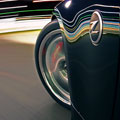

Keep in mind when you are editing, that HDR is about extending the tonal range of your image beyond what the camera can capture in a single exposure. I see large areas of near solid black with no detail in the grill area, tires, exhaust, etc.
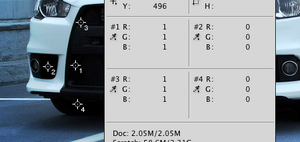
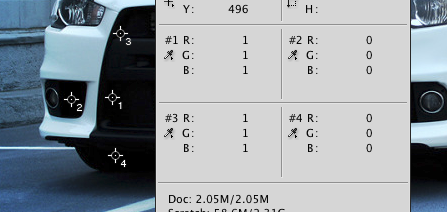
You can also reference your histogram to see if you're clipping your shadows and highlights, which you are:
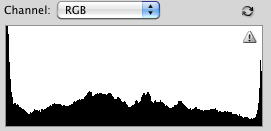
You can also reference your histogram to see if you're clipping your shadows and highlights, which you are:
Trending Topics
Keep in mind when you are editing, that HDR is about extending the tonal range of your image beyond what the camera can capture in a single exposure. I see large areas of near solid black with no detail in the grill area, tires, exhaust, etc.

You can also reference your histogram to see if you're clipping your shadows and highlights, which you are:

You can also reference your histogram to see if you're clipping your shadows and highlights, which you are:

I normally get the white balance down first before taking hdr shots, also when you start off with a darker shot, as someone posted you will lose a lot of detail in your shots.
I know its a different type of photography but the concept is the same - I started off with a lighted shot (first one) and ended up with a very detailed HDR shot (light HDR mask), I did +3 and -3 exposure (typically).


HDR should be a minimum of 3 shots, can be as many shots as you want (but it'll get too distorted if its more than 6, in my experience)
I normally get the white balance down first before taking hdr shots, also when you start off with a darker shot, as someone posted you will lose a lot of detail in your shots.
I know its a different type of photography but the concept is the same - I started off with a lighted shot (first one) and ended up with a very detailed HDR shot (light HDR mask), I did +3 and -3 exposure (typically).
I normally get the white balance down first before taking hdr shots, also when you start off with a darker shot, as someone posted you will lose a lot of detail in your shots.
I know its a different type of photography but the concept is the same - I started off with a lighted shot (first one) and ended up with a very detailed HDR shot (light HDR mask), I did +3 and -3 exposure (typically).
I will be taking another shot this weekend.
Awesome.
Take a ton of shots, try the P mode with +1 -1, then +2 -2, then +3 -3, make sure you don't move the camera and play around with it when you get it home.
You can always throw out the shots you don't need so take as many as you can.
Also make sure you take shots on both sides of the sun, in direct sunlight and standing with it behind you.
Take a ton of shots, try the P mode with +1 -1, then +2 -2, then +3 -3, make sure you don't move the camera and play around with it when you get it home.
You can always throw out the shots you don't need so take as many as you can.
Also make sure you take shots on both sides of the sun, in direct sunlight and standing with it behind you.

Thread
Thread Starter
Forum
Replies
Last Post
ars88
Zs & Gs For Sale
18
Apr 4, 2016 07:52 AM
