


Major ground noise after dvd hookup


Thread Starter
Registered User
Joined: Aug 2005
Posts: 1,225
Likes: 0
From: San Mateo
 Major ground noise after dvd hookup
I just installed my system and no ground noise whatsoever.. but as soon as I hook up an external dvd player connected to an external 7" screen.. I can hear major ground whining noise when I drive... what's up with that? I separated all connections from the amp power wires and followed all connection rules.. but stil lhear major engine whining noise 


Thread Starter
Registered User
Joined: Aug 2005
Posts: 1,225
Likes: 0
From: San Mateo
The noise - is it with all sources (you messed up your previous good ground system) or with just the DVD (it's ground is bad/it's bad)?
It's like a high pitch whining noise.. can't bare it.. even if I had **** on.. the only whining noise I wanna hear when I play **** are the slutty hookers

For reference.. when I hooked up the external DVD player.. I ground it in the same point as the rest of my system and also separated the rca video/audio cables away from the rest of the wiring..

New Member


Joined: Dec 2006
Posts: 7,337
Likes: 204
From: Edina, Minnesota
Originally Posted by Hybrid90
I just installed my system and no ground noise whatsoever.. but as soon as I hook up an external dvd player connected to an external 7" screen.. I can hear major ground whining noise when I drive... what's up with that? I separated all connections from the amp power wires and followed all connection rules.. but stil lhear major engine whining noise
--Spike
Thread Starter
Registered User
Joined: Aug 2005
Posts: 1,225
Likes: 0
From: San Mateo
Paul's answer is correct. Your problem is a faulty ground. It sounds as though the bad ground may be with your LCD screen. I know how frustrating this can be. You need to test your grounds.
My problem is.. the lcd only has a display cable all bundled together with good knows what other cables are intertwined together coming out of the lcd and into the brain of the dvd player. How am I suppose to test the lcd to see if the ground is bad or not when there's no ground wire to it? What else can be done to minimize the ground noise?
It's soooo ******* annoying when EVERYTHING sounds badass but when you want to watch a dvd.. it whines like crazy! It's really pissing me off.. please help!

New Member
Joined: Dec 2006
Posts: 7,337
Likes: 204
From: Edina, Minnesota
^^ I've been there, so I share your pain. It is just so darn frustrating...
A wiring harness can be mysterious, especially if it has shrouding that hides the individual wires inside the harness. But, the harness usually follows protocols for color-indicators on individual wires, so this a good place to start.
Red = Power Line (supplying the 12v power to the device). This line runs through the car's ACC and is switched ON/OFF.
Yellow = Constant Power Source to the device, and always receives power, whether or not the car's ACC is ON or OFF. Devices that use constant power (the yellow wire) should be intelligent (have an internal battery and recognize excessive draw) so they do not drain the car's battery.
Black = Ground. But, I have seen devices where the ground was a white wire (totally stupid thing to do).
Sounds as though you have a harness from the LCD screen that plugs into the DVD player. Right? (If my premise is wrong, none of the following advice is useful.)
If this is the case, you should slit the shroud on the harness, locate the black wire (the ground wire), and attach this wire to a reliable ground. If you have an instrument that tests grounds, you are looking for a resistance value off this wire to the ground that matches your other ground(s).
Truthfully I am not expert here, but I have solved most of my problems (the same problem you describe here) by simply fixing a deficient ground.
Hopefully Paul350Z (who know much more than I do about this 12v stuff) is still looking at this thread. He can often fix this type of problem posted by a Forum member if he has adequate information (complete configuration descriptions). He has helped (providing the correct answer) on two of my posts when I needed a solution.
--Spike
A wiring harness can be mysterious, especially if it has shrouding that hides the individual wires inside the harness. But, the harness usually follows protocols for color-indicators on individual wires, so this a good place to start.
Red = Power Line (supplying the 12v power to the device). This line runs through the car's ACC and is switched ON/OFF.
Yellow = Constant Power Source to the device, and always receives power, whether or not the car's ACC is ON or OFF. Devices that use constant power (the yellow wire) should be intelligent (have an internal battery and recognize excessive draw) so they do not drain the car's battery.
Black = Ground. But, I have seen devices where the ground was a white wire (totally stupid thing to do).
Sounds as though you have a harness from the LCD screen that plugs into the DVD player. Right? (If my premise is wrong, none of the following advice is useful.)
If this is the case, you should slit the shroud on the harness, locate the black wire (the ground wire), and attach this wire to a reliable ground. If you have an instrument that tests grounds, you are looking for a resistance value off this wire to the ground that matches your other ground(s).
Truthfully I am not expert here, but I have solved most of my problems (the same problem you describe here) by simply fixing a deficient ground.
Hopefully Paul350Z (who know much more than I do about this 12v stuff) is still looking at this thread. He can often fix this type of problem posted by a Forum member if he has adequate information (complete configuration descriptions). He has helped (providing the correct answer) on two of my posts when I needed a solution.
--Spike
Thread Starter
Registered User
Joined: Aug 2005
Posts: 1,225
Likes: 0
From: San Mateo
Sounds as though you have a harness from the LCD screen that plugs into the DVD player. Right? (If my premise is wrong, none of the following advice is useful.)
Trending Topics
New Member
Joined: Dec 2006
Posts: 7,337
Likes: 204
From: Edina, Minnesota
Originally Posted by Hybrid90
Well the shrinkwrapped harness runs from the lcd to the brain of the dvd which is separate from the dvd player. So when I splice the fat wire open.. I cut up the negative wire and ground it at each end to a good ground source? Am I getting that right? Cuz you know how the wire has two heads (one to the lcd and other to the brain).. so basically just cut the ground wire and ground both ends?
 I didn't quite understand your first post and may be giving wrong info. I'm still confused about your setup.
It sounds as though the harness runs from the LCD to a hideaway box, and then another harness runs from the hideaway box to the DVD player? Where do you have the ground to the car? Is the ground coming from the hideaway box? ... or, the DVD player?
--Spike
Thread Starter
Registered User
Joined: Aug 2005
Posts: 1,225
Likes: 0
From: San Mateo
It sounds as though the harness runs from the LCD to a hideaway box, and then another harness runs from the hideaway box to the DVD player? Where do you have the ground to the car? Is the ground coming from the hideaway box? ... or, the DVD player?
The hideaway brain has it's own power harness with a ground.. I grounded that to all the amp grounds.
The display cable (which I think is the main problem) runs from the lcd to the brain. The cable is all shrink wrapped together and at each end is a special adapter that connects to the lcd and the other end connects to the brain.
the noise ONLY comes on when the lcd is turned on.. when it's off.. everything is nice and quiet.. so I take it it's the lcd cable that's giving me the prob.
I'm really tempted to splice up the lcd cable to see if there's a ground in there but kinda scared cuz it's a discontinued item and the cable itself costs like $60
that's if theys till sell it.Let's say IF I was to cut up the harness.. how would I go about ground the lcd cable? I need this fixed soon cuz I'm taking a long road trip during July 4th and want the wife to have something to watch or else I'll NEVER hear the end of her nagging about this and that in the car!!!!!!!!!!!! <----- VERY SERIOUS MATTER LOL

New Member
Joined: Dec 2006
Posts: 7,337
Likes: 204
From: Edina, Minnesota
Well... crap... I'm not sure what to tell you.  It sounds as though the wiring harness from the LCD includes a ground wire, and that ground wire (inside the harness) goes to the hideaway box that has a ground that is supposed to properly ground both devices (the hideaway box and the LCD screen).
I think the first thing to try is changing the ground point of your hideaway box, instead of grounding this to the same ground you use for your amps (You said: "The hideaway brain has it's own power harness with a ground. I grounded that to all the amp grounds.")
I understand why you need to solve this quickly. The clock is ticking if you are planning a road trip over the 4th. At least you have the weekend and some uninterrupted time to work on this.
--Spike
It sounds as though the wiring harness from the LCD includes a ground wire, and that ground wire (inside the harness) goes to the hideaway box that has a ground that is supposed to properly ground both devices (the hideaway box and the LCD screen).I think the first thing to try is changing the ground point of your hideaway box, instead of grounding this to the same ground you use for your amps (You said: "The hideaway brain has it's own power harness with a ground. I grounded that to all the amp grounds.")
I understand why you need to solve this quickly. The clock is ticking if you are planning a road trip over the 4th. At least you have the weekend and some uninterrupted time to work on this.
--Spike

Originally Posted by Spike100
Well... crap... I'm not sure what to tell you. It sounds as though the wiring harness from the LCD includes a ground wire, and that ground wire (inside the harness) goes to the hideaway box that has a ground that is supposed to properly ground both devices (the hideaway box and the LCD screen).
I think the first thing to try is changing the ground point of your hideaway box, instead of grounding this to the same ground you use for your amps (You said: "The hideaway brain has it's own power harness with a ground. I grounded that to all the amp grounds.")
I understand why you need to solve this quickly. The clock is ticking if you are planning a road trip over the 4th. At least you have the weekend and some uninterrupted time to work on this.
--Spike
It sounds as though the wiring harness from the LCD includes a ground wire, and that ground wire (inside the harness) goes to the hideaway box that has a ground that is supposed to properly ground both devices (the hideaway box and the LCD screen).I think the first thing to try is changing the ground point of your hideaway box, instead of grounding this to the same ground you use for your amps (You said: "The hideaway brain has it's own power harness with a ground. I grounded that to all the amp grounds.")
I understand why you need to solve this quickly. The clock is ticking if you are planning a road trip over the 4th. At least you have the weekend and some uninterrupted time to work on this.
--Spike
Change your hideaway unit's ground point to another one at least 6-12 inches away from the one it's connected to now. Preferably a completely different piece of metal.
Last edited by Ichigo; Jun 28, 2007 at 06:07 PM.
Thread Starter
Registered User
Joined: Aug 2005
Posts: 1,225
Likes: 0
From: San Mateo
I think the first thing to try is changing the ground point of your hideaway box, instead of grounding this to the same ground you use for your amps
+1
Change your hideaway unit's ground point to another one at least 6-12 inches away from the one it's connected to now. Preferably a completely different piece of metal.
Change your hideaway unit's ground point to another one at least 6-12 inches away from the one it's connected to now. Preferably a completely different piece of metal.
New Member
Joined: Dec 2006
Posts: 7,337
Likes: 204
From: Edina, Minnesota
Originally Posted by Ichigo
Update?
I believe the OP's problem was based in his system's grounds. I say this because I just fixed a very frustrating (and similar) problem by establishing good grounds. My project was sending voice commands from a Garmin GVN52 Blackbox GPS to my front (Focal 165V Slim component) speakers using the mute line on the Garmin GVN52 to an add-on box (Peripheral SPK Two Channel Speaker Switcher).
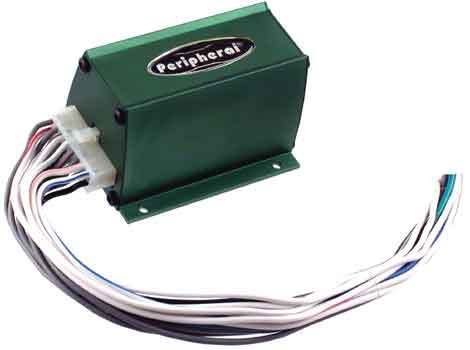
Peripheral SPK Two Channel Speaker Switcher
I added a 100K/ohm resistor to the ground, and tested this setup with the car's ignition at ACC. It worked perfectly. I put all the panels back into place, and drove the car. Unfortunately, what worked with the car's ignition at ACC didn't work at all when driving the car (with its ignition ON).
Well.. Crap! Ok... try something else... I'm thinking "bad ground." Disassembled the panels, and put a 200K/ohm resistor on the ground. Now... nothing worked (ignition at ACC or fully ON driving the car).
Ok... try a 150K/ohm resistor. OMG... it works! ...with any ignition (ACC or ON and driving). Problem solved!
Of course, I have totally "jacked" the Op's thread.
 Hopefully he has a great time with his gf during the July 4th Holiday, reads this extension of this thread upon his return, and doesn't flame me.
--Spike

Thread
Thread Starter
Forum
Replies
Last Post
wanderingstuden
Maintenance & Repair
6
Jan 28, 2016 07:03 PM


