


Kenwood Navigation in 03 cubby install


Thread Starter
Registered User
iTrader: (46)
Joined: Apr 2007
Posts: 1,150
Likes: 0
From: South Bay, CA
 Kenwood Navigation in 03 cubby install
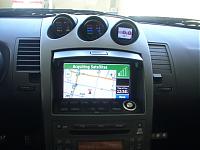
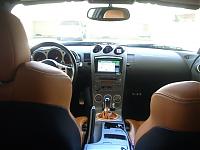
I recently had the Kenwood LZ702W touch screen with KNAG510 navigation with the CCD2000 rearview camera installed. I wanted to give props to Mando aka THEDUKE, he did a great install and I highly recommend him! He even helped me install my PLX gauges. This unit is amazing in every way.
EDIT:
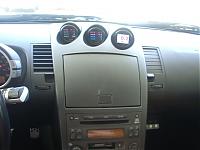
I went a step further and found the OEM navi finisher. It required only a little bit of modification and looks nice and clean. I can even close my cubby door, although it has a wierd stain on it. Obviously the buttons have no functionality and this mod is absolutely unneccessary, but I did it anyway. It fit perfectly and I didn't lose any of the screen visibilty.
Here I just wanted to point out the awesome viewing angle this thing has. Notice the camera views all the way to the otherside of the door. I hope you guys get the picture.
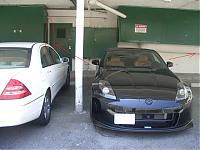
I know some wanted to see the camera at night, I'll try and remember to get a picture of it as soon as I can.
EDIT:
I went a step further and found the OEM navi finisher. It required only a little bit of modification and looks nice and clean. I can even close my cubby door, although it has a wierd stain on it. Obviously the buttons have no functionality and this mod is absolutely unneccessary, but I did it anyway. It fit perfectly and I didn't lose any of the screen visibilty.

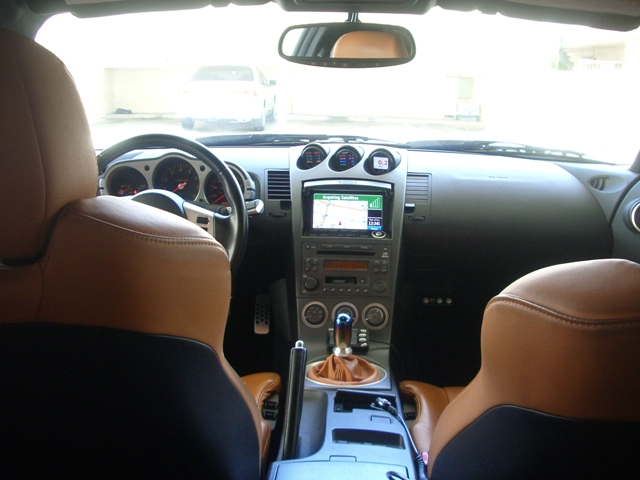

Here I just wanted to point out the awesome viewing angle this thing has. Notice the camera views all the way to the otherside of the door. I hope you guys get the picture.

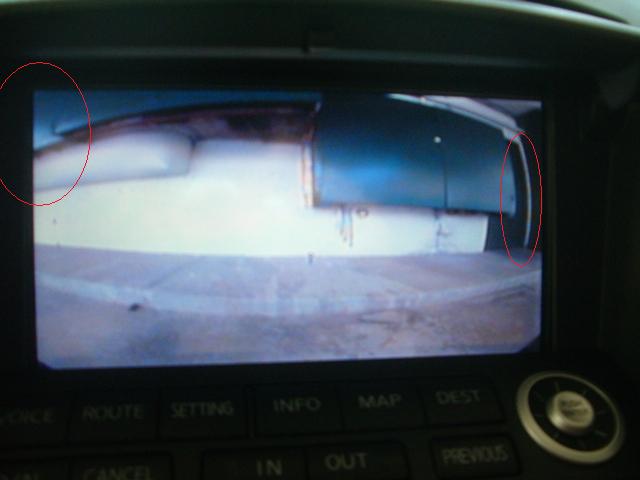
I know some wanted to see the camera at night, I'll try and remember to get a picture of it as soon as I can.
Last edited by Kal_El; Jun 7, 2008 at 12:01 PM.


how do you like your ccd 2000 at night? my shop installed my 2nd night vision cam and still sux... i can't see nothing at night from all the glares. i'm thinking ccd 2k.. third times a charm... and yeah duke's a stand up guy.. I bought my dnx-8120 from him.
Thread Starter
Registered User
iTrader: (46)
Joined: Apr 2007
Posts: 1,150
Likes: 0
From: South Bay, CA
I'll try and post some pics of the camera tonight, but I have no complaints so far. At night it works great and even duke will tell you, this camera has a wide view, you can see about 2ft from each side of the bumper.
I also have an FX and I wish we had something like the guiding lines, helps a bunch with parking.
I also have an FX and I wish we had something like the guiding lines, helps a bunch with parking.

Trending Topics

New Member


Joined: Dec 2006
Posts: 7,337
Likes: 204
From: Edina, Minnesota
Very nice. It looks OEM.
I really like the Kenwood LZ702W touchscreen and the Kenwood KOS-L702 touchscreen LCD monitors. They are razor sharp, have accurate and great color, display well at offset viewing-angles, and provide great touchscreen function.
Question: Has anyone mounted a Kenwood LZ702W or KOS-L702 touchscreen LCD in a 2006 upper/forward cubby?
I’ve received a few PM’s asking about this. I’ve never done this, so I cannot provide advice from personal experience. It’s certainly possible, but I’m sure requires some (probably minor) custom fabrication. Both screens are identical in size with similar cases, so if you can do it with one, the other would fit the same installation process.
--Spike
I really like the Kenwood LZ702W touchscreen and the Kenwood KOS-L702 touchscreen LCD monitors. They are razor sharp, have accurate and great color, display well at offset viewing-angles, and provide great touchscreen function.
Question: Has anyone mounted a Kenwood LZ702W or KOS-L702 touchscreen LCD in a 2006 upper/forward cubby?
I’ve received a few PM’s asking about this. I’ve never done this, so I cannot provide advice from personal experience. It’s certainly possible, but I’m sure requires some (probably minor) custom fabrication. Both screens are identical in size with similar cases, so if you can do it with one, the other would fit the same installation process.
--Spike
Thread Starter
Registered User
iTrader: (46)
Joined: Apr 2007
Posts: 1,150
Likes: 0
From: South Bay, CA
Thanks Spike. It plays the OEM role better than OEM. A few people have already checked it out and say they rather have this than the OEM unit. The only downside to this is that the speaker is mounted behind so even with the volume turned all the way up it is hard to hear, other than that it is perfect.
New Member
Joined: Dec 2006
Posts: 7,337
Likes: 204
From: Edina, Minnesota
I see you have the OEM H/U so it’s not easy to route the KNAG510’s voice guidance to your car’s speakers.
I know you are aware of this (but in case others are not), I thought I’d mention that it’s possible to output audio from the LZ-702W to the car’s speakers. The monitor’s hideaway box has audio outputs (and, video output as well).
Unfortunately the Z’s OEM H/U doesn’t support muting, and older models don’t have an AUX input (I think that’s right). So outputting audio via the car’s speakers requires using a device that can switch audio sources. That means adding another component, and audio switchers can be a little tricky.
If you have a good aftermarket H/U, it’s easy to output the voice guidance to the car’s speakers, muting the entertainment currently playing, play the voice guidance, and automatically return to the entertainment channel.
--Spike
I know you are aware of this (but in case others are not), I thought I’d mention that it’s possible to output audio from the LZ-702W to the car’s speakers. The monitor’s hideaway box has audio outputs (and, video output as well).
Unfortunately the Z’s OEM H/U doesn’t support muting, and older models don’t have an AUX input (I think that’s right). So outputting audio via the car’s speakers requires using a device that can switch audio sources. That means adding another component, and audio switchers can be a little tricky.
If you have a good aftermarket H/U, it’s easy to output the voice guidance to the car’s speakers, muting the entertainment currently playing, play the voice guidance, and automatically return to the entertainment channel.
--Spike
Originally Posted by Kal_El
Thanks Spike. It plays the OEM role better than OEM. A few people have already checked it out and say they rather have this than the OEM unit. The only downside to this is that the speaker is mounted behind so even with the volume turned all the way up it is hard to hear, other than that it is perfect.
Originally Posted by Spike100
^^ After doing the initial setup, you don't need to access the buttons. You do changes using the touch sreen functions.
--Spike
--Spike
Thread Starter
Registered User
iTrader: (46)
Joined: Apr 2007
Posts: 1,150
Likes: 0
From: South Bay, CA
THEDUKE did my installation and no modification is neccessary. I have a 6MT and as soon as I throw it in reverse it comes on. I believe he just tapped a wire. I think Spike was pointing out that with this unit, once you do the initial setup its all touchscreen from there. LOL, it is funny having those buttons there for nothing. I took out the circuit board for the buttons, I'm sure there is someone out there that could solder and program the buttons, but thats beyond me.

Where did you get the screen, and navigation unit from? Also what was the price of both products? I noticed when I looked up the screen, they have buttons on the bottom, but I don't see it in the picture, is it covered up in the picture? Is there any custom work to install it in the area? Looks very nice!
Thread Starter
Registered User
iTrader: (46)
Joined: Apr 2007
Posts: 1,150
Likes: 0
From: South Bay, CA
The buttons on the bottom are used for the initial setup, after that the touch screen controls everything, however they are accessible if you remove the finisher piece. I sourced all pieces from forum member THEDUKE, pm him for prices. There isn't too much involved custom work wise to fit it in the 03 cubby, fits in there perfectly. Hope this helps.



Very clean istall. Unit looks very OEM. Very clean playoff W/OEM finisher too. Would this setup require any "above and beyond" expertise. could an average joe like me pull this one off with just research and general A/V install knowlege? Or is this one of those "leave it to the pros" jobs? Nice shift boot/**** BTW.
Thread Starter
Registered User
iTrader: (46)
Joined: Apr 2007
Posts: 1,150
Likes: 0
From: South Bay, CA
Originally Posted by JasonZ-YA
i lightened up your pic........man that fits clean!! great job...
- j
- j

