


Kennwood DDX 6017 and navagation help?


Thread Starter
Registered User
iTrader: (22)
Joined: Aug 2007
Posts: 879
Likes: 0
From: Frostburg MD
 Kennwood DDX 6017 and navagation help?
i have had my 05 z for two years now and bought the car with the kennwood ddx 6017 already installed and it hasa menu for navagation but it doesnt work im wondering if it is just not hooked up or is it something you have to pay for or does my model z just not come with navi , its a 05 performance trim any help is thankful

New Member


Joined: Dec 2006
Posts: 7,337
Likes: 204
From: Edina, Minnesota
^^ Doesn't sound as though you are satisfied with the answer...
Your Kenwood DDX 6017 double-din device (a discontinued product) provides navigation by adding the Kenwood KNA-DV4100 navigation remote unit (also discontinued).
It probably isn’t worth trying to find a used Kenwood KNA-DV4100 navigation remote unit to add navigation to your Kenwood DDX 6017. The KNA-DV4100 navigation remote unit is old technology. It’s DVD-based, and thus slow. I doubt that you can get map updates, and if you can, it would be expensive.
Kenwood’s current remote navigation solution (KNA-G510 Hideaway Navigation Box) is just great:
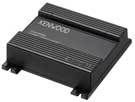
But, I am not sure the KNA-G510 Hideaway Navigation Box (that uses a proprietary connector) is compatible with your Kenwood DDX 6017 double-din device. You can find this out by going to Kenwood’s website and asking this question (“Is the KNA-G510 compatible with the DDX 6017?”) in the Support area. My experience is that it will take a week or more to get your question answered, so be patient.
If the KNA-G510 Hideaway Navigation Box is compatible with your Kenwood DDX 6017 double-din device, buy the KNA-G510 since you will have the best navigation solution connecting these two devices.
If the KNA-G510 Hideaway Navigation Box is not compatible with your Kenwood DDX 6017 double-din device, you still have a great option: You can team your Kenwood DDX 6017 with a Garmin GVN53 remote navigation blackbox.
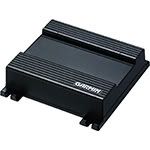
You can connect the Garmin GVN 53 (almost identical to the Kenwood KNA-G510 with one significant difference… more explanation at the end here) to your Kenwood DDX 6017 double-din device using either composite video (and right and left audio) or RGB. I would not use the RGB connector since it requires an adapter (more co$t), and the composite video provides a great image.
The perceived disadvantage of the Garmin GVN53 is that it does not support touch-screen function, but instead uses an RF handheld remote controller. Actually, I do not consider this a disadvantage since the RF handheld remote controller allows your passenger (if you have a passenger onboard) to operate the navigation system. And, personally I hate the fingerprints you get when operating a touch-screen navigation device.
I realize this is long post. I hope this is helpful and not confusing,
--Spike
Your Kenwood DDX 6017 double-din device (a discontinued product) provides navigation by adding the Kenwood KNA-DV4100 navigation remote unit (also discontinued).
It probably isn’t worth trying to find a used Kenwood KNA-DV4100 navigation remote unit to add navigation to your Kenwood DDX 6017. The KNA-DV4100 navigation remote unit is old technology. It’s DVD-based, and thus slow. I doubt that you can get map updates, and if you can, it would be expensive.
Kenwood’s current remote navigation solution (KNA-G510 Hideaway Navigation Box) is just great:
- Small footprint (the unit is light and tiny, so it fits just about anywhere)
- Solid state with no moving parts and lightning fast when navigating
- Preloaded maps and application software
- Updateable maps and software using the unit’s SD slot
But, I am not sure the KNA-G510 Hideaway Navigation Box (that uses a proprietary connector) is compatible with your Kenwood DDX 6017 double-din device. You can find this out by going to Kenwood’s website and asking this question (“Is the KNA-G510 compatible with the DDX 6017?”) in the Support area. My experience is that it will take a week or more to get your question answered, so be patient.
If the KNA-G510 Hideaway Navigation Box is compatible with your Kenwood DDX 6017 double-din device, buy the KNA-G510 since you will have the best navigation solution connecting these two devices.
If the KNA-G510 Hideaway Navigation Box is not compatible with your Kenwood DDX 6017 double-din device, you still have a great option: You can team your Kenwood DDX 6017 with a Garmin GVN53 remote navigation blackbox.
You can connect the Garmin GVN 53 (almost identical to the Kenwood KNA-G510 with one significant difference… more explanation at the end here) to your Kenwood DDX 6017 double-din device using either composite video (and right and left audio) or RGB. I would not use the RGB connector since it requires an adapter (more co$t), and the composite video provides a great image.
The perceived disadvantage of the Garmin GVN53 is that it does not support touch-screen function, but instead uses an RF handheld remote controller. Actually, I do not consider this a disadvantage since the RF handheld remote controller allows your passenger (if you have a passenger onboard) to operate the navigation system. And, personally I hate the fingerprints you get when operating a touch-screen navigation device.
I realize this is long post. I hope this is helpful and not confusing,
--Spike

Thread
Thread Starter
Forum
Replies
Last Post
