


My cheap-ass dvd/navi set up


Thread Starter
Registered User
Joined: Oct 2008
Posts: 81
Likes: 0
From: Lincoln, Ns
 My cheap-*** dvd/navi set up
So I got rid of the ghetto-*** stock bose head unit. I picked up a VERY cheap double din cd/dvd touchscreen head unit from work. It will also run my ipod on screen as well. I think I may order the optional rear camera as well (we all know about the terribl blind spots). I figured I would give this one a shot, if it sucked, I would just send it back. I have been very pleasantly surprised. It works very well and sounds MUCH better than the stock bose. I actually thought the stock sub was blown because it rattled all the time, I was wrong. With the new HU it sounds way better. The only drawback to it is that it does take a little extra time to load a cd or dvd. The other product I installed was a portable gps. I have another car and sometimes we take my girlfriend's car as well, so I wanted a portable gps. So I mounted it in the little cubbie in the dash and I think it worked out well.
Here are a few terrible shots in the dark:


Whatta ya think for a cheap/functional install?
Here are a few terrible shots in the dark:
Whatta ya think for a cheap/functional install?


I do the same **** with my tomtom LOL.
Caution:
Under hard braking situations Lori (Tomtom owners would know) may come flying out of your cubby hole!
Thus use industrial strength velcro pads provided by your local Wal-mart.
Anywho, TC how do you power it or do you just charge it and leave it in there? Cause the power cord won't fit in there with it.
Caution:
Under hard braking situations Lori (Tomtom owners would know) may come flying out of your cubby hole!
Thus use industrial strength velcro pads provided by your local Wal-mart.
Anywho, TC how do you power it or do you just charge it and leave it in there? Cause the power cord won't fit in there with it.

New Member


Joined: Dec 2006
Posts: 7,337
Likes: 204
From: Edina, Minnesota
I do the same **** with my tomtom LOL.
Caution:
Under hard braking situations Lori (Tomtom owners would know) may come flying out of your cubby hole!
Thus use industrial strength velcro pads provided by your local Wal-mart.
Anywho, TC how do you power it or do you just charge it and leave it in there? Cause the power cord won't fit in there with it.
Caution:
Under hard braking situations Lori (Tomtom owners would know) may come flying out of your cubby hole!
Thus use industrial strength velcro pads provided by your local Wal-mart.
Anywho, TC how do you power it or do you just charge it and leave it in there? Cause the power cord won't fit in there with it.
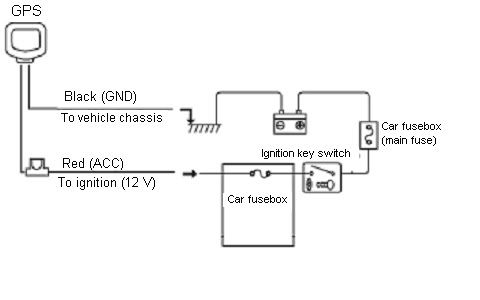
- Use the power plug connector that comes with the GPS, and add an inexpensive power input (i.e., a “cigar lighter” connector). You plug the GPS’s power-connector into the power input, and wire this to your car’s power.
- Use an ACC power line (ignition switched power line) for your power source. This way you won’t drain the car’s battery.
- You want to keep the power plug supplied with your GPS since many of these devices actually use less than 12 volts. The power plug modulates the power, and often reduces it to 9 to 11 volts. You may (probably) have an in-line fuse that comes with the power plug. Keep this in place for an extra measure of safety to protect your GPS’s internal components.
- Connect the black ground wire to a reliable ground.
- Hide the wiring by drilling a hole in one of the corners in the back of the cubby. Run the wiring through this hole, and stow the power plug and it’s receptacle behind the cubby (inside the dash). That provides a neat installation without having any visible wires.



Trending Topics
My first thought as well!
and my second one!!
now for my third - can you change the color of the button lighting? not feeling the blue for my car.
and my second one!!
now for my third - can you change the color of the button lighting? not feeling the blue for my car.


Thread Starter
Registered User
Joined: Oct 2008
Posts: 81
Likes: 0
From: Lincoln, Ns
Okay. To try and answer all the questions here:
How did I get the navi to sit flush? I used a dremel and cut out a little square in the back of the cubby that the mount for the navi slides back into. It makes it so it fits flush and holds it into place really well. I did also put a screw through the bottom of the mount so that thing is not going anywhere.
How did you power it-I thought that the power cord wouldn't fit? Wrong! It fits perfect. I ran the power cord behind/under the dash and console all the way to the back where it plugs in.
How is the signal inside the cubby? Perfect. If the signal couldn't go through a little bit of plastic I don't think it could go through the windshield!
Where do you live? Nebraska and it's already much colder than that!
Can you change the color of the buttons? On the tomtom yes, the hu, no.
How much? Tomtom was $250--I got the one that says the street names, but if you don't care about that you can get the same one for $200. The hu was just a click over $200.
How did I get the navi to sit flush? I used a dremel and cut out a little square in the back of the cubby that the mount for the navi slides back into. It makes it so it fits flush and holds it into place really well. I did also put a screw through the bottom of the mount so that thing is not going anywhere.
How did you power it-I thought that the power cord wouldn't fit? Wrong! It fits perfect. I ran the power cord behind/under the dash and console all the way to the back where it plugs in.
How is the signal inside the cubby? Perfect. If the signal couldn't go through a little bit of plastic I don't think it could go through the windshield!
Where do you live? Nebraska and it's already much colder than that!
Can you change the color of the buttons? On the tomtom yes, the hu, no.
How much? Tomtom was $250--I got the one that says the street names, but if you don't care about that you can get the same one for $200. The hu was just a click over $200.

Thread
Thread Starter
Forum
Replies
Last Post
