


Introducing Brainiac: Connected Car Technology with a 10.1" Display for your Z


Thread Starter
Vendor - Former Vendor
Joined: Aug 2015
Posts: 154
Likes: 18
From: Mississauga

Our goals with the portrait layout is to have the display long and tall to match the dashboard. The 10.1" 16:10 has been our best combination to fit multiple dashboards.

Registered User
Joined: Sep 2008
Posts: 908
Likes: 28
From: Winnipeg, MB
Our system is Android based so it unfortunately can't run Windows software. Yes, you can absolutely download your favorite Android apps to Brainiac and run them on the system 
As far as a digital audio out, if you can find an Android compatible USB digital audio out adapter then you should be good to go.
As far as a digital audio out, if you can find an Android compatible USB digital audio out adapter then you should be good to go.
I know you guys have a demo/emulator that can run on computers. I love your interface. Would it be possible to use a purchased copy the demo/emulator software on a windows tablet and still use the interface for the air ride, gps, OBD2 info, audio, etc?
Thread Starter
Vendor - Former Vendor
Joined: Aug 2015
Posts: 154
Likes: 18
From: Mississauga
I'm really really stuck on the Windows software... The primary intention to a tablet in my dash was to have my tuning & datalogging software in dash so I didn't have to have a laptop sitting on the passenger seat (this is a big no-no at the track)...
I know you guys have a demo/emulator that can run on computers. I love your interface. Would it be possible to use a purchased copy the demo/emulator software on a windows tablet and still use the interface for the air ride, gps, OBD2 info, audio, etc?
I know you guys have a demo/emulator that can run on computers. I love your interface. Would it be possible to use a purchased copy the demo/emulator software on a windows tablet and still use the interface for the air ride, gps, OBD2 info, audio, etc?
It would be a pretty major rewrite to try and support Windows under the sheets. Even trying to bring up Windows on the same chipset/drivers that Android uses would be required.
So unfortunately at the moment it isn't really something that we can take on. Our main concentration is getting things perfect with Android as our core OS.
Registered User
Joined: Sep 2008
Posts: 908
Likes: 28
From: Winnipeg, MB
Getting the front-end UI to work on a Windows system isn't really the challenge. The back-end code is all written to work with Android's services to deal with power cycling on start-up, suspending when the vehicle is turned off etc.
It would be a pretty major rewrite to try and support Windows under the sheets. Even trying to bring up Windows on the same chipset/drivers that Android uses would be required.
So unfortunately at the moment it isn't really something that we can take on. Our main concentration is getting things perfect with Android as our core OS.
It would be a pretty major rewrite to try and support Windows under the sheets. Even trying to bring up Windows on the same chipset/drivers that Android uses would be required.
So unfortunately at the moment it isn't really something that we can take on. Our main concentration is getting things perfect with Android as our core OS.

Registered User
Joined: Apr 2014
Posts: 6
Likes: 1
From: Holliston, MA
I love the idea of the 10.1" display in the dash, I'm all in for something like this. I currently have an 05 350Z but I did convert my interior to the 08 interior. You can put me down for interest in the 06-08 model and I'm ready to preorder whenever you're ready to offer that option
Mike
Mike
Last edited by roadster781; Dec 29, 2015 at 07:40 AM.

New Member


Joined: Dec 2006
Posts: 7,337
Likes: 204
From: Edina, Minnesota
Your explanation and reasoning are excellent, but many people reading your post might misunderstand your message. I say this from personal experience.
It’s really about the UI (User Interface) since that sells the product (e.g., Apple’s iPhone and other "I" products) since that is what the end-user sees and buys. But, that axiom fails when a solution reaches across hardware platforms and manufacturers. Microsoft’s Operating System (witness MOS 8) did not become #1 in the smart-phone and pad market.
While Microsoft is reaching, Apple remains too protective and proprietary. That leaves Android as the better choice. It is an interesting battle, and you have hitched your wagon to the best candidate. It's obvious you are expert in this field.
It’s really about the UI (User Interface) since that sells the product (e.g., Apple’s iPhone and other "I" products) since that is what the end-user sees and buys. But, that axiom fails when a solution reaches across hardware platforms and manufacturers. Microsoft’s Operating System (witness MOS 8) did not become #1 in the smart-phone and pad market.
While Microsoft is reaching, Apple remains too protective and proprietary. That leaves Android as the better choice. It is an interesting battle, and you have hitched your wagon to the best candidate. It's obvious you are expert in this field.
Getting the front-end UI to work on a Windows system isn't really the challenge. The back-end code is all written to work with Android's services to deal with power cycling on start-up, suspending when the vehicle is turned off etc.
It would be a pretty major rewrite to try and support Windows under the sheets. Even trying to bring up Windows on the same chipset/drivers that Android uses would be required.
So unfortunately at the moment it isn't really something that we can take on. Our main concentration is getting things perfect with Android as our core OS.
It would be a pretty major rewrite to try and support Windows under the sheets. Even trying to bring up Windows on the same chipset/drivers that Android uses would be required.
So unfortunately at the moment it isn't really something that we can take on. Our main concentration is getting things perfect with Android as our core OS.

Very nice piece of hardware for a good price. I did something similar to my car a few years back to address connectivity issues with the performance and audio upgrades i've done, but your implementation looks much more sleek. I really like that tapered edge and that it's running off of android (that display is removable and i have a set of analog gauges as backup behind it)
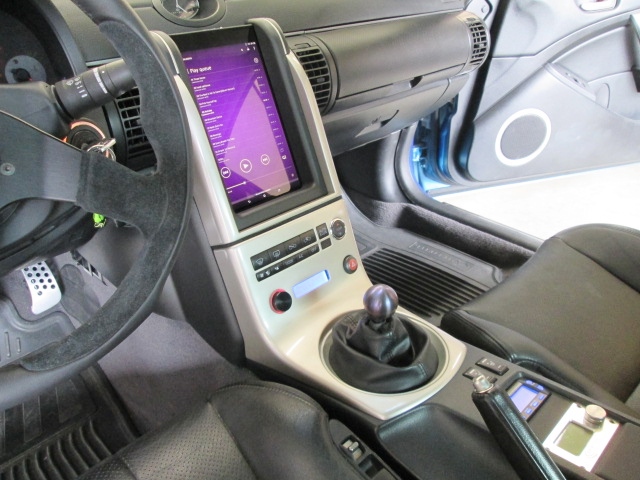
Couple of questions for you guys.
1. What kind of hardware (SoC and mem) is running the Android OS? (I really DashCommand but it can get pretty sluggish on slower devices)
2. What version of Android is running and does it have full access to the play store?
3. Does is support A2DP over bluetooth?
4. Any possibility of integrating HVAC controls?
5. Does it support bluetooth 4.0 and wifi? (i have a set of PLX external sensors streaming thru BT, my DSP is connected via BT, internet is via wifi)
6. Any plans for the G35?
7. What kind of storage is on that device?
Thanks in advance for your answers

Couple of questions for you guys.
1. What kind of hardware (SoC and mem) is running the Android OS? (I really DashCommand but it can get pretty sluggish on slower devices)
2. What version of Android is running and does it have full access to the play store?
3. Does is support A2DP over bluetooth?
4. Any possibility of integrating HVAC controls?
5. Does it support bluetooth 4.0 and wifi? (i have a set of PLX external sensors streaming thru BT, my DSP is connected via BT, internet is via wifi)
6. Any plans for the G35?
7. What kind of storage is on that device?
Thanks in advance for your answers

Thread Starter
Vendor - Former Vendor
Joined: Aug 2015
Posts: 154
Likes: 18
From: Mississauga
Very nice piece of hardware for a good price. I did something similar to my car a few years back to address connectivity issues with the performance and audio upgrades i've done, but your implementation looks much more sleek. I really like that tapered edge and that it's running off of android (that display is removable and i have a set of analog gauges as backup behind it)
1. What kind of hardware (SoC and mem) is running the Android OS? (I really DashCommand but it can get pretty sluggish on slower devices)
2. What version of Android is running and does it have full access to the play store?
3. Does it support A2DP over bluetooth?
4. Any possibility of integrating HVAC controls?
5. Does it support bluetooth 4.0 and wifi? (i have a set of PLX external sensors streaming thru BT, my DSP is connected via BT, internet is via wifi)
6. Any plans for the G35?
7. What kind of storage is on that device?

You should add a feature where the user can select what image fills the screen.
A zillion point three uses for this for anyone that has basic photoshop skills in order to make a useful image for onscreen display. (pic of their girlfriend, pic of their family, a folder of images of things they need to memorize...can cycle one a day or one an hour..whatever...read them at stoplights...practical jokes on passenger depending on content....overview map image of a new area...favorite photo....etc.)
Is there any way you can relay the screen from an iPhone to play full width or in a window on the Brainiac screen?
Uber cool would be an analog set of dials that could be installed to control certain on screen functions for those that prefer analog feel and no-look usage. (safer and personally I just like a dial to turn, especially one that's well designed and dampened) (I'm dreaming...I know...just throwing this out there for fun)
Random thoughts,
Saved
A zillion point three uses for this for anyone that has basic photoshop skills in order to make a useful image for onscreen display. (pic of their girlfriend, pic of their family, a folder of images of things they need to memorize...can cycle one a day or one an hour..whatever...read them at stoplights...practical jokes on passenger depending on content....overview map image of a new area...favorite photo....etc.)
Is there any way you can relay the screen from an iPhone to play full width or in a window on the Brainiac screen?
Uber cool would be an analog set of dials that could be installed to control certain on screen functions for those that prefer analog feel and no-look usage. (safer and personally I just like a dial to turn, especially one that's well designed and dampened) (I'm dreaming...I know...just throwing this out there for fun)
Random thoughts,
Saved
Thread Starter
Vendor - Former Vendor
Joined: Aug 2015
Posts: 154
Likes: 18
From: Mississauga
You should add a feature where the user can select what image fills the screen.
A zillion point three uses for this for anyone that has basic photoshop skills in order to make a useful image for onscreen display. (pic of their girlfriend, pic of their family, a folder of images of things they need to memorize...can cycle one a day or one an hour..whatever...read them at stoplights...practical jokes on passenger depending on content....overview map image of a new area...favorite photo....etc.)
Is there any way you can relay the screen from an iPhone to play full width or in a window on the Brainiac screen?
Uber cool would be an analog set of dials that could be installed to control certain on screen functions for those that prefer analog feel and no-look usage. (safer and personally I just like a dial to turn, especially one that's well designed and dampened) (I'm dreaming...I know...just throwing this out there for fun)
Random thoughts,
Saved
A zillion point three uses for this for anyone that has basic photoshop skills in order to make a useful image for onscreen display. (pic of their girlfriend, pic of their family, a folder of images of things they need to memorize...can cycle one a day or one an hour..whatever...read them at stoplights...practical jokes on passenger depending on content....overview map image of a new area...favorite photo....etc.)
Is there any way you can relay the screen from an iPhone to play full width or in a window on the Brainiac screen?
Uber cool would be an analog set of dials that could be installed to control certain on screen functions for those that prefer analog feel and no-look usage. (safer and personally I just like a dial to turn, especially one that's well designed and dampened) (I'm dreaming...I know...just throwing this out there for fun)
Random thoughts,
Saved
Is there a specific feature of your iPhone that you are hoping to display on Brainiac?
Saved

Something seems wrong with this, but it's beautiful and I'm sure the final product will be too...but the photoshop just altered reality I think?
Will be about 20% improved once those buttons get stylized as well...so this looks pretty promising.
Saved
Last edited by savedbygrace; Jan 13, 2016 at 07:24 PM.

Thread Starter
Vendor - Former Vendor
Joined: Aug 2015
Posts: 154
Likes: 18
From: Mississauga
What happened to the AC controls?
Something seems wrong with this, but it's beautiful and I'm sure the final product will be too...but the photoshop just altered reality I think?
Will be about 20% improved once those buttons get stylized as well...so this looks pretty promising.
Saved
Something seems wrong with this, but it's beautiful and I'm sure the final product will be too...but the photoshop just altered reality I think?
Will be about 20% improved once those buttons get stylized as well...so this looks pretty promising.
Saved
Our screen positioning still needs some work, as the photoshop is to just get a general idea. The screen would likely move downward slightly to make the area under the buttons smaller. We also looked at the possibility of making the area under the buttons a pocket of some kind. But if we were to move the screen downward slightly the pocket gets smaller and smaller.
So, it's a starting point of what could be possible. Lots of polishing to do
Thread Starter
Vendor - Former Vendor
Joined: Aug 2015
Posts: 154
Likes: 18
From: Mississauga
Yes Brainiac is able to play FLAC audio files. Android has supported them since version 3.1. You should be able to pair any Bluetooth accessory to Brainiac including something that has a Bluetooth audio profile like a wireless speaker.
Thread Starter
Vendor - Former Vendor
Joined: Aug 2015
Posts: 154
Likes: 18
From: Mississauga
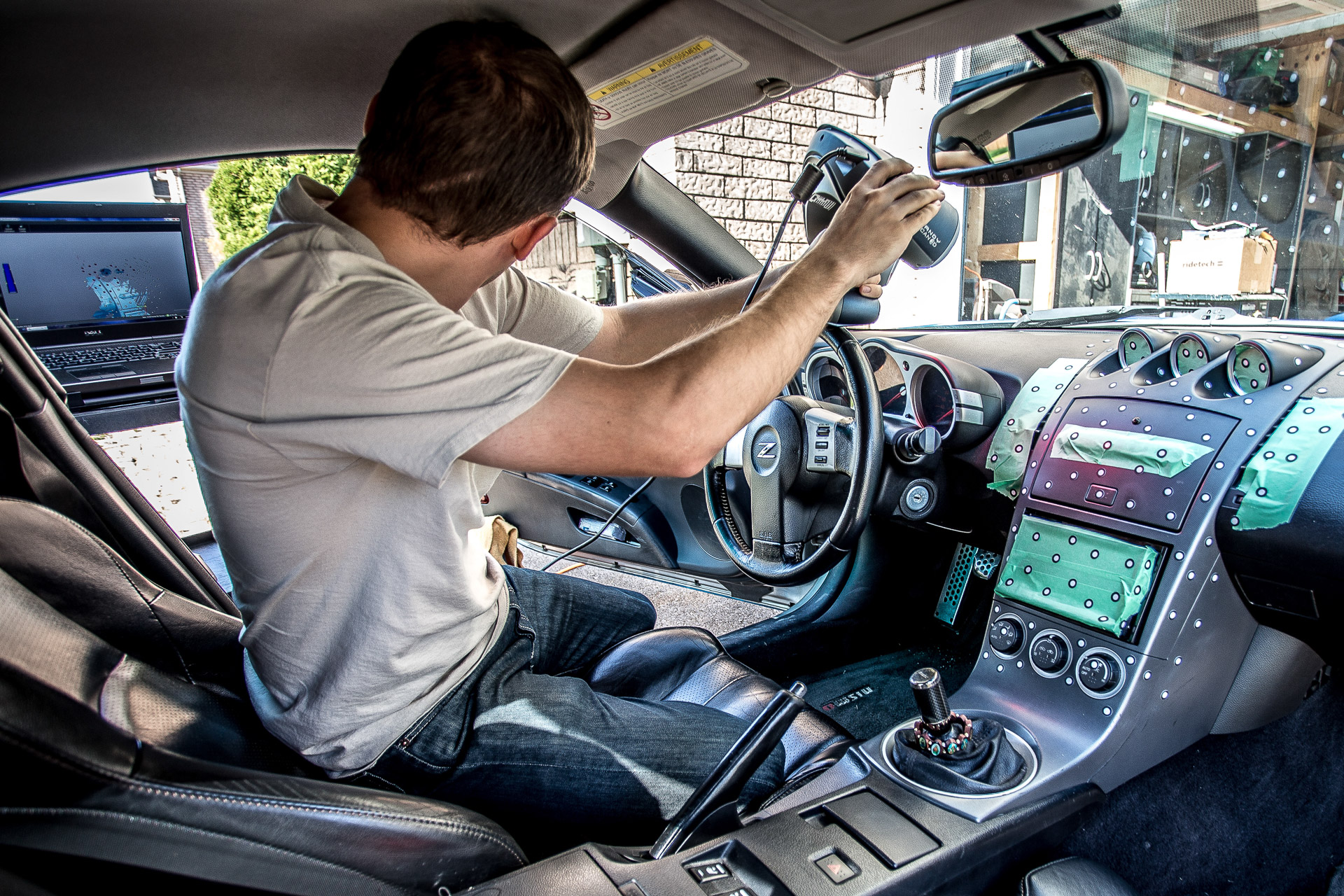
Check out our latest progress update and vote for which vehicle you would like to see a 10.1" snap-in kit for next!
Blog Post
http://workshoptwelve.com/2016/01/15...hicle-is-next/
Blog Post
http://workshoptwelve.com/2016/01/15...hicle-is-next/
