


Recommend a NAV System


 Recommend a NAV System
Hi guys,
This is my first post here and I was hoping you guys could help me out. I just bought my very first car (350Z obviously) and was looking to install a NAV system. It is a 2006 and I was looking to install it in the cubby. I've seen some pics in this thread:
https://my350z.com/forum/audio-builds/310660-show-me-your-screens.html
I particularly like Watkins' and Spike100's setups. What would you all recommend in a system? What other parts would I need to buy? Obviously, I'd like to keep the costs reasonable.
Try to go easy on me here, I'm a newbie, and thanks in advance.
This is my first post here and I was hoping you guys could help me out. I just bought my very first car (350Z obviously) and was looking to install a NAV system. It is a 2006 and I was looking to install it in the cubby. I've seen some pics in this thread:
https://my350z.com/forum/audio-builds/310660-show-me-your-screens.html
I particularly like Watkins' and Spike100's setups. What would you all recommend in a system? What other parts would I need to buy? Obviously, I'd like to keep the costs reasonable.
Try to go easy on me here, I'm a newbie, and thanks in advance.


Registered User
Joined: Sep 2007
Posts: 17
Likes: 0
From: Dallas, TX
Hey man this might help, I believe this is the screen and list off some parts you might need. 
https://my350z.com/forum/showthread....ight=farenhiet
https://my350z.com/forum/showthread....ight=farenhiet

New Member


Joined: Dec 2006
Posts: 7,337
Likes: 204
From: Edina, Minnesota
I have a 2003 Performance model, so my installation was simple. In fact it was a “drop-in” installation requiring no custom fabrication. I followed Paul350z’s instruction to install the LCD monitor. veLoc1ty references Paul’s thread (#3 message on this/your thread). If you plan installing an LCD screen in the upper/forward cubby, this is a good read.
You have a 2006 Z, and that car has a different style upper/forward cubby. Your upper/forward cubby does not have the removable pocket found in the 2003 model. That means you need to do some minor custom fabrication to fit an LCD screen, or swap in different parts. The fabrication would be a simple job requiring cutting out the pocket behind the upper/forward cubby, and making a bracket to hold the LCD screen. If you’re not comfortable doing this yourself, you can take your car to any high-end Professional Installer. This is a simple fabrication that is not expensive. You should not expect this type of service at Circuit City or Best Buy.
Anyway, here is how I did my installation:
I installed an LCD screen in the upper/forward cubby and the GPS black box in the small upper cubby behind the driver’s seat.
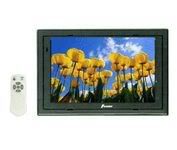
My LCD screen is a Power Acoustik PT-700MHR 7” LCD monitor (same models are Farenheit T-7000MHR and NESA Vision NSM-7005)
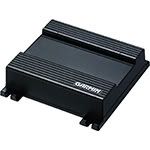
My navigation device is the Garmin GVN 52 blackbox.
Notes:
1) I set my LCD monitor to “always on” and installed a master ON/OFF switch (the switch is where Nissan installs the seat- heater switches). That way I don’t need to dig for a remote to turn the system ON/OFF.
2) The Garmin GVN 52 provides voice guidance that you can route to your car’s speakers. You connect the Garmin’s mute wire to your H/U, set the volume inside the Garmin device, and you get automatic muting of your radio or CD/DVD player when the Garmin device issues voice commands through your car’s CES. If your H/U doesn’t support this, it’s easy to add another component to handle this.
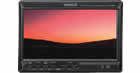
3) My installation (and the Garmin GVN 52) does not support touch-screen function. That was a deliberate choice since I don’t like looking at an LCD screen full of fingerprints. That’s me; someone else might not mind this and prefer the convenience of touch-screen functions. If you prefer touch-screen function, you can replace the LCD in my system with a Kenwood LZ-702W Monitor…
…and swap out the Garmin GVN 52 with a Kenwood KNA-G520 Navigation Box.
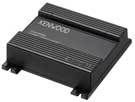
That arrangement is the same installation, but it supports touch-screen functions.
I'm sure I didn't describe this fully, and you probably have additional questions... so ask away.
--Spike
You have a 2006 Z, and that car has a different style upper/forward cubby. Your upper/forward cubby does not have the removable pocket found in the 2003 model. That means you need to do some minor custom fabrication to fit an LCD screen, or swap in different parts. The fabrication would be a simple job requiring cutting out the pocket behind the upper/forward cubby, and making a bracket to hold the LCD screen. If you’re not comfortable doing this yourself, you can take your car to any high-end Professional Installer. This is a simple fabrication that is not expensive. You should not expect this type of service at Circuit City or Best Buy.
Anyway, here is how I did my installation:
I installed an LCD screen in the upper/forward cubby and the GPS black box in the small upper cubby behind the driver’s seat.
My LCD screen is a Power Acoustik PT-700MHR 7” LCD monitor (same models are Farenheit T-7000MHR and NESA Vision NSM-7005)
My navigation device is the Garmin GVN 52 blackbox.
Notes:
1) I set my LCD monitor to “always on” and installed a master ON/OFF switch (the switch is where Nissan installs the seat- heater switches). That way I don’t need to dig for a remote to turn the system ON/OFF.
2) The Garmin GVN 52 provides voice guidance that you can route to your car’s speakers. You connect the Garmin’s mute wire to your H/U, set the volume inside the Garmin device, and you get automatic muting of your radio or CD/DVD player when the Garmin device issues voice commands through your car’s CES. If your H/U doesn’t support this, it’s easy to add another component to handle this.
3) My installation (and the Garmin GVN 52) does not support touch-screen function. That was a deliberate choice since I don’t like looking at an LCD screen full of fingerprints. That’s me; someone else might not mind this and prefer the convenience of touch-screen functions. If you prefer touch-screen function, you can replace the LCD in my system with a Kenwood LZ-702W Monitor…
…and swap out the Garmin GVN 52 with a Kenwood KNA-G520 Navigation Box.
That arrangement is the same installation, but it supports touch-screen functions.
I'm sure I didn't describe this fully, and you probably have additional questions... so ask away.
--Spike

New Member
Joined: Dec 2006
Posts: 7,337
Likes: 204
From: Edina, Minnesota
Originally Posted by cheshirecat79
Just get yourself a double din nav system for to replace the stock radio rather than taking on a project that is beyond the scope of what you are trying to accomplish.
--Spike
Thanks for all the help guys. Spike, the step by step instructions are a big help and I'm going to look into purchasing the parts. Cheshire, I've seen setups like you describe but I'm not really a fan of those. The forward cubby just seems useless for storage to me so I'd like to do something with it.
Trending Topics

Originally Posted by Spike100
Certainly installing your navigation screen/device in the 350z’s double-din space is the easiest way to do this. Unfortunately this installation violates a principle that car companies voluntarily have agreed upon for placement of GPS screens. There is now an informal agreement among manufacturers that the driver/operator should have no more than a 30 degree viewing diversion to see the screen. It’s all about safe operation. Viewing a GPS screen at the level of the Z’s upper/forward cubby meets that guideline. That’s why Nissan mounts the OEM GPS screen there. The double-din position goes past this viewing angle that the industry defines as safe.
--Spike
--Spike



 I have a Clarion DXZ745MP H/U, which is 4 years old. I haven't replaced it since it's a very good unit and is integrated with a Sirius satellite radio receiver.
Thread
Thread Starter
Forum
Replies
Last Post
Justin100
Intake Exhaust
26
Nov 29, 2015 03:58 PM