


Aftermarket Systems?


Thread Starter
Registered User
Joined: Jul 2009
Posts: 5
Likes: 0
From: San Diego, CA
 Aftermarket Systems?
I have 2003 Enthusiast, which means I do not have the BOSE system or the navigation system (I know, weak). Now that I am about to graduate from college, I will have the means to focus on fixing my Z up. I want to get that extra audio kick as well as a navigation system, but want to avoid changing the stock look as much as possible.
I guess what I am trying to ask is:
How/What can I buy so I get a decent audio system and navigation system while avoiding changing the stock look of the front of the stereo. Also, I'm trying to put the nav system where it would go if I had an upgraded model.

Thank you!
I guess what I am trying to ask is:
How/What can I buy so I get a decent audio system and navigation system while avoiding changing the stock look of the front of the stereo. Also, I'm trying to put the nav system where it would go if I had an upgraded model.
Thank you!



New Member


Joined: Dec 2006
Posts: 7,337
Likes: 204
From: Edina, Minnesota
Read this thread:
https://my350z.com/forum/audio-build...pics-here.html
This setup allows you to keep your OEM "stuff and look," and then add anything you want.
--Spike
https://my350z.com/forum/audio-build...pics-here.html
This setup allows you to keep your OEM "stuff and look," and then add anything you want.
--Spike
Read this thread:
https://my350z.com/forum/audio-build...pics-here.html
This setup allows you to keep your OEM "stuff and look," and then add anything you want.
--Spike
https://my350z.com/forum/audio-build...pics-here.html
This setup allows you to keep your OEM "stuff and look," and then add anything you want.
--Spike
New Member
Joined: Dec 2006
Posts: 7,337
Likes: 204
From: Edina, Minnesota
Hello?!... Please read the entire thread.
You can add the Kenwood KOS Controller, keep the OEM H/U, and run the best system you will ever get in a car.
There are many examples in my thread, and some suggest adding a DD H/U, but my point in this thread is you can remain OEM and still have superior CES features.
If there is something you don't understand... ask away.
--Spike
You can add the Kenwood KOS Controller, keep the OEM H/U, and run the best system you will ever get in a car.
There are many examples in my thread, and some suggest adding a DD H/U, but my point in this thread is you can remain OEM and still have superior CES features.
If there is something you don't understand... ask away.
--Spike
Hello?!... Please read the entire thread.
You can add the Kenwood KOS Controller, keep the OEM H/U, and run the best system you will ever get in a car.
There are many examples in my thread, and some suggest adding a DD H/U, but my point in this thread is you can remain OEM and still have superior CES features.
If there is something you don't understand... ask away.
--Spike
You can add the Kenwood KOS Controller, keep the OEM H/U, and run the best system you will ever get in a car.
There are many examples in my thread, and some suggest adding a DD H/U, but my point in this thread is you can remain OEM and still have superior CES features.
If there is something you don't understand... ask away.
--Spike
You can add the Kenwood KOS Controller, keep the OEM H/U, and run the best system you will ever get in a car.
New Member
Joined: Dec 2006
Posts: 7,337
Likes: 204
From: Edina, Minnesota
I opened the thread and saw the first post written by you which was talking of adding a double-din headunit and a processor. Admittedly I stopped reading because I saw you mentioning the double-din several times on the first page. Anyway...
-------
Pretty bold statement to make. In any case, why will this make your car sound any better than using a 360.2, DSP6, Bit-1 or DQL-8?
-------
Pretty bold statement to make. In any case, why will this make your car sound any better than using a 360.2, DSP6, Bit-1 or DQL-8?

So what's the advantage/definition of the stuff you mention?
 ... I'm responding to your statement: "In any case, why will this make your car sound any better than using a 360.2, DSP6, Bit-1 or DQL-8?"
Please explain these parameters you reference.
--Spike
Trending Topics
You should have kept on reading.
So what's the advantage/definition of the stuff you mention? ... I'm responding to your statement: "In any case, why will this make your car sound any better than using a 360.2, DSP6, Bit-1 or DQL-8?"
Please explain these parameters you reference.
--Spike
So what's the advantage/definition of the stuff you mention?
... I'm responding to your statement: "In any case, why will this make your car sound any better than using a 360.2, DSP6, Bit-1 or DQL-8?"Please explain these parameters you reference.
--Spike
They are not parameters they are DSP processors. That I personally would purchase before purchasing the Kenwood you mentioned.
I simply wanted to know what basis you had to claim that one would be able to "run the best system you will ever get in a car" without having heard all that is out there. Those are four of the five top DSP processors on the market (JL Cleansweep being the fifth), yet you don't know what their model names are.
No big deal as your opinion is your opinion and I, nor anyone else, can't take that right away from you.
New Member
Joined: Dec 2006
Posts: 7,337
Likes: 204
From: Edina, Minnesota
I agree that I should have read the entire thread.
They are not parameters they are DSP processors. That I personally would purchase before purchasing the Kenwood you mentioned.
I simply wanted to know what basis you had to claim that one would be able to "run the best system you will ever get in a car" without having heard all that is out there. Those are four of the five top DSP processors on the market (JL Cleansweep being the fifth), yet you don't know what their model names are.
No big deal as your opinion is your opinion and I, nor anyone else, can't take that right away from you.
They are not parameters they are DSP processors. That I personally would purchase before purchasing the Kenwood you mentioned.
I simply wanted to know what basis you had to claim that one would be able to "run the best system you will ever get in a car" without having heard all that is out there. Those are four of the five top DSP processors on the market (JL Cleansweep being the fifth), yet you don't know what their model names are.
No big deal as your opinion is your opinion and I, nor anyone else, can't take that right away from you.
Please post your information so readers can compare relative installations. That shouldn't be too difficult.
--Spike
It's the equivalent of me saying I have the best sound system ever in my car. I would never say such a ludicrous statement because I have no basis to make such a claim.
I am still waiting for the OP to respond with how much he/she is looking to spend before I start making suggestions on what should be purchased to achieve their goals.
If you personally are looking to find out more information (as well as reviews) about the products I mentioned in my previous post, here is a good forum for you to do so: www.diymobileaudio.com
Edit: I just looked up the specs on that Kenwwod KOS and I don't even know why I'm wasting my time responding to you about the topic. This unit looks to be good for integration of navigation things like iPods but doesn't have some of the really good features line time alignment, line-level outputs, amongst other things.
If you're serious about sound getting this thing would be a waste of money in my opinion. Might as well get one real DSP and get a portable GPS unit.
Last edited by Kwame; Jul 26, 2009 at 10:43 PM.
Thread Starter
Registered User
Joined: Jul 2009
Posts: 5
Likes: 0
From: San Diego, CA
First and foremost, thank you both for replying.
Spike100: Thanks for that thread, I will read it and let you know if I have any questions.
Spike100: Thanks for that thread, I will read it and let you know if I have any questions.
Last edited by zgamma; Jul 27, 2009 at 10:07 AM.
Thread Starter
Registered User
Joined: Jul 2009
Posts: 5
Likes: 0
From: San Diego, CA
By decent I mean, first of all, better than the stock crap speakers that I have. I guess what I mean by decent is that I want nice sound with a punch. Since I am not audio tech savy, all I can say is I want a good system that wont break my *****. I have not set a budget yet because I am still doing my homework on this, but I do want to upgrade my speakers and add a subwoofer, and an amp along the way (possibly).

By decent I mean, first of all, better than the stock crap speakers that I have. I guess what I mean by decent is that I want nice sound with a punch. Since I am not audio tech savy, all I can say is I want a good system that wont break my *****. I have not set a budget yet because I am still doing my homework on this, but I do want to upgrade my speakers and add a subwoofer, and an amp along the way (possibly).
get a nice 2 channel amp to drive the speakers. the 125.2 from Sundown Audio is a good bang for your buck amp, i think its available for $200 shipped. then another amp to drive your sub.also you should just disconnect your rear speakers no point in wasting money on rear fill.
for subs there are quite a few good bang for your buck as well like Sound Solutions Audio, Fi Audio, Dayton, Image Dynamics. A 10" sub from either of those companys will sound real nice and give that extra punch your looking for.
some real good quality sub boxes are the zenclosure ones. i have one and it looks like a stock setup. i recommend them highly.
I'd also consider upgrading your "Big 3" http://ezinearticles.com/?The-Big-3-...ade&id=1411196
i would look into sound deadening as well to kill as much vibration as possible. there's second skin audio damplifier, dynamat xtreme, raamat.
Another thing I would get is either wicked cas door pods or kick panels. That will help improve the sound a lot.
hope this kind of gives you an idea of what you should look into and research further to find the system that fits your needs.
New Member
Joined: Dec 2006
Posts: 7,337
Likes: 204
From: Edina, Minnesota
Hi zgamma… I would like to offer more information that is specific to your very good question. Please forgive my exchange with Kwame@z1Auto since none of this was appropriate to your thread and your question, and the exchange between Kwame@z1Auto and me potentially jacks your thread.
I’m going to make two assumptions:
I mentioned this thread…
https://my350z.com/forum/audio-build...pics-here.html
… because it describes the Kenwood KOS system. The KOS Controller allows you to keep your OEM H/U, and add whatever you want (including iPod, USB, external amps, HD radio, satellite radio, SubW, etc.).
The two essential things you must do:
1) Add an external amplifier.
When adding an external amp, you don’t need to go crazy on the price. There are a lot of moderately priced external amplifiers that deliver decent sound.
2) Replace your cheap Clarion OEM speakers.
You should replace the front components with at least a moderately priced speaker. Doing this will give you much better sound. You don’t really need the rears (many members here simply disconnect the rears), but if you keep these, replace with at least a moderately priced coaxial speaker.
Here is a picture of the OEM Clarion component speaker.
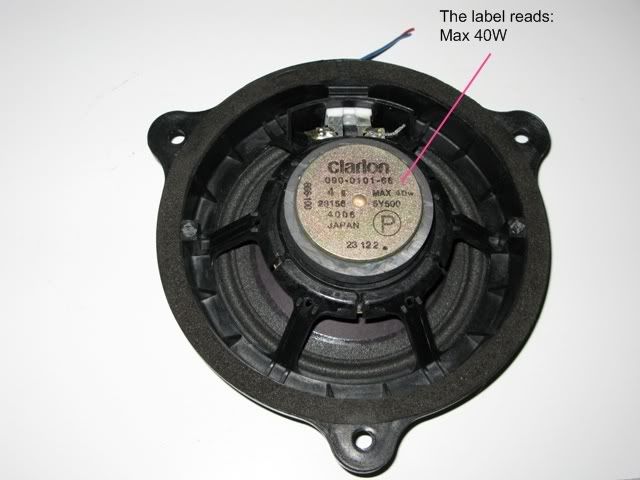
Notice that this speaker supports only 40 watts of power. It’s no wonder you need to replace this.
Also, any recommendation on the best way to mount your front component speaker (kicks, door pods, or stock position) will result in endless posts/replies. In fact, any of these positions will work quite well, and each has advantages and disadvantages. You should search here to find the best solution for your specific requirements (e.g., cost, cabin interference, etc.).
The same is true for tweeter mounting. There are a lot of opinions, and searching will give you a perspective that matches your requirements.
One thing for sure is that you need to add sound deadening, especially if you go with the stock door-mount.
Navigation
A fixed7” LCD screen in the upper/forward cubby is the best position and setup for navigation in the Z. You know this because your present this in your thread.
You have a 2003 model, and therefore you have the best arrangement for installing a 7” LCD without any requirement for custom fabrication. You can simply remove the rear pocket and install your screen. Paul350Z has an excellent DIY to do this:
https://my350z.com/forum/audio-build...tallation.html
Kenwood provides two different ways to do this (and both ways have touch-screen support). Garmin has a solution as well, but this does not support touch-screen, but instead uses a handheld RF controller (that works very well).
I hope this helps; but if you have any more questions, please post to this thread and “ask away.”
--Spike
I have 2003 Enthusiast, which means I do not have the BOSE system or the navigation system (I know, weak). Now that I am about to graduate from college, I will have the means to focus on fixing my Z up. I want to get that extra audio kick as well as a navigation system, but want to avoid changing the stock look as much as possible.
I guess what I am trying to ask is:
How/What can I buy so I get a decent audio system and navigation system while avoiding changing the stock look of the front of the stereo. Also, I'm trying to put the nav system where it would go if I had an upgraded model.
Thank you!
I guess what I am trying to ask is:
How/What can I buy so I get a decent audio system and navigation system while avoiding changing the stock look of the front of the stereo. Also, I'm trying to put the nav system where it would go if I had an upgraded model.
Thank you!
- You want to keep your stock H/U (or, at least this “look”)
- You want navigation, and you want the screen to be in the OEM position (a 7” LCD in the upper/forward cubby)
I mentioned this thread…
https://my350z.com/forum/audio-build...pics-here.html
… because it describes the Kenwood KOS system. The KOS Controller allows you to keep your OEM H/U, and add whatever you want (including iPod, USB, external amps, HD radio, satellite radio, SubW, etc.).
The two essential things you must do:
1) Add an external amplifier.
When adding an external amp, you don’t need to go crazy on the price. There are a lot of moderately priced external amplifiers that deliver decent sound.
2) Replace your cheap Clarion OEM speakers.
You should replace the front components with at least a moderately priced speaker. Doing this will give you much better sound. You don’t really need the rears (many members here simply disconnect the rears), but if you keep these, replace with at least a moderately priced coaxial speaker.
Here is a picture of the OEM Clarion component speaker.
Notice that this speaker supports only 40 watts of power. It’s no wonder you need to replace this.
Also, any recommendation on the best way to mount your front component speaker (kicks, door pods, or stock position) will result in endless posts/replies. In fact, any of these positions will work quite well, and each has advantages and disadvantages. You should search here to find the best solution for your specific requirements (e.g., cost, cabin interference, etc.).
The same is true for tweeter mounting. There are a lot of opinions, and searching will give you a perspective that matches your requirements.
One thing for sure is that you need to add sound deadening, especially if you go with the stock door-mount.
Navigation
A fixed7” LCD screen in the upper/forward cubby is the best position and setup for navigation in the Z. You know this because your present this in your thread.
You have a 2003 model, and therefore you have the best arrangement for installing a 7” LCD without any requirement for custom fabrication. You can simply remove the rear pocket and install your screen. Paul350Z has an excellent DIY to do this:
https://my350z.com/forum/audio-build...tallation.html
Kenwood provides two different ways to do this (and both ways have touch-screen support). Garmin has a solution as well, but this does not support touch-screen, but instead uses a handheld RF controller (that works very well).
I hope this helps; but if you have any more questions, please post to this thread and “ask away.”
--Spike
Thread Starter
Registered User
Joined: Jul 2009
Posts: 5
Likes: 0
From: San Diego, CA
some real good quality sub boxes are the zenclosure ones. i have one and it looks like a stock setup. i recommend them highly.
I'd also consider upgrading your "Big 3" http://ezinearticles.com/?The-Big-3-...ade&id=1411196
i would look into sound deadening as well to kill as much vibration as possible. there's second skin audio damplifier, dynamat xtreme, raamat.
Another thing I would get is either wicked cas door pods or kick panels. That will help improve the sound a lot.
hope this kind of gives you an idea of what you should look into and research further to find the system that fits your needs.
I'd also consider upgrading your "Big 3" http://ezinearticles.com/?The-Big-3-...ade&id=1411196
i would look into sound deadening as well to kill as much vibration as possible. there's second skin audio damplifier, dynamat xtreme, raamat.
Another thing I would get is either wicked cas door pods or kick panels. That will help improve the sound a lot.
hope this kind of gives you an idea of what you should look into and research further to find the system that fits your needs.
Great stuff here. Thanks!
Thread Starter
Registered User
Joined: Jul 2009
Posts: 5
Likes: 0
From: San Diego, CA
I mentioned this thread…
https://my350z.com/forum/audio-build...pics-here.html
… because it describes the Kenwood KOS system. The KOS Controller allows you to keep your OEM H/U, and add whatever you want (including iPod, USB, external amps, HD radio, satellite radio, SubW, etc.).
The two essential things you must do:
1) Add an external amplifier.
When adding an external amp, you don’t need to go crazy on the price. There are a lot of moderately priced external amplifiers that deliver decent sound.
2) Replace your cheap Clarion OEM speakers.
You should replace the front components with at least a moderately priced speaker. Doing this will give you much better sound. You don’t really need the rears (many members here simply disconnect the rears), but if you keep these, replace with at least a moderately priced coaxial speaker.
The same is true for tweeter mounting. There are a lot of opinions, and searching will give you a perspective that matches your requirements.
One thing for sure is that you need to add sound deadening, especially if you go with the stock door-mount.
Navigation
A fixed7” LCD screen in the upper/forward cubby is the best position and setup for navigation in the Z. You know this because your present this in your thread.
You have a 2003 model, and therefore you have the best arrangement for installing a 7” LCD without any requirement for custom fabrication. You can simply remove the rear pocket and install your screen. Paul350Z has an excellent DIY to do this:
https://my350z.com/forum/audio-build...tallation.html
Kenwood provides two different ways to do this (and both ways have touch-screen support). Garmin has a solution as well, but this does not support touch-screen, but instead uses a handheld RF controller (that works very well).
I hope this helps; but if you have any more questions, please post to this thread and “ask away.”
--Spike
Thanks Spike!
New Member
Joined: Dec 2006
Posts: 7,337
Likes: 204
From: Edina, Minnesota
^^ Thanks much for the reply. It’s appreciated.
If you encounter any problems or have additional questions, post this back to your thread. I’m subscribing to your thread, and very willing to offer help when I can. I promise to avoid the “thread-jacking” discussion/debate I did with another reader, but instead provide good help when I can from personal experience.
And… please let us know when you decide on your solution. That is very helpful since we all learn from installations (cost, resources, preferences, etc.).
Thanks for posting and starting your good thread.
--Spike
If you encounter any problems or have additional questions, post this back to your thread. I’m subscribing to your thread, and very willing to offer help when I can. I promise to avoid the “thread-jacking” discussion/debate I did with another reader, but instead provide good help when I can from personal experience.
And… please let us know when you decide on your solution. That is very helpful since we all learn from installations (cost, resources, preferences, etc.).
Thanks for posting and starting your good thread.
--Spike
By decent I mean, first of all, better than the stock crap speakers that I have. I guess what I mean by decent is that I want nice sound with a punch. Since I am not audio tech savy, all I can say is I want a good system that wont break my *****. I have not set a budget yet because I am still doing my homework on this, but I do want to upgrade my speakers and add a subwoofer, and an amp along the way (possibly).
By the way if you would like to add a subwoofer then you must add an amplifier.

Thread
Thread Starter
Forum
Replies
Last Post
